
poitto: Screenshot to To-Do AI
Ikke hentetEmails, messages, screenshots — just toss them in
Av Takumi Nishimura · Produktivitet




Kort fortalt
poitto: Screenshot to To-Do AI is a productivity app that turns emails, chat messages, web links and screenshots into draft tasks, events and notes, then places them on a four-quadrant Eisenhower Matrix. It suits people who want to capture things from school flyers, messages or other apps and sort them by urgency and importance. It stands out for working without an account, with tasks saved on the iPhone.
Sammendrag fra Debuts, basert på oppføringen i App Store.Om appen
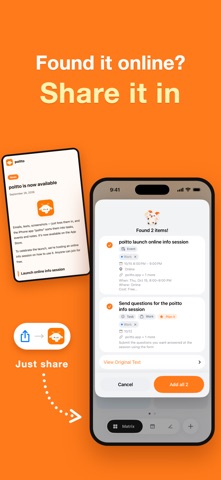
Emails, messages, screenshots — just toss them in. School flyers too: snap a photo and get a draft event.
poitto reads the text and images you paste or share, and turns them into draft tasks, events and notes. Everything lands on a four-quadrant urgent × important grid (the Eisenhower Matrix), so you can see at a glance what to do now and what can wait.
TOSS IT IN, AI SORTS IT OUT • Toss in emails, chat messages, posts on X, web links, screenshots or photos as they are • Understands phrases like "tomorrow", "next Tuesday" or "end of the month" and turns them into dates • Drafts come with a title, due date or time, place, notes and even a checklist • Check everything on a review card before it's added — fix what you like, uncheck what you don't need • While it works, Pakupaku the goat munches away. Switch to another app and a Live Activity keeps you posted
FOUR QUADRANTS, CLEAR PRIORITIES • Do it now! / Plan it / Knock it out / Someday • Drag tasks between quadrants. Sort them your own way or by due date • Keep separate matrices for work, home and more, and change each quadrant's name, icon and color (poitto Pro)
FOR EVERY DAY • Today: what's due, what's overdue and today's events on one screen • Schedule: dated tasks and events in order, alongside events from your iPhone calendars • Notifications: a morning heads-up on today's tasks, plus reminders for each task • Repeating tasks: daily, weekly, monthly, every N days and more (poitto Pro) • Notes and tags: AI suggests matching tags from the ones you already have • Search by title, notes, place or tag • Deleted something by mistake? Undo it right away
TOSS FROM ANYWHERE • Share sheet: send things to poitto straight from the Share button in other apps • Copied some text? poitto offers to paste it when you open the app • Quick Toss from Control Center, the Lock Screen or the Action button • Home Screen and Lock Screen widgets • Light and dark mode
START WITHOUT AN ACCOUNT Use everything, AI included, without signing up. You'll create an account with Sign in with Apple only when you buy poitto Pro or connect a calendar — your tasks come with you.
PRIVACY No ads. The original text and images you toss in are not stored on our server. Your tasks, events and notes are saved on your iPhone.
PLANS Free • 20 AI sorts a month (up to 3,000 characters and 1 image each time) • 1 matrix, 3 tags, 1 notification per task • Completed history for the last 30 days • The small Matrix widget on the Home Screen
poitto Pro • 300 AI sorts a month (up to 10,000 characters and 5 images each time) • Unlimited matrices and tags; custom quadrant names, icons and colors • Repeating tasks and multiple notifications per task • Add events to your iPhone calendars and log completed tasks there • All widgets, plus a quadrant on your Lock Screen • Full completed history and saved original text
ABOUT THE AUTO-RENEWING SUBSCRIPTION • poitto Pro (Monthly): renews every month • poitto Pro (Yearly): renews every year • Prices are shown in the app and on the App Store purchase screen, and may vary by country or region • Payment is charged to your Apple Account when you confirm the purchase • Your subscription renews automatically for the same period and price unless you cancel at least 24 hours before the current period ends. The next period is charged within the 24 hours before the current one ends • To turn off auto-renewal, go to Settings > [your name] > Subscriptions on your iPhone. After you cancel, you can keep using poitto Pro until the end of the period you've paid for • Deleting your poitto account does not cancel your subscription
Terms of Use: https://poitto.app/en/terms Privacy Policy: https://poitto.app/en/privacy Support: https://poitto.app/en/support
Slik vurderer folk den
Logg inn for å vurdere denne appen. Det ærlige svaret teller.
Ingen vurderinger ennå. Har du prøvd den? Vær den første til å vurdere.
Flere Produktivitet-apper
Ukens beste nye Produktivitet-apper ChickMark: Habit TrackerChickMark is a simple habit tracker for routines, goals, and reminders
 Dayflint: One Thing a DayToo many priorities?
 Snappy Do ItSix connected modes. One traceable journey.
 Fristo CAFMFristo is the app for Fristo CAFM, the facility management software
 UhWhat? Voice NotesCatch the thought before it disappears
- BeginAnywayMorning alarm for hard tasks: set one task, prove you started, build a streak