
Screen Loupe
Ikke hentetA zoomed monitor exactly where you need it
Av Stanislav Semenov · VerktøyHvorfor vi forventer det: Thoughtful pixel-true inspection tools with clear value for designers and front-end developers.




Kort fortalt
Screen Loupe pins a movable frame over part of the screen and shows that area magnified in a live, pixel-true Viewer, while clicks still reach the app underneath. It is aimed at UI designers, front-end and Apple-platform developers, and anyone writing design reviews or bug reports. A notable feature is the Color Meter, which copies colour values as HEX, CSS, SwiftUI, AppKit or display formats with one click.
Sammendrag fra Debuts, basert på oppføringen i App Store.Om appen
A zoomed monitor exactly where you need it. Pin a frame over any part of the screen, keep working there with your normal mouse and keyboard, and watch that spot magnified — live, pixel-true and perfectly still — in a window next to it.
Made for UI designers checking how a design actually renders, for front-end and Apple-platform developers tuning layout, and for anyone writing a design review or a bug report who needs a crisp, zoomed picture of exactly what is on screen.
WORK IN PLACE • Clicks inside the frame go to the app underneath, so hover states stay live while the Viewer shows them big — on the same display or another one. • The Viewer keeps its zoom and framing while you move or resize the frame. Nothing moves on its own. • Snap the frame to window edges with ⌘, fit it to a window in one click, or attach it with the magnet so it follows the window as it moves and resizes. • Margins capture only an inner part of that window, such as a web page without the browser's toolbar. • A handle on the frame pans the Viewer right from the frame.
PIXEL-TRUE • At 800% every screen pixel is a crisp 8×8 square, never a blur, on Retina and non-Retina displays alike. • Zoom presets from Fit to 16×, or any value by pinch, scroll or a typed percentage. Presets glide smoothly.
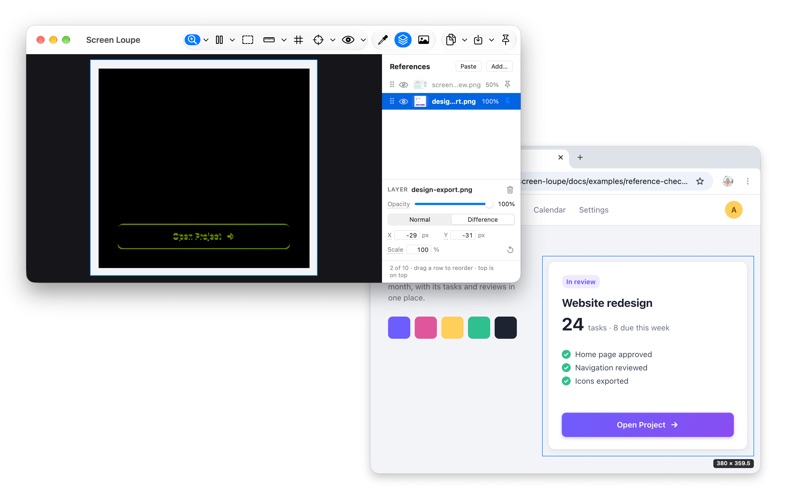
INSPECT • Color Meter: HEX, CSS rgb(), SwiftUI Color, AppKit NSColor and the native display value, each one click to copy. Recent colours and eight favourites, kept between launches. • Contrast: a text and a background colour, the WCAG 2 ratio and AA and AAA verdicts. • Rulers in pixels and points: a corner ruler you place, and a selection ruler for a selection's width and height. • A pixel grid on the exact pixel boundaries. • Reference layers: lay a design export over the live screen in Difference, and matching pixels turn black. • Before and after: use a snapshot or the frozen frame as a reference, change the code, and whatever moved glows. • Open, drop or paste an image file and inspect it with the same tools.
SEE IT AS OTHERS DO • Colour vision simulation: protanopia, protanomaly, deuteranopia, deuteranomaly, tritanopia and grayscale, live over any app while you edit — and in Copy View, for a bug report.
COPY EXACTLY WHAT YOU SEE • Copy View: the zoomed view as it looks, ready for a review or a bug report. • Copy Source: the area at native resolution, unmagnified. • Copy a selection snapped to whole pixels, or Option-drag any region. Save as PNG.
SCREENSHOT STUDIO Exact, clean pictures for App Store and website screenshots, docs and bug reports. • Exact pixel sizes, including the Mac App Store's, your own sizes and Aspect Lock. • A 3, 5 or 10 second timer to catch a menu or a hover. • A colour, gradient or image background, shown on screen under every window. • One window alone, whole even where it is covered, with or without its shadow. • PNG, JPEG or HEIC, sRGB or the display's colours, with no date, device or location in the file.
CATCH TRANSIENT STATES • Freeze the view from any app with a global shortcut while the mouse is still held down, or after a countdown. • Take Snapshot (⌘T) keeps the moment in Recent Captures, with opened images, to inspect later — also after a restart. • Link snapshots to share one zoom and position, and flip between the light and the dark theme at the same spot.
OUT OF THE WAY • At rest the frame is a hairline; handles appear only when the cursor comes near. • The app's own windows never show up in its capture. • Global shortcuts, a menu bar item, and a menu-bar-only mode.
PRIVACY Screen Loupe needs Screen Recording access to see the screen. What it captures stays on your Mac: no account, no analytics, no network. The app collects no data.
Free and open source (MIT).
Slik vurderer folk den
Logg inn for å vurdere denne appen. Det ærlige svaret teller.
Ingen vurderinger ennå. Har du prøvd den? Vær den første til å vurdere.
Flere Verktøy-apper
Ukens beste nye Verktøy-apper Drainly: Speaker CleanerMuffled speaker after a splash, rain, or a sweaty workout?
 Photo & PDF Resize: KBFile too large to upload?
 Arvectum Proxy LauncherArvectum Proxy Launcher is a network utility that routes your iPhone through a proxy you…
 Vodoalarm: vodostaji BiHVodoalarm javlja kad tvoja rijeka naglo raste, pa ne moraš stalno gledati vodostaje
 Dusty: Photo Cleaner PetYour camera roll's new pet
 FairAuth: AuthenticatorFairAuth creates the codes for two-step verification on iPhone and iPad