
Scroll Ladder: Stop Scrolling
Ikke hentetStop opening distracting apps on autopilot
Av Aleksandr Popov · Produktivitet



Kort fortalt
Scroll Ladder: Stop Scrolling is a productivity app that adds a short, growing challenge before you can open apps and websites you pick. Each challenge is a math question or a set of squats or jumping jacks, which the iPhone's front camera counts on device. It stands out for its daily ladder, which resets each day and gets one step harder with each unlock.
Sammendrag fra Debuts, basert på oppføringen i App Store.Om appen
Stop opening distracting apps on autopilot.
Scroll Ladder adds a small, growing challenge before you can open the apps and websites you choose.
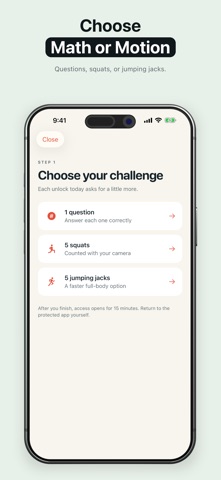
HOW IT WORKS 1. Choose apps or websites to protect. Block them immediately or set a daily free allowance. 2. When access is blocked, choose math, squats, or jumping jacks. 3. Finish the current step to open a timed access window. Return to your app when you're ready.
THE LADDER GROWS WITH YOU Your first unlock today takes 1 math question or 5 movement reps. The second takes 2 questions or 6 reps. Each later unlock adds one more. The ladder resets each day.
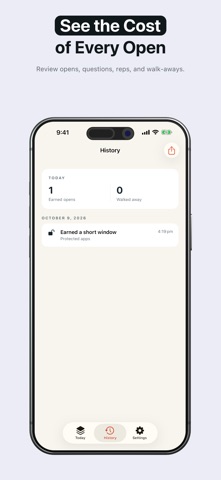
BUILT FOR REAL LIFE • Pick math any time, including when you can't use the camera. • Squats and jumping jacks are counted on your iPhone using the front camera. • Choose a 15, 20, 30, 45, or 60-minute access window. • Review earned opens and moments you chose to walk away in History. • Share a private daily recap that does not reveal protected-app names. • Pause, edit, or remove a ladder whenever you want.
Scroll Ladder requires a subscription, introductory trial, or lifetime purchase after onboarding. Subscription plans renew automatically unless canceled at least 24 hours before the end of the current period. Manage or cancel in your Apple Account settings.
PRIVACY Your protected app selections and activity history stay on your iPhone. Camera frames are analyzed on device and aren't saved or uploaded. No account is required.
Screen Time authorization is required to protect apps and websites. You can revoke it in iOS Settings.
Terms of Use (EULA): https://www.apple.com/legal/internet-services/itunes/dev/stdeula/ Terms: https://www.moonscape.party/terms Privacy Policy: https://www.moonscape.party/privacy
Slik vurderer folk den
Logg inn for å vurdere denne appen. Det ærlige svaret teller.
Ingen vurderinger ennå. Har du prøvd den? Vær den første til å vurdere.
Flere Produktivitet-apper
Ukens beste nye Produktivitet-apper ChickMark: Habit TrackerChickMark is a simple habit tracker for routines, goals, and reminders
 Dayflint: One Thing a DayToo many priorities?
 Snappy Do ItSix connected modes. One traceable journey.
 Fristo CAFMFristo is the app for Fristo CAFM, the facility management software
 UhWhat? Voice NotesCatch the thought before it disappears
- BeginAnywayMorning alarm for hard tasks: set one task, prove you started, build a streak