
STTBar
Ikke hentetSTTBar turns your voice into finished text, in any app on your Mac
Av Simon-Daniel Marz · ProduktivitetHvorfor vi forventer det: Clear value, thoughtful privacy controls and flexible on-device or server options make STTBar a compelling dictation tool for Mac users.




Kort fortalt
STTBar turns speech into text that appears at the cursor in any Mac app. It suits people who dictate into email, chat, editors or AI assistant prompts. It can run speech recognition on-device after a one-time model download, and it offers a German or English interface.
Sammendrag fra Debuts, basert på oppføringen i App Store.Om appen
STTBar turns your voice into finished text, in any app on your Mac.
Press a hotkey and speak. Press it again and STTBar transcribes the recording, on your Mac or on a server of your choice. The text appears where your cursor is: in an email, a chat, your editor or the prompt field of an AI assistant.
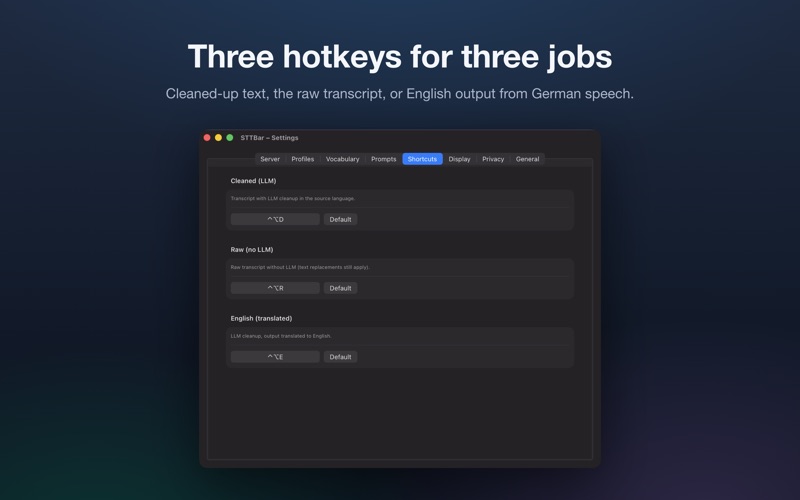
What STTBar does: • Three hotkeys: cleaned-up text, raw transcript and English output (speak German, paste English). • On-device speech recognition with Parakeet or WhisperKit. After the model download, recognition works offline. Local models are preloaded when the app starts. • Or a Whisper server: on a computer in your network or on the internet, with an API key if it needs one. • Optional cleanup with a language model of your choice: locally, for example in LM Studio or Ollama, or hosted through OpenRouter and other OpenAI-compatible services. It removes filler words and gives the text a clear structure. Cleanup mode can fall back to the raw transcript if enabled. English output requires a working language model endpoint. • API keys stay in your Mac's keychain and only go to the server they belong to. • A small overlay with a live waveform shows whether STTBar is recording, transcribing or cleaning up. • Word replacements for names and jargon, so they are always spelled right. • History with privacy controls, and a sensitive mode that never stores a dictation. • German or English interface.
No account, no subscription, no ads. Recordings and texts leave your Mac only if you add a server or service yourself.
STTBar needs access to the microphone and to Accessibility. Accessibility is required to insert the text into the active app.
Requires macOS 14 and a Mac with Apple silicon. On-device recognition downloads model files once. The first download and preparation can take 1 to 5 minutes.
Slik vurderer folk den
Logg inn for å vurdere denne appen. Det ærlige svaret teller.
Ingen vurderinger ennå. Har du prøvd den? Vær den første til å vurdere.
Flere Produktivitet-apper
Ukens beste nye Produktivitet-apper ChickMark: Habit TrackerChickMark is a simple habit tracker for routines, goals, and reminders
 Dayflint: One Thing a DayToo many priorities?
- BeginAnywayMorning alarm for hard tasks: set one task, prove you started, build a streak
 DHUDEDHUDE Analityxs es la herramienta de gestión diaria para grupos de restauración y ocio…
 FTC BIOBUZZ Scorer & TrainerBIOBUZZ Scorer is a free, ad-free scorer for the 2026–2027 FTC season, built on…
 Intent - Scroll by ChoiceTake back control of your screen time