
TeXAnt
Ikke hentetTeXAnt lets you write LaTeX documents, compile them and read the PDF, while managing…
Av Zeki Ozen · UtdanningHvorfor vi forventer det: Thorough description, on-device LaTeX compilation and a clear feature set make this a compelling debut for academic writers.





Kort fortalt
TeXAnt is an education app for writing LaTeX documents, compiling them on the device with an embedded LuaTeX engine, and reading the resulting PDF. It targets people who produce articles, theses, books and presentations and want no server queue or account. One standout feature is that when a compile hits a missing package, the app installs it from CTAN mirrors with one tap and resumes.
Sammendrag fra Debuts, basert på oppføringen i App Store.Om appen
TeXAnt lets you write LaTeX documents, compile them and read the PDF, while managing your bibliography and versions in the same app. No account or extra software required.
The embedded LuaTeX engine compiles articles, books, book chapters, theses, presentations and all your scientific work on your device: no server queue, no internet.
COMPILATION ENGINE • LuaTeX and HarfBuzz-powered LuaHBTeX, with correct typesetting for complex scripts. • Smart multi-pass compilation resolves bibliography and cross-references and builds index, glossary and nomenclature automatically. • Multi-file projects: chapter files added with \include are compiled together with the main document.
PACKAGE AND FONT MANAGEMENT • When a compile hits a missing package, TeXAnt reads the error, installs it from CTAN mirrors with one tap and resumes compiling. • Install packages yourself anytime: search the Package & Font Manager, see dependencies, install without waiting for a compile. • Ready-made install sets and TeX Live collections. • Same flow for fonts: just call them with \setmainfont or \fontspec.
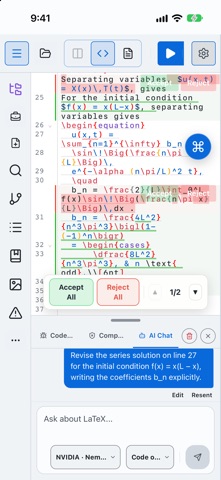
ADVANCED CODE EDITOR • Rich syntax highlighting for LaTeX, BibTeX and Markdown. • Smart autocompletion: command, environment, \cite{} and \ref{} suggestions. • Instant math preview while the cursor is on a formula. • Live linter: catches bracket, environment and syntax errors without compiling. • Vim mode, spell checking and a symbol/command keyboard bar for touch screens.
PDF PREVIEW AND SYNCTEX • Bidirectional SyncTeX: tap a point in the PDF to jump to its source line, and back. • Built-in PDF reader: text search, two-page view and thumbnail grid.
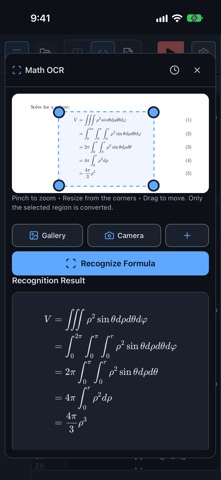
SMART INPUT TOOLS • Math OCR: take a photo of a formula and TeXAnt turns it into LaTeX. Recognition runs on device; your image is never uploaded. • Visual formula editor: edit formulas visually and get the LaTeX code instantly.
AI ASSISTANT • Connect OpenAI, Anthropic, Gemini, Nvidia or OpenRouter with your own API key. • Have it write, explain, debug or optimize code, and apply the fix with one tap. • Optional: only the text you select is sent to the provider you connect.
CLOUD STORAGE • Sync and back up your projects with iCloud Drive, Google Drive, Dropbox, OneDrive, Box, Yandex Disk or Amazon S3.
BUILT-IN GIT • Clone repositories from GitHub, GitLab, Bitbucket and Overleaf; commit, push, pull and browse history.
BIBLIOGRAPHY MANAGEMENT • Edit your references in the Bibliography Manager. • Import records from Zotero, Mendeley and EndNote into your project as .bib.
AND MORE • 16 project templates: thesis, article, book chapter, exam, Beamer presentation, CV, lecture notes and more. • Languages template: a ready-to-write document in 11 languages such as Arabic, Chinese, Japanese and Hindi. • Equation editor, figure inserter and Beamer slide tools. • Navigate sections, figures, tables and references in the Structure panel. • Snippets panel to quickly insert and manage frequently used LaTeX commands. • Project-wide search with regex, and replace all. • Printing; ZIP import/export, compatible with Overleaf and desktop projects. • Light and dark themes, three-panel layout, a 25-language interface and right-to-left (RTL) support.
Slik vurderer folk den
Logg inn for å vurdere denne appen. Det ærlige svaret teller.
Ingen vurderinger ennå. Har du prøvd den? Vær den første til å vurdere.
Flere Utdanning-apper
Ukens beste nye Utdanning-apper FluencyToolShadow a native Japanese sentence, hear your own voice back, and get scored.
 YoMoo: Read & Shadow JapaneseYoMoo turns real Japanese writing into graded reading practice: news articles, Wikipedia…
 KeyswingLearn music notes, rhythm and piano through playful practice in a magical forest.
 Uncle Math Homeschool - 6 to 8No Math Fear, Uncle Math Is Here
 Malachi SpeaksMalachi Speaks gives a voice to people who don't use speech
 SelvarisWatch evolution unfold in real time – on an entire planet