
Three Days!
Ikke hentetWHAT IS THIS?
Av Paul Petty · ProduktivitetHvorfor vi forventer det: A clever idea that turns your existing AI assistant into a daily morning brief.


Om appen
WHAT IS THIS? Three Days is your morning brief, written for you by the AI assistant you already use. Every morning a scheduled task in your own Claude or ChatGPT account reads your calendar, email, and Slack, writes a short summary, and sends it to Three Days. The app shows it as three screens: Yesterday, Today, and Tomorrow. Nothing to type, nothing to organise. Open it and the day is laid out.
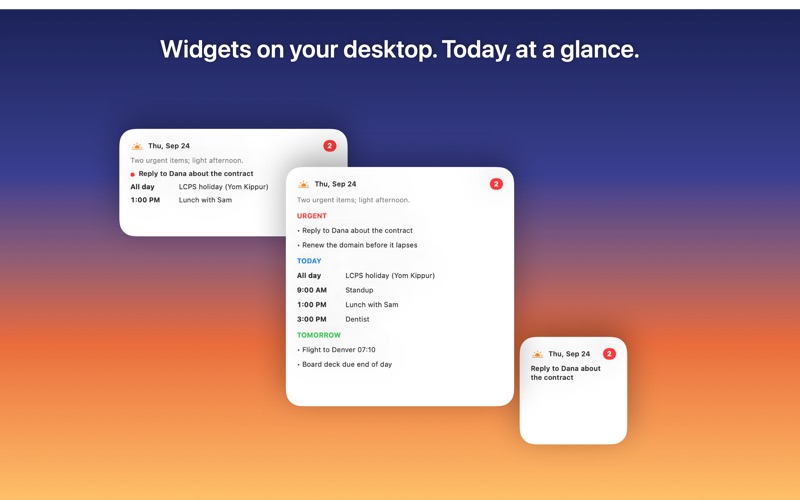
WHAT YOU SEE • Today: a one-line headline, the urgent issues in priority order, and today's schedule in time order • Tomorrow: what is already on the calendar and what to prepare • Yesterday: what mattered, so nothing slips • Check off items as you handle them; they tuck into a Completed section • A notification when the summary lands, and Home Screen widgets with today at a glance
SETUP (ABOUT FIVE MINUTES) 1. Sign in with Apple. Want a look first? Tap "Explore a sample day" on the welcome screen. 2. Add the connector to your assistant. Claude: Customize → Connectors → Add custom connector. Name it Three Days, paste https://threedays.net/mcp, tap Add, then Connect. ChatGPT (paid plan): Settings → Apps & Connectors → Advanced settings → turn on Developer mode, then Create a connector named Three Days with the same URL and OAuth. 3. Approve it. A page opens with a six-character code. Tap "Open Three Days" on that page, or enter the code in the app under Settings → Approve a connection. 4. Create the scheduled task. In your assistant, make a daily task for each morning, enable the Three Days connector plus your calendar, mail, and Slack, and paste this prompt: "Prepare my Three Days summary. First call the Three Days connector's get_instructions tool and follow the instructions it returns exactly, using only the connectors attached to this task. Finish by confirming the publish as those instructions describe." 5. Run it once. Tap Run now on the task; within a minute the app fills in, and from then on it happens by itself every morning.
The full walkthrough with screenshots, and a reference for the connector, is at https://threedays.net
MAC AND IPHONE Three Days is a universal purchase. Sign in with the same Apple ID on your Mac and iPhone and both show the same three days; each app also works entirely on its own.
PRIVACY Three Days never sees your email, calendar, or messages. Your assistant reads those inside your own account and sends only the finished summary. The service stores the summaries, an anonymous identifier from Sign in with Apple, and a push token. No ads, no analytics, no tracking. Delete everything from Settings at any time. Policy: https://threedays.net/privacy
REQUIREMENTS A Claude or ChatGPT account that supports scheduled tasks and custom connectors, with your calendar, mail, or Slack connected there. Three Days is an independent app and is not affiliated with Anthropic or OpenAI.
Slik vurderer folk den
Logg inn for å vurdere denne appen. Det ærlige svaret teller.
Ingen vurderinger ennå. Har du prøvd den? Vær den første til å vurdere.
Flere Produktivitet-apper
Ukens beste nye Produktivitet-apper ChickMark: Habit TrackerChickMark is a simple habit tracker for routines, goals, and reminders
 Dayflint: One Thing a DayToo many priorities?
 Snappy Do ItTurn photos, text and voice into tasks, plans and more.
 Fristo CAFMFristo is the app for Fristo CAFM, the facility management software
 UhWhat? Voice NotesCatch the thought before it disappears
- BeginAnywayMorning alarm for hard tasks: set one task, prove you started, build a streak