
Volume Lock: Max Volume
Ikke hentetmacOS has no way to set a maximum volume
Av Wednesday Solutions, Inc · VerktøyHvorfor vi forventer det: A clear, well-explained solution to a real gap, with thoughtful touches like silent enforcement and an optional PIN.


Kort fortalt
Volume Lock: Max Volume is a macOS utility that sets a volume ceiling, enforced from every source that can change it, including keyboard keys, System Settings, and scripts. It suits parents who want to cap a child's listening level on a Mac, and it can be PIN-protected. It does not cover AirPlay speakers or some HDMI, USB, and optical outputs.
Sammendrag fra Debuts, basert på oppføringen i App Store.Om appen
macOS has no way to set a maximum volume. Screen Time has no audio controls, and the parental controls do not cover the volume slider. So if a child turns the volume to maximum with headphones on, nothing on the Mac stops them.
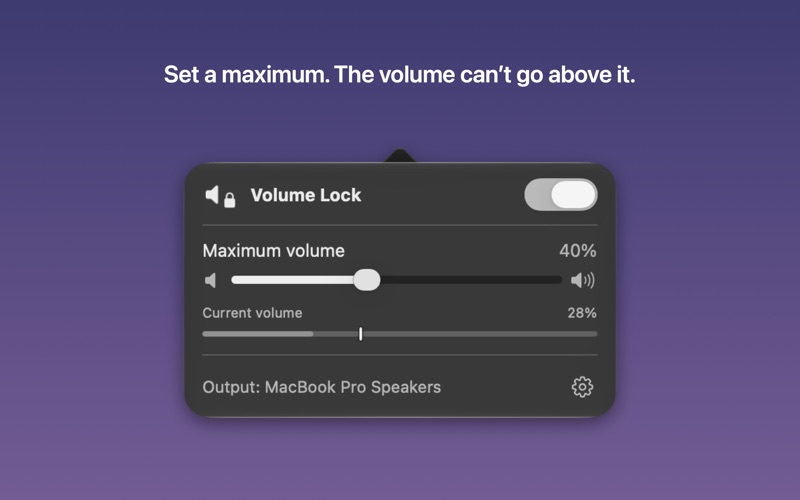
Volume Lock does. You set a ceiling, switch the lock on, and the volume cannot go above it.
HOW IT WORKS
Click the speaker icon in the menu bar. Drag the Maximum volume slider to the level you want. Flip the switch. That is the whole setup, and it takes about ten seconds.
From then on, anything that raises the volume past your limit is pulled straight back down: the keyboard volume keys, Control Center, System Settings, scripts, and other apps. It happens in a fraction of a second.
Lowering the volume and muting always work. The cap is a ceiling, never a floor, so your child can still turn things down.
WHAT YOU GET
- A maximum volume that holds, from every source that can change it. - A live readout, so you can watch a revert happen while you are setting it up. - Silent enforcement. No beep and no alert when the volume is pulled back, so it never becomes a game to play. - The cap follows your output device. macOS keeps a separate volume for each one, so the limit is re-applied when headphones or AirPods are connected. - It holds across restarts and sleep. Start Volume Lock at login and the limit is in place before anyone uses the Mac. That switch is yours, in Settings, and you can turn it off. - An optional PIN. Set one and the lock cannot be switched off, and the maximum cannot be changed, without it. Unlocking lasts a few minutes and then re-locks on its own, so you are not entering it repeatedly while you adjust things. Forgotten it? Touch ID or your login password will reset it, so you cannot be shut out of your own Mac. - No notification permission, no microphone access, no sign-in and no setup account.
WHAT IT CANNOT DO
A safety tool should be honest about its limits, so here they are before you buy.
- The limit applies while Volume Lock is running. If the app is quit, nothing is enforced until it starts again. - Some HDMI, USB and optical outputs give macOS no volume to set. Volume Lock cannot cap those, and it says so with a warning naming the device rather than pretending. Built-in speakers and headphones are the normal case and work fine. - AirPlay speakers are not covered. - Some devices only accept volume in fixed steps, so the volume can settle up to one step above your cap. That is the hardware, not the app. - Anyone with the Mac's administrator password can quit or remove any app, including this one. No app can prevent that, and the PIN does not change it. If you are limiting someone who has admin access, give them a standard account.
PRIVACY
Slik vurderer folk den
Logg inn for å vurdere denne appen. Det ærlige svaret teller.
Ingen vurderinger ennå. Har du prøvd den? Vær den første til å vurdere.
Flere Verktøy-apper
Ukens beste nye Verktøy-apper Vodoalarm: vodostaji BiHVodoalarm javlja kad tvoja rijeka naglo raste, pa ne moraš stalno gledati vodostaje
 NadhirNadhir is an independent app
 Rokey: Romanian KeyboardType Romanian without worrying about diacritics
 Vibe Island: AI Agent MonitorVibe Island is a command center for the AI coding agents running on your Mac
 Private AuthenticatorPrivate Authenticator keeps your two-factor authentication codes on your own Apple…
 Photo Clean: Photo CleanupA crowded camera roll?