
Clipkin: Clipboard & Snippets
Niet geclaimdClipkin is a keyboard-first clipboard manager and snippet library for the Mac
Door JAY SLAY · Productiviteit



Over deze app
Clipkin is a keyboard-first clipboard manager and snippet library for the Mac. It keeps what matters and forgets your secrets. Everything stays on your Mac: no account, no analytics, and no network requests.
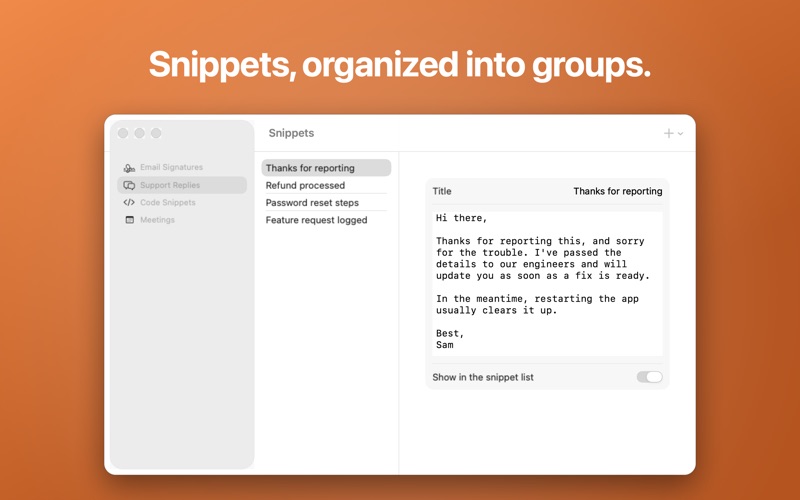
HOW IT WORKS Press a hotkey (⌘⇧V by default, and you can change it) to open a floating panel with your clipboard history: text, rich text, images, files, and links. Pick an item and Clipkin copies it and takes you back to the app you were using, ready to paste with ⌘V. Search with fuzzy matching, or type what you're looking for — "link," "image," "json," "email," "qr" — and Clipkin finds it. A second hotkey (⌘⇧B by default) opens your snippets: reusable text organized into groups, ready to paste anywhere.
SECRET-SAFE BY DEFAULT Clipkin skips anything your password manager marks as concealed, and excludes common password managers from capture entirely. It also scans what it does capture for API keys, tokens, private keys, and one-time codes — masking them in the list and deleting them automatically after 10 minutes (configurable). Its panel is hidden from screen sharing and recordings, so your history stays off the call. Nothing to configure, nothing to opt into: it's on from the first launch.
QUICK ACTIONS Select a clip and press ⌘K (or T) to run a Quick Action: format or minify JSON, convert rich text to plain text, change case (UPPERCASE, lowercase, Title Case, camelCase, snake_case, kebab-case, CONSTANT_CASE), sort, dedupe or reverse lines, trim whitespace, URL encode/decode, remove tracking parameters from links, Base64 encode/decode, extract links or email addresses, or count words and characters. Every result previews before it's pasted.
FOR AI CHATS Copy an answer from an AI assistant, press ⌘K, and tidy it before it lands in your notes or code: extract the code, turn Markdown into plain text, swap curly quotes and long dashes for plain ones, strip invisible characters and citation marks, or drop the "Sure! Here's…" lead-in and "Let me know if…" sign-off.
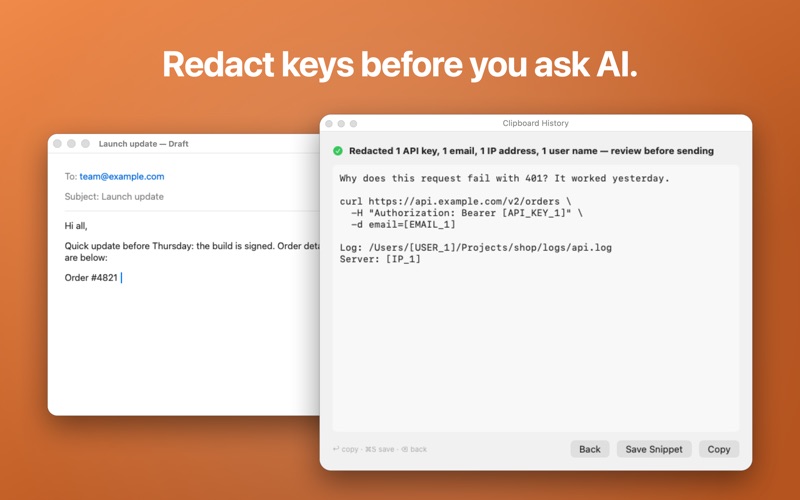
Going the other way, Redact for AI swaps API keys, tokens, passwords, private keys, emails, phone numbers, card numbers, addresses, IP addresses and your user name in file paths for placeholders like [API_KEY_1], and tells you what it changed. It's a best-effort check, so review before you send.
Both also work on selected text in any app, from the Services menu. Snippets can fill in {{clipboard}}, {{date}} and {{time}}, and Count shows approximate tokens.
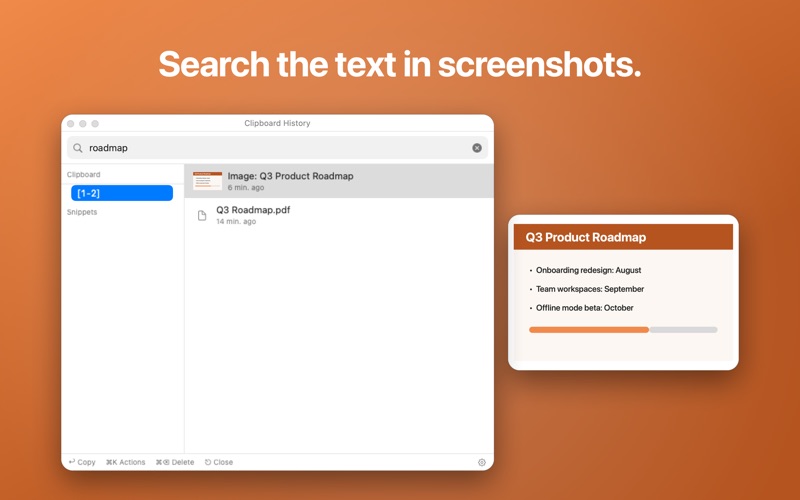
SCREENSHOTS, IMAGES, QR CODES AND TRANSLATION, ON THIS MAC When you copy a screenshot or image, Clipkin reads the text in it on your Mac and notes what it shows, so you can search for "receipt" or "dog" later and copy the text out. It also reads QR codes and barcodes, and opens their links if you ask. Remove Background cuts the subject out of an image as a transparent PNG. Translate to… turns text into another language with Apple's on-device translation. None of it sends your data anywhere.
SHORTCUTS, SIRI AND SPOTLIGHT Copy any snippet from the Shortcuts app or by asking Siri ("Copy Email Signature with Clipkin"), or use its text in your own shortcuts. Letting Spotlight find your snippets is optional and off until you turn it on. Your clipboard history is never added to Spotlight.
BACK UP YOUR DATA Export your clipboard history and snippets to JSON any time, and import them back in, on this Mac or a new one.
ONE PRICE, EVERYTHING INCLUDED Pay once. No subscription, no add-ons, no limits: history up to 5,000 items, unlimited snippet groups and snippets, and every feature above.
PRIVACY Clipkin doesn't have an account system, doesn't track you, doesn't collect analytics, and doesn't connect to the internet. Your clipboard history and snippets are stored locally on your Mac. Text recognition, image labels, background removal and translation use Apple's frameworks on your Mac. macOS may download a translation language the first time you use it.
Zo beoordelen mensen de app
Log in om deze app te beoordelen. Eerlijk is wat telt.
Nog geen beoordelingen. Heb je de app geprobeerd? Beoordeel hem als eerste.
Meer apps in Productiviteit
Beste nieuwe apps in Productiviteit van deze week ChickMark: Habit TrackerChickMark is a simple habit tracker for routines, goals, and reminders
 Dayflint: One Thing a DayToo many priorities?
 Fristo CAFMFristo is the app for Fristo CAFM, the facility management software
- BeginAnywayMorning alarm for hard tasks: set one task, prove you started, build a streak
 DHUDEDHUDE Analityxs es la herramienta de gestión diaria para grupos de restauración y ocio…
 Unlocky: Training App BlockerLock the apps that eat your day