
Comment Reflow
Niet geclaimdComment Reflow reflows long // and /// comments in Xcode to a column width you choose —…
Door Nils Anspach · Hulpprogramma'sWaarom we dit verwachten: A focused, clearly useful Xcode utility with a well-explained description, privacy stance, and free access for Swift developers.



Kort samengevat
Comment Reflow is a macOS utility that rewraps long // and /// comments in Xcode to a column width the user sets. It keeps indentation, comment markers, and DocC structure such as parameter lists and code blocks intact, and it can process a single comment, a selection, or a whole file in one command. Its standout feature is that it runs entirely on the Mac, with source code held in memory only while a command runs.
Samenvatting door Debuts, gebaseerd op de vermelding in de App Store.Over deze app
Comment Reflow reflows long // and /// comments in Xcode to a column width you choose — keeping indentation, comment markers, and DocC structure correct on every line, even across multiple comment blocks at once.
If you have ever pasted a long comment into Swift code and ended up with an ugly, overlong line — or manually re-wrapped a DocC comment after editing one word — Comment Reflow fixes that with one command.
HOW IT WORKS
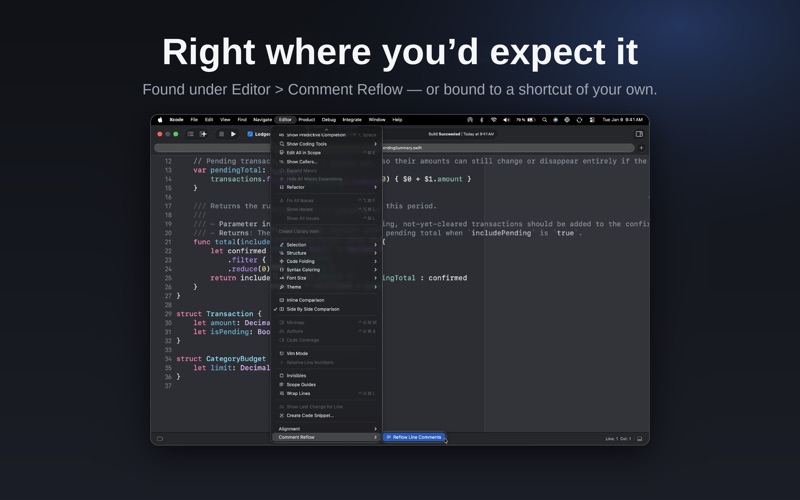
Place your cursor in a // or /// comment, or select part of one, then run "Reflow Line Comments" from the Editor menu in Xcode (or your own keyboard shortcut). Select a larger range — even an entire file — to reflow every comment block inside it in one pass, while leaving your actual code untouched.
FEATURES
• Wraps // line comments and /// DocC comments to a configurable column width • Preserves indentation and comment markers on every line • Correctly re-wraps DocC structure: parameter lists, bullet points, code blocks, and callouts • Reflows a single comment, a selection, or an entire file in one command • Works as a lightweight Source Editor Extension for Xcode — no changes to your project files or build settings
PRIVACY
Comment Reflow works entirely on your Mac. Your source code is processed in memory only while you run a command, and is never stored or sent anywhere.
SETUP
After installing, open the app once and follow the Setup tab to enable the extension in System Settings and (optionally) assign a keyboard shortcut in Xcode.
Comment Reflow is free, with no ads, no tracking, and no account required.
Zo beoordelen mensen de app
Log in om deze app te beoordelen. Eerlijk is wat telt.
Nog geen beoordelingen. Heb je de app geprobeerd? Beoordeel hem als eerste.
Meer apps in Hulpprogramma's
Beste nieuwe apps in Hulpprogramma's van deze week Drainly: Speaker CleanerMuffled speaker after a splash, rain, or a sweaty workout?
 Photo & PDF Resize: KBFile too large to upload?
 Arvectum Proxy LauncherArvectum Proxy Launcher is a network utility that routes your iPhone through a proxy you…
 Look Twice: Scam & AI CheckLook twice before you click
 Vodoalarm: vodostaji BiHVodoalarm javlja kad tvoja rijeka naglo raste, pa ne moraš stalno gledati vodostaje
 Sift: Photo CleanupYour camera roll is full of blurry shots, old screenshots and videos you'll never watch…