
Dutyy - Tasks in Your Notch
Niet geclaimdDutyy turns the notch on your MacBook into a tiny, always‑available task list
Door Akylbek Utekeshev · ProductiviteitWaarom we dit verwachten: Dutyy makes a clever use of the MacBook notch, with a clearly explained task and focus-timer workflow backed by seven screenshots.



Kort samengevat
Dutyy - Tasks in Your Notch is a productivity app for Mac that expands the notch at the top of the screen into a task list when the cursor moves there. It lets users add tasks by hotkey with plain-language due dates and repeats, and includes a focus timer that shows beside the notch. Its most distinctive point is that tasks are stored only on the Mac, with no account, sync or internet connection.
Samenvatting door Debuts, gebaseerd op de vermelding in de App Store.Over deze app
Dutyy turns the notch on your MacBook into a tiny, always‑available task list. Move the cursor to the top of the screen — the notch expands into your tasks. Move it away — the list disappears. Nothing sits on your desktop, nothing fights for space with your work.
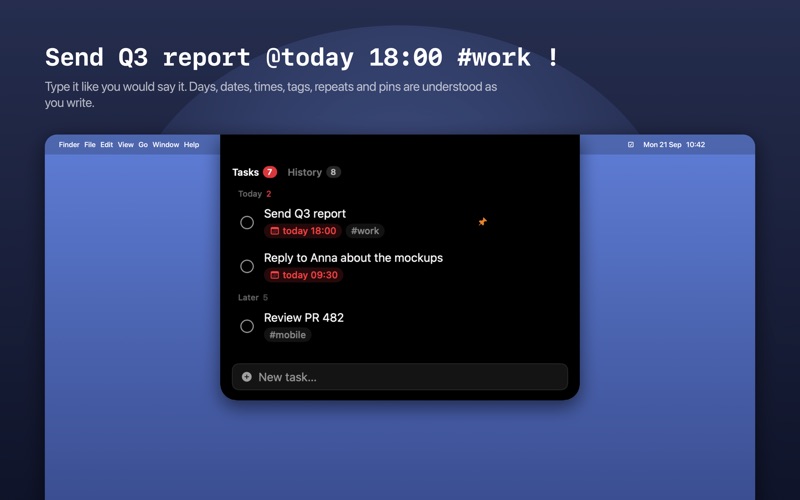
WRITE A TASK IN SECONDS Press the hotkey (⌥ Space by default, or any combination you choose) and type. Plain language works: "Report @tomorrow 18:00 #work !" becomes a pinned task with a due date and a tag. Days of the week, dates, "in 3 days", times, and repeats like @daily or @weekdays are all understood.
SEE WHAT MATTERS TODAY Tasks due today and anything overdue are grouped at the top. Overdue items turn red. A small counter next to the notch shows how many tasks are open, and turns red when something has slipped.
FOCUS ON ONE THING Start a 25‑minute focus timer on any task. The countdown shows right next to the notch while the list is hidden. Add five minutes, type your own duration ("45", "1:30", "2h"), or pause and pick it up later — switching to another task never loses your time.
NEVER MISS A DEADLINE Get a notification ten minutes before a task is due, and again at the due time. Whole‑day tasks remind you in the morning.
REPEATING TASKS Daily stand‑up, weekly report, watering the plants: complete a repeating task and the next occurrence appears on its own.
HISTORY THAT MOTIVATES Completed tasks are kept by day, with the time you finished. See how many you closed today, this week, and your streak of productive days.
BUILT FOR YOUR DESKTOP • Works with or without a notch — on an external display a small pill at the top edge takes its place • Choose which display hosts the list • Dark and light themes, three sizes, adjustable width and opacity • Drag to reorder, pin to top, edit with a double‑click, undo a deletion with ⌘Z • Launch at login, optional menu bar counter • Add tasks from Shortcuts or any launcher via the dutyy://add?title=… URL scheme • English and Russian
PRIVATE BY DESIGN Dutyy has no account, no sync service and no analytics. Your tasks are stored only on your Mac. The app never connects to the internet.
Dutyy is for people who keep a short list of what matters today and want it one glance away — without another window to manage.
Zo beoordelen mensen de app
Log in om deze app te beoordelen. Eerlijk is wat telt.
Nog geen beoordelingen. Heb je de app geprobeerd? Beoordeel hem als eerste.
Meer apps in Productiviteit
Beste nieuwe apps in Productiviteit van deze week ChickMark: Habit TrackerChickMark is a simple habit tracker for routines, goals, and reminders
 Dayflint: One Thing a DayToo many priorities?
 Snappy Do ItTurn photos, text and voice into tasks, plans and more.
 Fristo CAFMFristo is the app for Fristo CAFM, the facility management software
 UhWhat? Voice NotesCatch the thought before it disappears
- BeginAnywayMorning alarm for hard tasks: set one task, prove you started, build a streak