
Easylock Parental Controls
Niet geclaimdEasylock replaces the flood of "ask for more time" requests with one simple exchange
Door AVRAM ELIEZER FRISCH · Hulpprogramma'sWaarom we dit verwachten: A clear, well-explained idea that turns endless screen time requests into one simple family exchange.


Kort samengevat
Easylock Parental Controls uses Apple's Screen Time to lock a child's apps by daily limit or set lock times, and lets the child send one request for more time that a parent can answer from their own iPhone. It is for families who want fewer back-and-forth requests and can limit how often the child may ask. One notable detail: a single approval unlocks the whole phone rather than each app separately.
Samenvatting door Debuts, gebaseerd op de vermelding in de App Store.Over deze app
Easylock replaces the flood of "ask for more time" requests with one simple exchange. When your child's apps lock, they can ask you once. You tap Give 30 min, pick another amount, or say no. Everything on their phone unlocks at once, for as long as you decided, and locks itself when the time runs out.
HOW IT WORKS
On your child's phone, Easylock uses Apple's Screen Time controls to lock the apps you choose. You set a daily limit, lock times such as homework and bedtime, and how often your child can ask for more. When the limit hits or a lock time starts, the apps show a lock screen with one button: Ask for more time.
On your phone, the request arrives as a notification. Answer it from anywhere. You can also give time whenever you like, without waiting to be asked, or unlock the phone in person with your parent PIN.
ASKING IS RATIONED, NOT ENDLESS
You decide how many times your child can ask: once each time the phone locks, a few times a day, every few hours, or any time. Once the asks are used up, the button disappears and the lock screen says when they can ask again. Extra time you give does not reset the count.
ONE ANSWER UNLOCKS EVERYTHING
Built-in Screen Time sends a request for every single app. Easylock locks and unlocks the phone as a whole. One yes means your child can get on with what they were doing, and you get on with your day.
PRIVATE BY DESIGN
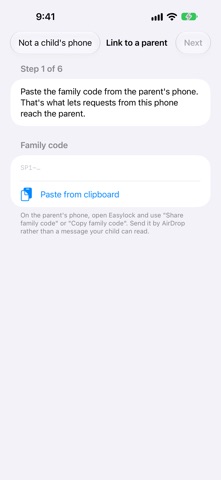
Requests and answers travel through your own iCloud account using a private family code. There are no accounts to create, no servers of ours, and no tracking. Which apps are limited never leaves your child's phone. Requests are deleted automatically after two days.
BUILT FOR FAMILIES
- Works with Family Sharing, so your child can't delete the app or turn it off without you. - Up to 8 named lock times, each with its own days and hours. Bedtime on school nights only, for example. - A second parent can join with the same family code and answer requests too. - Always-allowed apps stay open: Phone, Messages, and whatever else you choose. - Custom amounts from one minute to 12 hours. - Lock now: lock a child's apps for an hour, the afternoon, or the rest of the day, from wherever you are. - One child, all their devices: an iPhone and an iPad follow the same rules and the same locks.
Zo beoordelen mensen de app
Log in om deze app te beoordelen. Eerlijk is wat telt.
Nog geen beoordelingen. Heb je de app geprobeerd? Beoordeel hem als eerste.
Meer apps in Hulpprogramma's
Beste nieuwe apps in Hulpprogramma's van deze week Vodoalarm: vodostaji BiHVodoalarm javlja kad tvoja rijeka naglo raste, pa ne moraš stalno gledati vodostaje
 NadhirNadhir is an independent app
 Rokey: Romanian KeyboardType Romanian without worrying about diacritics
 Vibe Island: AI Agent MonitorVibe Island is a command center for the AI coding agents running on your Mac
 Private AuthenticatorPrivate Authenticator keeps your two-factor authentication codes on your own Apple…
 Photo Clean: Photo CleanupA crowded camera roll?