
FAGL: Focus Timer & Goals
Niet geclaimdFAGL: Focused Action, Goalful Life
Door Jongmin Lee · ProductiviteitWaarom we dit verwachten: A thoughtful multi-device focus timer with clear value, a careful description, and rich features for productivity fans.




Kort samengevat
FAGL: Focus Timer & Goals is a productivity app for Mac, iPhone, iPad and Apple Watch that pairs to-do items with goal times and a visual countdown. It also offers a reflection journal, a focus grid and optional AI features that can be turned on or left off. Its Awesome Life Timer shows time left on each to-do, and the Mac version also displays it in the menu bar and the notch.
Samenvatting door Debuts, gebaseerd op de vermelding in de App Store.Over deze app
FAGL: Focused Action, Goalful Life.
A calm focus timer and to-do app for Mac, iPhone, iPad and Apple Watch. Give each to-do a goal time, focus with a visual countdown, reflect when you're done, and watch your days fill in on a focus grid.
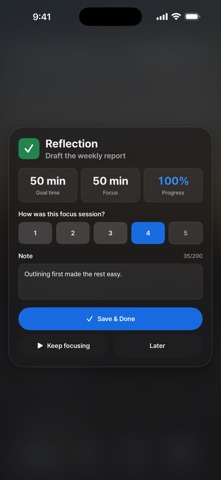
FEATURES • Awesome Life Timer: a visual countdown tied to each to-do's goal time • Focus grid: your focus each day at a glance • Repeat rounds: one to-do in rounds, with breaks in between • Daily to-dos: back on your list every day, even once finished • Reflection journal: ratings and notes, saved the moment you finish • History and weekly goal: follow your week and see how close your time estimates were • Deep Focus: a full-screen timer that keeps your display awake (on Mac, optionally with Do Not Disturb) • Focus sound: optional background noise while the timer runs • Goals and roadmap: plan mid- and long-term goals in stages • Today's Plan: an optional morning planning step • Backup and transfer: automatic local backups, one .fagl backup file to move your records to another device over AirDrop, and CSV export
ON EVERY DEVICE • Mac: your current to-do and time left in the MacBook notch (on Macs without a notch, at the top of the screen) and in the menu bar, Quick Add and global shortcuts from any app • iPhone and iPad: widgets for the Home Screen and Lock Screen, and on iPhone a Live Activity with the time left • Apple Watch: start, pause and finish from your wrist, and see the time left on a complication
AI, ONLY IF YOU WANT IT • Weekly summary of your focus and reflections, the patterns that keep coming up, and how this week compares with last • Goal planner that turns a goal into a roadmap of stages and to-dos • Break a big to-do into smaller steps • Tidy up to-do titles • A short nudge to keep you going
FAGL uses the first AI that's available: 1. Cloud AI, powered by Claude from Anthropic. Your purchase includes a one-time free credit of roughly a few hundred uses, with a daily limit. It's for ages 18 and up and only runs after you say yes on an in-app consent screen. What you send goes through the FAGL server to Anthropic just to write the answer. FAGL doesn't store it, it isn't used to train AI, and Anthropic usually deletes it within 30 days. 2. Apple's on-device AI (Apple Intelligence) on supported devices. Nothing leaves your device. 3. On Mac, an optional on-device AI model (about 3.6 GB or 5.2 GB) you can download in Settings. After that, it works offline. If you say no, hit the daily limit, or use up the credit, AI keeps working on your device wherever on-device AI is available. AI is optional, and every core feature works without it. Or use your own API key from OpenAI, Anthropic, xAI or Google (Settings > AI).
YOUR DATA STAYS ON YOUR DEVICES To-dos, focus sessions, goals, and reflections are stored only on your devices. No account, no sign-in, no ads, no analytics, no tracking. Cloud AI is optional and only runs with your permission. The daily background photo comes from a free photo service, and no personal data is sent to get it.
ONE-TIME PURCHASE Buy once for Mac, iPhone, iPad and Apple Watch. No ads. The optional AI Plus subscription only adds more cloud AI.
AI PLUS (OPTIONAL SUBSCRIPTION) • USD 2.99 a month (prices vary by region) for a monthly cloud AI allowance, typically about 200 to 500 uses depending on the feature, with a daily limit • Charged to your Apple Account. Renews automatically unless you cancel at least 24 hours before the current period ends. • Manage or cancel anytime in your App Store account settings. No Family Sharing. • Your one-time purchase and its free credit stay as they are. Terms of Use: https://www.apple.com/legal/internet-services/itunes/dev/stdeula/
FIVE LANGUAGES English, Korean, Japanese, Traditional Chinese, and German. Switch anytime, no restart needed.
Requires macOS 26.0 or later on a Mac with Apple silicon, or iOS or iPadOS 26.1 or later. The Apple Watch app requires watchOS 26 or later and a paired iPhone.
Zo beoordelen mensen de app
Log in om deze app te beoordelen. Eerlijk is wat telt.
Nog geen beoordelingen. Heb je de app geprobeerd? Beoordeel hem als eerste.
Meer apps in Productiviteit
Beste nieuwe apps in Productiviteit van deze week ChickMark: Habit TrackerChickMark is a simple habit tracker for routines, goals, and reminders
 Dayflint: One Thing a DayToo many priorities?
 Snappy Do ItSix connected modes. One traceable journey.
 Fristo CAFMFristo is the app for Fristo CAFM, the facility management software
 UhWhat? Voice NotesCatch the thought before it disappears
- BeginAnywayMorning alarm for hard tasks: set one task, prove you started, build a streak