
Image to PDF - Convertly
Niet geclaimdConvertly is your all-in-one, 100% on-device file, photo, and PDF studio for iPhone
Door PATOLIYA ABHISHEK · Productiviteit


Kort samengevat
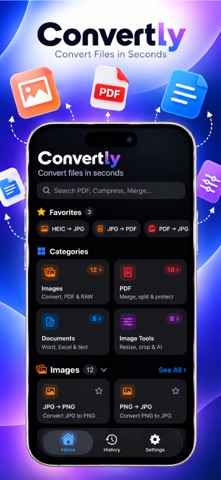
Image to PDF - Convertly is a productivity app for iPhone that converts images, merges, splits, signs, compresses, and OCR-scans PDFs, and turns Word and Excel files into PDFs. It is aimed at people who handle contracts, scanned paper, and personal photos and want them processed without uploads. A standout point is that all processing happens on the device, so documents are never sent to a server.
Samenvatting door Debuts, gebaseerd op de vermelding in de App Store.Over deze app
Convertly is your all-in-one, 100% on-device file, photo, and PDF studio for iPhone.
Convert images, merge and sign contracts, compress large files, scan physical paper, or turn Word and Excel files into clean PDFs in seconds. Best of all, Convertly processes everything locally on your Apple hardware—your private documents and personal photos never leave your device and are never uploaded to any server.
POWERFUL PDF TOOLS • Merge & Split: Combine multiple PDFs into an organized document or extract page ranges into separate files. • Sign & Annotate: Draw a smooth digital signature using Apple Pencil or your finger, place and resize it on any page, and highlight or mark up documents. • Compress PDF: Reduce document file sizes quickly with Low, Balanced, or Maximum compression presets. • Make PDF Searchable (OCR): Turn scanned paper or image-only documents into searchable, selectable PDFs with on-device Apple Vision text recognition. • Page Manager: Reorder pages with intuitive drag-and-drop, delete unwanted pages, duplicate, or extract selections. • Password Protect & Unlock: Encrypt PDFs with secure AES passwords or unlock protected documents you have access to. • Form Filling & Redaction: Fill out interactive AcroForm text fields and checkboxes, or permanently black out sensitive information with redaction blocks. • Watermark & Rotate: Stamp custom text watermarks across pages (custom opacity, font, and angle) and rotate pages in 90° increments. • PDF to Long Image: Stitch multiple PDF pages vertically into one seamless tall image with customizable page spacing.
IMAGE CONVERSION & STUDIO • Universal Image Formats: Convert between JPG, PNG, HEIC, WebP, TIFF, BMP, and professional camera RAW files (DNG, CR2, NEF, ARW, and more). • Background Removal: Cut out subjects from photos instantly with on-device AI foreground segmentation. • Photos to PDF: Combine single photos or large photo batches into clean, paginated PDFs with custom margins and orientations. • Perspective Correction: Straighten tilted photos of paper documents with interactive 4-corner pin adjustments. • Resize, Crop & Rotate: Crop images with freeform or fixed aspect ratios (1:1, 4:3, 16:9, 3:2), resize by dimensions or percentage, and adjust orientation.
DOCUMENTS & SPREADSHEETS • Word to PDF: Convert DOCX, DOC, and RTF documents into crisp, paginated PDFs while preserving tables, fonts, and formatting. • Excel to PDF: Render XLSX, XLS, and CSV spreadsheets as clean, readable PDF tables. • PowerPoint to PDF: Convert PPTX and PPT presentations into shareable PDFs. • Text & CSV to PDF: Import plain text or CSV files to generate formatted PDFs with custom headers, margins, and automatic delimiter detection (comma, semicolon, or tab).
DESIGNED FOR PRIVACY & SPEED • 100% On-Device: Zero server uploads, zero cloud queues, and zero file tracking. Everything converts natively on your device. • Camera Document Scanner: Scan physical receipts, notes, and multi-page agreements with automatic edge detection and perspective correction. • On-Device Translation: Translate recognized text between languages using Apple's system translation framework without external third-party servers. • Face ID / Touch ID Security: Lock your conversion history behind biometric authentication to keep personal files confidential. • iOS Share Sheet Extension: Convert images and PDFs directly from Safari, Files, or Photos without leaving the app you are in. • Home Screen Widgets: Keep track of your conversion count and quick-access recent files right from your Home Screen. • Shortcuts & Siri: Automate routine compression and format conversion workflows with built-in Apple Shortcuts App Intents.
Convertly works completely offline, requires no account or login, and has no recurring subscriptions.
Zo beoordelen mensen de app
Log in om deze app te beoordelen. Eerlijk is wat telt.
Nog geen beoordelingen. Heb je de app geprobeerd? Beoordeel hem als eerste.
Meer apps in Productiviteit
Beste nieuwe apps in Productiviteit van deze week ChickMark: Habit TrackerChickMark is a simple habit tracker for routines, goals, and reminders
 Dayflint: One Thing a DayToo many priorities?
 Snappy Do ItSix connected modes. One traceable journey.
 Fristo CAFMFristo is the app for Fristo CAFM, the facility management software
 UhWhat? Voice NotesCatch the thought before it disappears
- BeginAnywayMorning alarm for hard tasks: set one task, prove you started, build a streak