
KeyAct Translator & Dictionary
Niet geclaimdCopy text, press Command-G and translate without opening a separate translation website
Door Vitalii Stekolshchykov · Productiviteit




Kort samengevat
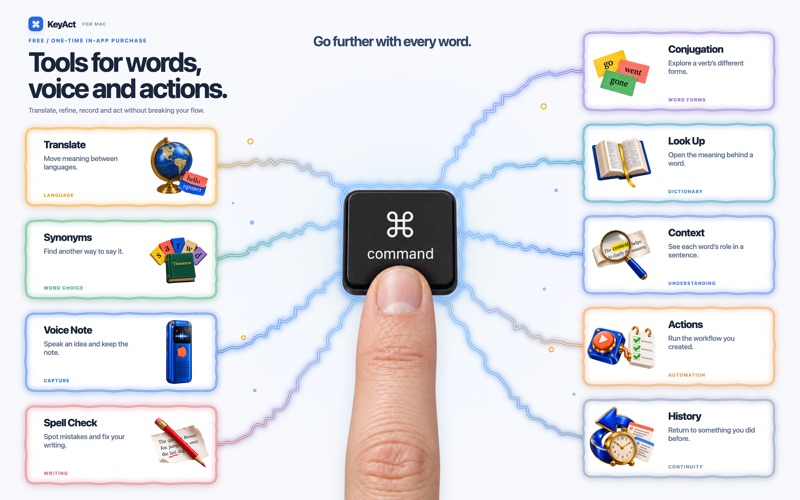
KeyAct Translator & Dictionary is a Mac menu bar app that translates copied or typed text using Apple's translation engine, with synonyms and word definitions alongside. It is aimed at Mac users who want quick lookups without opening a separate website. One thing that stands out is that extra tools like Context, Spell Check, Conjugation, Voice Note and Actions come from a single one-time purchase with no account or subscription.
Samenvatting door Debuts, gebaseerd op de vermelding in de App Store.Over deze app
Copy text, press Command-G and translate without opening a separate translation website. KeyAct keeps translation, synonyms and word definitions in your Mac's menu bar. Start with these three tools for free.
TRANSLATE AND EXPLORE WORDS - Translate typed or copied text with Apple's translation engine. - Copy the result or hear it read aloud with available system voices. - Find related words and look up definitions. - Choose your languages and keyboard shortcuts, and use a light or dark theme.
MORE TOOLS, ONE PURCHASE KeyAct Full Access unlocks Context, Spell Check, Conjugation, Voice Note and Actions with one non-consumable in-app purchase. No KeyAct account and no subscription.
- Context identifies parts of speech in a sentence. - Spell Check helps find spelling errors. - Conjugation shows verb forms from bundled offline dictionaries for 14 languages. Coverage varies by language and verb. - Voice Note records audio and transcribes speech when supported on-device resources are available. Save audio, text or both in local history, then copy or listen to a transcript. - Actions opens URLs, sends HTTP requests and runs scripts you install in KeyAct's Application Scripts folder.
BUILT FOR YOUR MAC Requires macOS 15 or later. Language support varies by tool, macOS version and available Apple resources. Translation and speech may need an initial download. Some resources must be installed through macOS. Look Up may use an online Wiktionary fallback; HTTP actions also require internet access.
This App Store edition uses typed or clipboard text and does not read another app's selection through Accessibility. Related words are not always interchangeable, and Context is not a full grammar checker.
Technical error reports are optional in Settings. They never include translations, clipboard contents, transcripts or audio recordings. Microphone and speech permissions are requested when recording is used.
Support and privacy: https://stekolshchykov.github.io/dochub/products/keyact/
Zo beoordelen mensen de app
Log in om deze app te beoordelen. Eerlijk is wat telt.
Nog geen beoordelingen. Heb je de app geprobeerd? Beoordeel hem als eerste.
Meer apps in Productiviteit
Beste nieuwe apps in Productiviteit van deze week ChickMark: Habit TrackerChickMark is a simple habit tracker for routines, goals, and reminders
 Dayflint: One Thing a DayToo many priorities?
 Snappy Do ItTurn photos, text and voice into tasks, plans and more.
 Fristo CAFMFristo is the app for Fristo CAFM, the facility management software
 UhWhat? Voice NotesCatch the thought before it disappears
- BeginAnywayMorning alarm for hard tasks: set one task, prove you started, build a streak