
Lama Client
Niet geclaimdLama Client is a VPN client for your own access keys
Door Ciparu Troja SIA · Hulpprogramma'sWaarom we dit verwachten: The clear, careful description, strong privacy promises, and useful Autopilot features make this a promising debut for experimenters.




Kort samengevat
Lama Client is a VPN client for iPhone that connects through access keys you already have from a provider, such as VLESS, VMess, Trojan or Shadowsocks links. It suits people who manage several keys and want them kept in one list, with Autopilot switching to the next key when a connection fails. Keys are stored in the iPhone's Keychain, and the app runs no servers of its own.
Samenvatting door Debuts, gebaseerd op de vermelding in de App Store.Over deze app
Lama Client is a VPN client for your own access keys. Add one key or several, and the llama keeps the connection going.
IMPORTANT: you need an access key from your provider — a vless://, vmess://, trojan:// or ss:// link, or a subscription URL. The app does not sell or provide VPN servers.
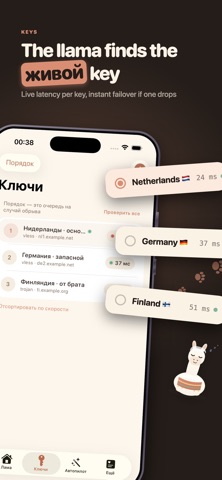
SEVERAL KEYS, ONE QUEUE Keys from different providers live in one list, in the order you choose. Turn on Autopilot, and if the active key drops or the internet stops working through it, the llama connects the next one. You don't have to tap anything.
AUTOPILOT • Turns the VPN on by itself on unfamiliar Wi-Fi and on cellular • Trusted networks: no VPN at home or at work • Regularly checks that the connection through the key is alive, and switches keys if it isn't
EASY TO ADD A KEY Paste a link from the clipboard, scan a QR code, or load every key from your provider's subscription. Each key shows its latency, and the list can be sorted by speed. Keep a note on a key — for example, when it expires.
ROUTES Pick sites that should open directly, outside the VPN — your bank, for example. Or the other way round: send only selected sites through the key.
THE LLAMA The llama dozes while the VPN is off and stands guard once you're connected. A Home Screen widget turns the VPN on and off without opening the app, and a Live Activity shows the status on the Lock Screen and in the Dynamic Island.
PRIVACY • No account, no registration, no ads • No analytics or third-party trackers • Keys are stored in the iPhone's encrypted Keychain and never leave the device • We run no servers of our own: traffic goes to your provider's server
Protocols: VLESS, VMess, Trojan, Shadowsocks; TLS and Reality; TCP, WebSocket, gRPC, HTTP/2, HTTPUpgrade and XHTTP transports.
The connection uses Apple's system VPN mechanism. On first connection iOS asks permission to add a VPN configuration.
Requires an iPhone with iOS 17 or later.
Zo beoordelen mensen de app
Log in om deze app te beoordelen. Eerlijk is wat telt.
Nog geen beoordelingen. Heb je de app geprobeerd? Beoordeel hem als eerste.
Meer apps in Hulpprogramma's
Beste nieuwe apps in Hulpprogramma's van deze week Drainly: Speaker CleanerMuffled speaker after a splash, rain, or a sweaty workout?
 Photo & PDF Resize: KBFile too large to upload?
 Arvectum Proxy LauncherArvectum Proxy Launcher is a network utility that routes your iPhone through a proxy you…
 Look Twice: Scam & AI CheckLook twice before you click
 Vodoalarm: vodostaji BiHVodoalarm javlja kad tvoja rijeka naglo raste, pa ne moraš stalno gledati vodostaje
 Sift: Photo CleanupYour camera roll is full of blurry shots, old screenshots and videos you'll never watch…