
lizlo: Focus & App Blocker
Niet geclaimdA study session
Door PASCAL LAVOIE · ProductiviteitWaarom we dit verwachten: The description is thorough and candid about permissions, privacy, and how each focus mode works.



Kort samengevat
lizlo: Focus & App Blocker is a free iPhone productivity app that combines a focus timer, selected-app blocking and a daily plan. It offers Lock in sessions that stay active until the user ends them with Apple's controls, plus a Focus mode that blocks chosen apps during a session. Its standout detail is that Screen Time data stays on the device, with only rough totals kept locally.
Samenvatting door Debuts, gebaseerd op de vermelding in de App Store.Over deze app
A study session. A chapter. Time away from your feed. lizlo brings a focus timer, selected-app blocking and a plan for your day into one free iPhone app.
TWO WAYS TO FOCUS
Lock in Choose your duration and lock in. Your iPhone stays in lizlo until you end the lock yourself with Apple's built-in controls; lizlo never starts or ends it for you. A timer reaching zero does not end it.
Focus mode Choose the apps to block with Apple's picker and allow Screen Time access. Focus mode blocks those apps during your session. Set your breaks before you start. This is not parental monitoring, and you can turn off Screen Time access in Settings.
KEEP YOUR TOOLS CLOSE Choose from 15 in-session tools, including notes, tasks, a calculator and music. Enable the ones you want before your Lock in. Some tools need permissions or a compatible service.
A PLAN FOR YOUR DAY In Plan, set schedules, app limits and goals. Use the time jar to turn qualifying focus time into time you can spend in blocked apps. Scheduled Focus blocking can start automatically; scheduled Lock ins remind you to start them yourself.
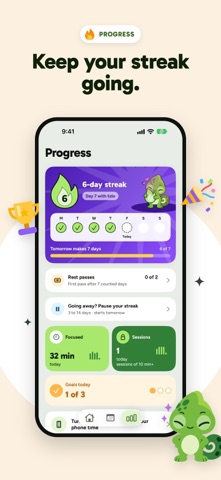
LOOK BACK AT YOUR SESSIONS Progress brings together your session history, streaks and weekly recap. Add widgets and follow an active session with Live Activities. Recorded session time is not a measure of attention or work completed.
SCREEN TIME PRIVACY Apple draws the exact minutes. lizlo keeps only rough totals on this iPhone. lizlo doesn't upload Screen Time usage data. Raw usage measurements stay on this iPhone.
START AS A GUEST Focus and local progress work without an account. Accounts are optional and for people aged 14 and up.
BEFORE YOU LOCK IN Emergency Services and Crash Detection are unavailable during a Lock in. Read the in-app safety guidance before starting. You can always end a Lock in yourself with Apple's controls.
Requires an iPhone with iOS 18 or later.
Zo beoordelen mensen de app
Log in om deze app te beoordelen. Eerlijk is wat telt.
Nog geen beoordelingen. Heb je de app geprobeerd? Beoordeel hem als eerste.
Meer apps in Productiviteit
Beste nieuwe apps in Productiviteit van deze week ChickMark: Habit TrackerChickMark is a simple habit tracker for routines, goals, and reminders
 Dayflint: One Thing a DayToo many priorities?
 Snappy Do ItSix connected modes. One traceable journey.
 Fristo CAFMFristo is the app for Fristo CAFM, the facility management software
 UhWhat? Voice NotesCatch the thought before it disappears
- BeginAnywayMorning alarm for hard tasks: set one task, prove you started, build a streak