
MarkdownPaper: Markdown Viewer
Niet geclaimdMarkdownPaper is a Markdown viewer and reader for Mac
Door RENISH BHASKARAN · Hulpprogramma'sWaarom we dit verwachten: Clear value and a careful description make this Markdown viewer a promising pick for Mac readers.





Kort samengevat
MarkdownPaper is a Mac app that displays .md files as typeset pages, with Quick Look previews in Finder and a mdpaper command for Terminal. It suits anyone who reads READMEs, notes, or plans written by AI coding tools. One notable feature is that it updates the page live when another app or AI tool changes the file.
Samenvatting door Debuts, gebaseerd op de vermelding in de App Store.Over deze app
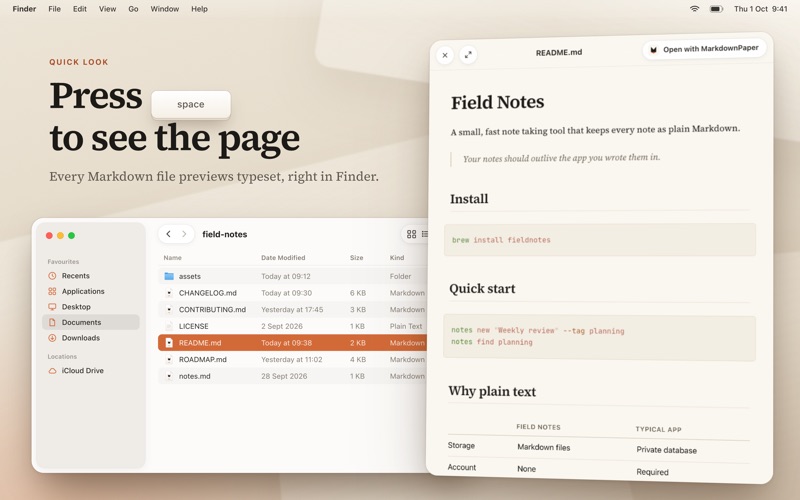
MarkdownPaper is a Markdown viewer and reader for Mac. Double click any .md file, or select it in Finder and press Space, and read it as a clean, typeset page, like a finished document rather than code.
Markdown is everywhere now. READMEs, meeting notes, project plans, and the plans and reports your AI tools write all arrive as .md files. Most apps show them as raw text full of symbols, or squeeze a Markdown preview into a small pane beside the code. MarkdownPaper is a Markdown file viewer that gives the finished document the whole window. It is a README viewer for every repository on your Mac, and a calm place to read the plans, specs and reports AI coding agents leave behind.
RIGHT IN FINDER
• Quick Look Markdown preview: select any .md file and press Space to see it typeset, without opening an app. • Double click to open. MarkdownPaper offers to become your default app for Markdown, so every .md file opens as a page. • Live updates: when another app or an AI coding tool changes the file, the page follows. Rename or move the file and your library keeps up. • From Terminal too: the free mdpaper command opens a file in MarkdownPaper, handy right after an AI coding agent writes a plan.
A PAGE WORTH READING
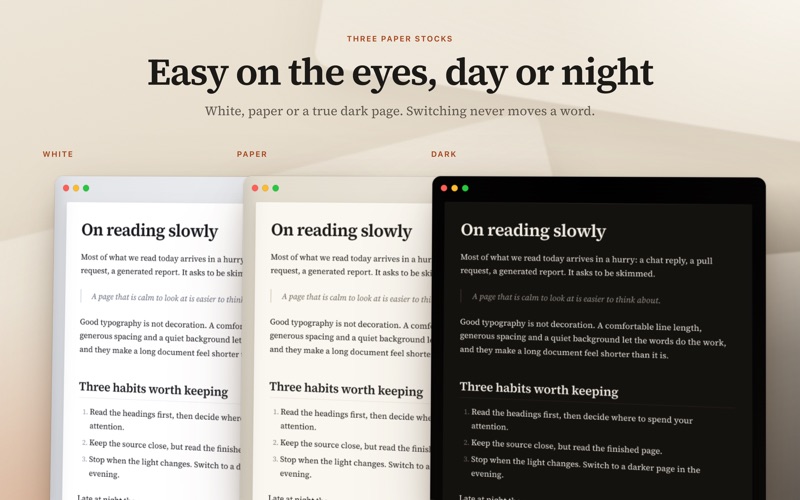
• A comfortable line length, real typography and a calm layout. • Everything renders: tables, task lists, footnotes, callouts, math and Mermaid diagrams. • Code blocks with highlighting, file names and marked lines. Copying a terminal session takes only the commands. • Images stored beside a README appear on the page. • Expand any image or diagram to fill the window. • Three paper styles: white, warm paper and a true dark mode. • Set the page width by dragging its edges, and choose your text size.
FIND YOUR WAY
• Find with Command-F: every match is marked on the page and listed by section. • A contents list in the margin of long documents. Point at the left edge to jump to any section. • Open a whole folder of notes or docs at once.
EDIT WHEN YOU NEED TO
• A focused Markdown editor, or the source beside a live preview. Changes save back to your file. • Tick a task box on the page and the file updates. • The controls stay out of the way and fade while you read.
SHARE AND EXPORT
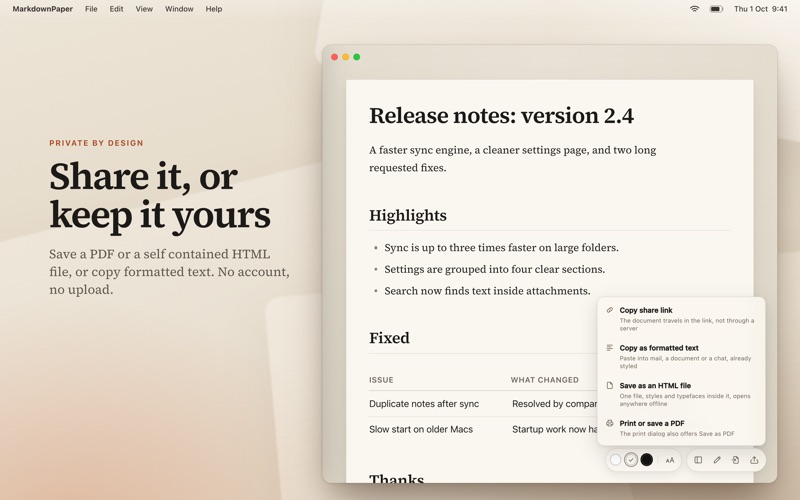
• Save as PDF: print with proper page margins, or save a PDF from the print dialog. • Save as HTML: one self contained file with its styles and fonts inside, that opens anywhere, even offline. • Copy as formatted text: paste into documents, email or chat with headings, lists and tables intact. • Copy a share link: for shorter documents, the whole document travels inside the link, not through a server, and opens in any web browser.
Zo beoordelen mensen de app
Log in om deze app te beoordelen. Eerlijk is wat telt.
Nog geen beoordelingen. Heb je de app geprobeerd? Beoordeel hem als eerste.
Meer apps in Hulpprogramma's
Beste nieuwe apps in Hulpprogramma's van deze week Vodoalarm: vodostaji BiHVodoalarm javlja kad tvoja rijeka naglo raste, pa ne moraš stalno gledati vodostaje
 Letter Explainer: PostklarGot an official letter and only understand half of it?
 NadhirNadhir is an independent app
 Rokey: Romanian KeyboardType Romanian without worrying about diacritics
 Vibe Island: AI Agent MonitorVibe Island is a command center for the AI coding agents running on your Mac
 Private AuthenticatorPrivate Authenticator keeps your two-factor authentication codes on your own Apple…