
MW PDF Reader
Niet geclaimdPDF Reader is one simple, modern place to read your documents and keep them organised
Door Mount-Wolf for information technology · ProductiviteitWaarom we dit verwachten: Clear value and thorough features make this a promising reader for people who manage many documents.




Over deze app
PDF Reader is one simple, modern place to read your documents and keep them organised. It opens PDFs, documents, spreadsheets and text files on your iPhone and in the folders you add from iCloud Drive and other storage apps – and it works like the file manager you already know.
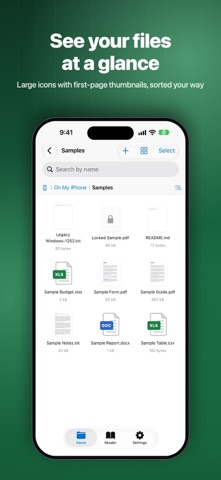
A FILE MANAGER THAT FEELS FAMILIAR • Folder tree with expand and collapse, a tappable path bar and Back/Up navigation • Details, List and Large-icon views; sort by name, date, size or type; folders first; group by type • Rename, move, copy, duplicate, delete, new folder, Get Info; select many items at once • Same-name clashes ask Keep Both, Replace or Skip; drag and drop between folders • Recycle Bin: restore what you deleted, or let it empty itself after the days you choose • Pin favourite folders and files to Quick Access; see recent files and what you're reading • Add folders from iCloud Drive and other cloud storage apps, USB drives and servers; files open where they are and download when needed • Search files by name in a folder or everywhere, and from iPhone Search
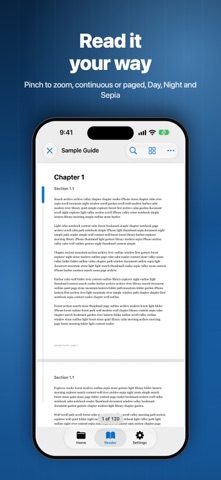
A READER BUILT FOR LONG DOCUMENTS • Smooth zoom with pinch and double tap; two-finger pan; continuous, single-page, two-page and horizontal modes • A scrubber on the edge to fly through hundreds of pages • Fast search with highlighted matches, a results list and Go to page • Thumbnails, table of contents and bookmarks • Day, Night and Sepia page themes, in-reader brightness, keep the screen awake while reading • Tap once to hide the toolbar and read full screen • Highlight, underline, strike through and add notes, saved into the PDF only when you tap Save • Fill in forms, open password-protected PDFs, print, share or open in another app • Picks up exactly where you left off, even after you rename or move the file
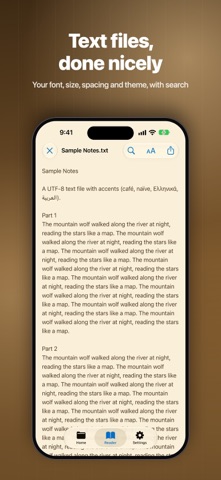
DOCUMENTS, SPREADSHEETS AND TEXT • Documents (.docx, .doc) and spreadsheets (.xlsx, .xls, .csv) open in a clean preview with zoom and sheet tabs • Text files (.txt, .md, .log) open in a native reader with your font, size, spacing and theme, automatic encoding detection and in-text search
OPEN FROM ANYWHERE Share or Open in PDF Reader from Mail, Safari, Files, Books and other apps, or AirDrop a file; it lands in Imported and opens right away. Your documents also appear in the Files app and in Finder on a Mac.
MAKE IT YOURS Seven app icons, four folder styles, three file icon styles, eight accent colours, light or dark appearance, and the order of your Home screen.
PRIVATE BY DESIGN No account, no ads, no subscription, no tracking, no analytics. PDF Reader collects no data – your files, reading positions and settings stay on your iPhone or in the folders you choose.
Supported files: PDF, DOCX, DOC, XLSX, XLS, CSV, TXT, MD and LOG.
Zo beoordelen mensen de app
Log in om deze app te beoordelen. Eerlijk is wat telt.
Nog geen beoordelingen. Heb je de app geprobeerd? Beoordeel hem als eerste.
Meer apps in Productiviteit
Beste nieuwe apps in Productiviteit van deze week ChickMark: Habit TrackerChickMark is a simple habit tracker for routines, goals, and reminders
 Dayflint: One Thing a DayToo many priorities?
 Snappy Do ItSix connected modes. One traceable journey.
 Fristo CAFMFristo is the app for Fristo CAFM, the facility management software
 UhWhat? Voice NotesCatch the thought before it disappears
- BeginAnywayMorning alarm for hard tasks: set one task, prove you started, build a streak