
Nom: Screenshot & File Cleaner
Niet geclaimdScreenshots, downloaded files, images apps saved — they pile up
Door Younghwa Kim · Hulpprogramma's


Kort samengevat
Nom is a utility app for clearing screenshots, downloaded files, and app-saved images from a phone. Items it "eats" stay in a holding list until the user digests them, and only Digest deletes them. One detail stands out: photos are never sent off the device, and no account or sign-in is needed.
Samenvatting door Debuts, gebaseerd op de vermelding in de App Store.Over deze app
Screenshots, downloaded files, images apps saved — they pile up. Nom eats them.
Nom is a yellow blob. No expression, no nagging, no streaks to keep. Just hungry.
Feeding is not deleting • What Nom eats sits in its belly. Have it spat back out any time — after 7 days Nom asks whether to digest. • Only Digest deletes for real. Photos then stay in Recently Deleted for another 30 days. • Files stay in the folder when fed; they only leave Nom’s list. Only “Digest” deletes them. • Files have no Recently Deleted, so Nom lists them by name and asks once more.
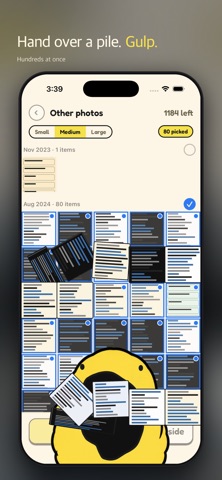
Picking • Every screenshot you have left, laid out like the Photos app. Tap the ones you don't need. • Tap a month to take the whole month, then tap back whatever you want to keep. • Pinch for 3, 5 or 8 across. Press and hold to see one large and flip through them. • Favourites and anything from the last 24 hours never show up. Photos with a location, Live Photos and portraits are kept out of Other photos too.
What it eats • Screenshots • Other photos — not screenshots, and not ones that look camera-taken. App-saved images land here • Videos and screen recordings — biggest first, press and hold to play one • PDFs and zips in your Downloads folder
Keeping something? Set it aside • Tap Set aside and Nom leaves it alone. • Send them to a Photos album later, all at once. The photo stays where it is — only the album is new.
No subscription. Clear 50 free every day, and 50 more each time you watch an ad. Settings keeps a running total of what you've freed.
Photos never leave your phone. No account, no sign-in.
Zo beoordelen mensen de app
Log in om deze app te beoordelen. Eerlijk is wat telt.
Nog geen beoordelingen. Heb je de app geprobeerd? Beoordeel hem als eerste.
Meer apps in Hulpprogramma's
Beste nieuwe apps in Hulpprogramma's van deze week Drainly: Speaker CleanerMuffled speaker after a splash, rain, or a sweaty workout?
 Photo & PDF Resize: KBFile too large to upload?
 Arvectum Proxy LauncherArvectum Proxy Launcher is a network utility that routes your iPhone through a proxy you…
 Vodoalarm: vodostaji BiHVodoalarm javlja kad tvoja rijeka naglo raste, pa ne moraš stalno gledati vodostaje
 Dusty: Photo Cleaner PetYour camera roll's new pet
 FairAuth: AuthenticatorFairAuth creates the codes for two-step verification on iPhone and iPad