
PDF Editor: Edit & Change Text
Niet geclaimdPDF Editor lets you change the words in any PDF, fill in printed forms, sign, annotate…
Door TechCreative Lab LLC · Productiviteit


Kort samengevat
PDF Editor: Edit & Change Text lets people change the words in a PDF, fill in printed forms, sign, annotate and share, all on the iPhone or iPad without an account or uploads. It suits anyone who handles real documents such as forms, scans and password-protected files. Everything runs on the device, and the original file is never overwritten.
Samenvatting door Debuts, gebaseerd op de vermelding in de App Store.Over deze app
PDF Editor lets you change the words in any PDF, fill in printed forms, sign, annotate and share, right on your iPhone or iPad. No account, no upload, no ads. Your documents never leave your device.
EDIT PDF TEXT Tap any line of text to change it. PDF Editor reads the original font, size and colour and matches them, so your edit looks like it was always there. Add new text boxes anywhere, move and resize them, and choose font, size, colour, bold, italic and alignment.
FILL FORMS IN SECONDS Smart Fill finds the blanks, boxes and checkboxes on printed forms, even when the PDF has no real form fields. Tap a field, type, and jump to the next one. Tick checkboxes with a single tap.
SIGN ANY DOCUMENT Draw your signature with your finger or Apple Pencil, type it, or import an image. Signatures are saved on your device for reuse, and placed with a transparent background so they sit naturally on the page.
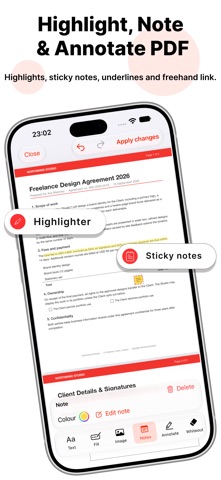
ANNOTATE AND MARK UP Highlight, underline and strike through text. Draw freehand with adjustable colour and width. Add sticky notes, rectangles, ellipses, lines and arrows.
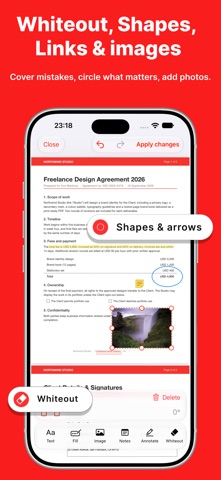
WHITEOUT AND CLEAN UP Cover anything with a whiteout rectangle in white or any colour you pick. When you export, the covered content is flattened into the page.
IMAGES AND LINKS Insert photos from your library or files, then move, resize and rotate them. Add clickable web links or jump-to-page links to any area of a document.
EDITS STAY LIVE Every change stays editable until you tap Apply changes. Undo and redo anything. If the app closes unexpectedly, your session is restored exactly where you left it.
EXPORT AND SHARE Apply changes creates a new PDF that keeps vector text, page sizes, rotation and links intact. Share it to Mail, Messages, Files, AirDrop or any other app. The original file is never overwritten.
BUILT FOR REAL DOCUMENTS • Password-protected PDFs • Rotated pages and mixed page sizes • Long documents, rendered page by page • Scanned PDFs (annotate, sign, whiteout and add text) • Dark Mode, Dynamic Type and VoiceOver • iPad pointer support and keyboard shortcuts • Available in 38 languages
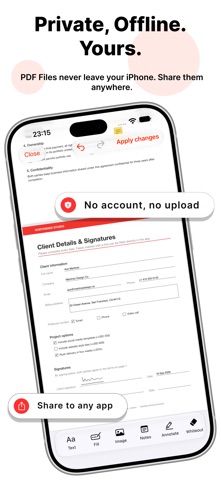
PRIVATE BY DESIGN Everything happens on your device. PDF Editor never uploads your documents, file names or images anywhere.
FREE AND PREMIUM PDF Editor is free to use with every tool included. Premium unlocks unlimited exports without a watermark, unlimited Smart Fill fields, a signature library and documents of any length. Premium is available as a weekly, monthly or yearly subscription, or as a one-time lifetime purchase.
Zo beoordelen mensen de app
Log in om deze app te beoordelen. Eerlijk is wat telt.
Nog geen beoordelingen. Heb je de app geprobeerd? Beoordeel hem als eerste.
Meer apps in Productiviteit
Beste nieuwe apps in Productiviteit van deze week ChickMark: Habit TrackerChickMark is a simple habit tracker for routines, goals, and reminders
 Dayflint: One Thing a DayToo many priorities?
 Snappy Do ItSix connected modes. One traceable journey.
 Fristo CAFMFristo is the app for Fristo CAFM, the facility management software
 UhWhat? Voice NotesCatch the thought before it disappears
- BeginAnywayMorning alarm for hard tasks: set one task, prove you started, build a streak