
PocketAnthem: AI Song Maker
Niet geclaimdPocketAnthem turns a sentence, a photo or your own lyrics into a complete song, melody…
Door Vincent GOURBIN · Muziek en audioWaarom we dit verwachten: A thoughtful on-device song maker with clear value, strong privacy appeal and a detailed, well-explained feature set.



Kort samengevat
PocketAnthem: AI Song Maker turns a sentence, a photo, a hummed tune or your own lyrics into a complete song with melody, chords, vocals and accompaniment, generated on the device with no account or server. It is aimed at people who want to start a song from almost any input and then revise it step by step. One notable detail is the workshop, which keeps a melody and changes the style, lyrics or tempo while grouping each version from original to latest.
Samenvatting door Debuts, gebaseerd op de vermelding in de App Store.Over deze app
PocketAnthem turns a sentence, a photo or your own lyrics into a complete song, melody, chords, vocals and accompaniment, generated on your iPhone, iPad or Mac. No server, no account: everything happens on the device.
START WITH A SOUND, A PHOTO OR WORDS • One gesture to begin, then the app guides you step by step: what you bring, the style, then the proposal. • Hum, sing or whistle a tune: it becomes the score of the whole song. • Import a song or capture music around you: PocketAnthem reads its melody and sings it again in another style (Covers model, downloaded once). Pick the section to cover. • Take a photo and frame it: the place, the light and the mood become the song's subject, and the photo its cover. Lyrics written on the photo can become the song's. • Capture the moment: long-press the icon, Control Center and Lock Screen controls, the Action button, Siri. • A style field that searches dozens of styles and learns your taste, and a mood to pick. • Short, medium or long: the lyrics follow your choice, up to six minutes of song. • Pick the lyrics language, ten languages available. • Apple Intelligence proposes a title, a style, a key, a tempo and lyrics in sections, from a different angle every time and without repeating what you already wrote. You edit everything before anything starts. • Your own lyrics: paste them, add your melody, pick the style; they are kept as they are. • No lyrics: instrumentals, on a proposed or hummed tune. • Three quality levels: Light and Standard ship inside the app, Quality downloads once.
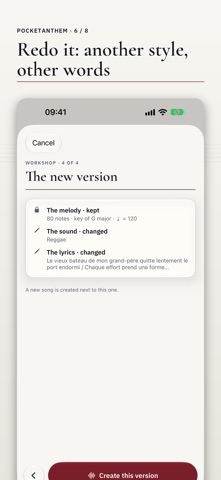
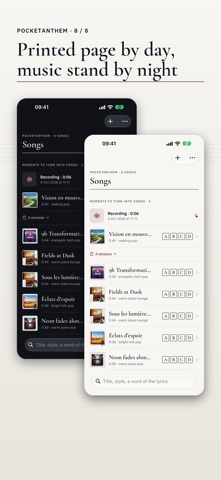
LISTEN, READ, SHARE • The song plays in the app with its waveform: scrub it with a finger, skip ten seconds either way, and playback goes on with the screen locked. • Lyrics follow the voice word by word and the score moves with the music; turn your iPhone to open it as a notebook. • The score shows as notation or guitar tablature, the cursor follows playback, export to PDF or ABC. • A new version in one tap: another take, a variation, redo the rest from a moment (with other words if you wish), a longer version if the song was cut, or a higher quality level. • The workshop: keep the melody and change the rest, step by step — another style, other lyrics, another tempo, the instrumental version, or lyrics on an instrumental. Each version is a new song; they stay grouped, from the original to the latest. • A library to listen from the list, love with a heart, tag, filter and make playlists, some of which make themselves. • Find your songs by title, style, a word of the lyrics, or by meaning. • Share the audio from the song page.
WHILE IT GENERATES • Four readable stages, plan, semantics, synthesis, decoding, each with its progress. • Follow along from the Lock Screen and the Dynamic Island. • A generation takes a few minutes (about 4–5 minutes for 30 seconds on iPhone 15 Pro Max). Stay in the app during the synthesis: iOS keeps the GPU for the app in front; if you leave, the synthesis resumes at the next step when you come back.
EVERYTHING STAYS WITH YOU • No account, no upload, no tracking. The song model ships inside the app, which works offline right after install; recordings and photos stay on the device. • Every export carries a machine-readable "made with AI" marker.
PocketAnthem embeds the YuE2 models by Multimodal Art Projection (CC BY-NC 4.0 with individual creator permission): personal users and musicians may publish and monetize the songs they make; companies need a licence from the model authors. Details in Settings › Terms & licences.
Requires an iPhone 15 Pro or later, an iPad with M1 or later, or a Mac with Apple silicon, and about 3.5 GB of free space (3.8 GB more for the Quality level, 1.5 GB for covers). Apple Intelligence is needed for proposals and cover art; without it, songs are written by hand.
Zo beoordelen mensen de app
Log in om deze app te beoordelen. Eerlijk is wat telt.
Nog geen beoordelingen. Heb je de app geprobeerd? Beoordeel hem als eerste.
Meer apps in Muziek en audio
Beste nieuwe apps in Muziek en audio van deze week KlingKlang – Control de AudioKlingKlang reúne todas las salas de tu sistema Sonos en una sola pantalla
 BANANA-1One banana
 Acord: Guitar Tuner, MetronomeAcord is a precise tuner and metronome for every musician
 MonandaegMōnandæg is two field recorders that cannot leave anything alone
 Yul — Gugak Tuner & JangdanA tuner and rhythm trainer built for Korean traditional instruments
 MusiquitosMusiquitos es una app de música para niños con treinta canciones para cantar, bailar y…