
SiestaTime - Keep PC Awake
Niet geclaimdYour computer has a terrible habit: the moment you step away, it nods off, dims the…
Door Jan David · Hulpprogramma'sWaarom we dit verwachten: Clear, playful pitch solves a real everyday annoyance without installing anything on the computer.


Kort samengevat
SiestaTime - Keep PC Awake is a utilities app that stops a computer from sleeping or dimming by having the phone nudge the cursor. It works either as a Bluetooth mouse that moves the cursor and returns it to its place, or by placing a computer mouse on the phone screen. It suits people running long downloads, renders, or remote sessions. It stands out for needing no software on the computer and offering a one-time purchase.
Samenvatting door Debuts, gebaseerd op de vermelding in de App Store.Over deze app
Your computer has a terrible habit: the moment you step away, it nods off, dims the screen and tells the whole world you've gone missing. Meanwhile you're just getting a coffee. Or thinking deeply. With your eyes closed.
SiestaTime fixes that. Your phone gently nudges the mouse cursor every now and then, so your computer stays wide awake while you enjoy a well-deserved siesta.
No software on the computer. No admin rights. No suspicious USB gadgets. Just your phone.
TWO WAYS TO STAY AWAKE
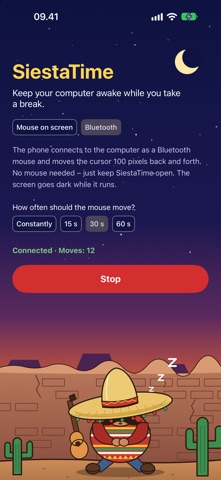
BLUETOOTH MOUSE (recommended) Your phone pairs with the computer as an ordinary Bluetooth mouse and glides the cursor smoothly back and forth – then puts it right back where it was. Pair once, and SiestaTime reconnects by itself next time. Just keep SiestaTime open – the screen goes dark while it works. Works with Windows, Mac and Linux.
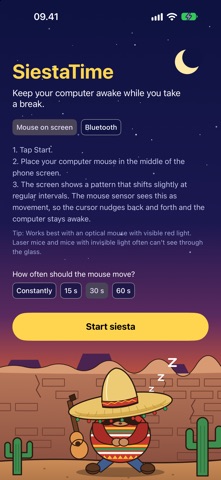
MOUSE ON SCREEN Old school, but charming. Put your computer mouse on top of the phone. SiestaTime shows a moving high-contrast pattern, the mouse sensor thinks it's being moved, and the cursor wiggles. Choose between fine, medium, coarse and striped patterns. Works best with optical mice that have a visible red light.
WHAT YOU GET • Choose how often the cursor moves: constantly, or every 15, 30 or 60 seconds • Smooth, gentle movements – the cursor always returns to its starting point • No internet access, no ads, no tracking, no account • One-time purchase – no subscription. A siesta should never come with a monthly fee • Available in 26 languages
PERFECT FOR • Long downloads, renders, backups and builds that die when the computer sleeps • Presentations and dashboards that must stay on screen • Remote desktops and sessions that log you out after a few idle minutes • Lunch breaks that turned into "lunch breaks" • Anyone who is tired of wiggling the mouse every five minutes
The sombrero is included. The nap is up to you.
Please follow your workplace's rules for computer use. SiestaTime keeps your computer awake – not your boss asleep.
Zo beoordelen mensen de app
Log in om deze app te beoordelen. Eerlijk is wat telt.
Nog geen beoordelingen. Heb je de app geprobeerd? Beoordeel hem als eerste.
Meer apps in Hulpprogramma's
Beste nieuwe apps in Hulpprogramma's van deze week Drainly: Speaker CleanerMuffled speaker after a splash, rain, or a sweaty workout?
 Photo & PDF Resize: KBFile too large to upload?
 Arvectum Proxy LauncherArvectum Proxy Launcher is a network utility that routes your iPhone through a proxy you…
 Look Twice: Scam & AI CheckLook twice before you click
 Vodoalarm: vodostaji BiHVodoalarm javlja kad tvoja rijeka naglo raste, pa ne moraš stalno gledati vodostaje
 Ham Radio IQHam Radio IQ answers one question: which band is open right now, from where you are, and…