
slassh: SSH Terminal
Niet geclaimdslassh is an SSH terminal for iPhone and iPad that does one thing properly: it puts you…
Door Ernest Martinus van der Linden · Hulpprogramma'sWaarom we dit verwachten: Clear value for SSH users, with on-device keys, private connections, and a thorough description and screenshots.




Kort samengevat
slassh: SSH Terminal is an SSH client for iPhone and iPad that connects directly from the device to the user's own servers, with no intermediary servers, accounts or analytics. It suits people who run vim, tmux or htop on remote machines and want full-colour terminal output, tabs and on-device key generation. One thing that stands out is that the private key is generated on the device and cannot be moved to another device.
Samenvatting door Debuts, gebaseerd op de vermelding in de App Store.Over deze app
slassh is an SSH terminal for iPhone and iPad that does one thing properly: it puts you at a prompt on your own machines.
It connects directly from your device to your server. There is no relay, no account to create, no analytics and no crash reporter — slassh has no servers of its own, so there is nothing in the middle to see your session, go down, or ask you to subscribe.
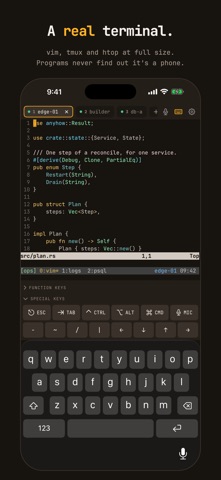
A REAL TERMINAL • vim, tmux, htop, less and journalctl run at full size, in full colour, with bold, italic and underline. • Full-screen programs get the mouse and scroll events they expect; a plain shell keeps up to 50,000 lines of scrollback. • JetBrains Mono, with a Nerd Font for powerline prompts and icons. • Several sessions at once in tabs, switched with a tap or ⌘1–⌘9.
KEYS DONE RIGHT • Generate an ed25519 key on the device — the private half never leaves it. • Install it on a server in one step: slassh logs in once with your password and adds the key to authorized_keys for you. • Keys live in the iOS Keychain, can never be moved to another device, and can require Face ID or Touch ID. • Import existing OpenSSH, PKCS#8 and PEM keys, passphrase-protected or not. • Host keys are pinned on first use; a changed key stops the connection instead of warning and carrying on.
BRING YOUR ~/.ssh ACROSS Point slassh at your laptop and it reads your ssh config over SSH — hosts, Include files, Match blocks and the keys they use — then shows you everything before saving a thing.
BUILT FOR THE KEYBOARD, AND FOR NO KEYBOARD • With a hardware keyboard, every screen works without touching it, and Ctrl, Alt and the arrows reach the shell untouched. • Without one, a row of extra keys puts Esc, Tab, Ctrl, Alt, the arrows and F1–F24 under your thumb. Tap Ctrl twice to lock it.
DICTATION THAT STAYS ON THE DEVICE On iOS 26, say a command instead of typing it. Speech is transcribed on the device, and nothing reaches the shell until you have read it — or, in the experimental hands-free mode, until you stop talking.
HONEST ABOUT WHAT IT ISN’T slassh is a terminal and only a terminal: no file transfer, no port forwarding, no ProxyJump, no mosh. iOS pauses apps in the background, so a session left for more than about half a minute may drop — slassh reconnects when you come back, and tmux on the server keeps your work across drops.
One price, once. No subscription, no in-app purchases, nothing collected.
Zo beoordelen mensen de app
Log in om deze app te beoordelen. Eerlijk is wat telt.
Nog geen beoordelingen. Heb je de app geprobeerd? Beoordeel hem als eerste.
Meer apps in Hulpprogramma's
Beste nieuwe apps in Hulpprogramma's van deze week Drainly: Speaker CleanerMuffled speaker after a splash, rain, or a sweaty workout?
 Photo & PDF Resize: KBFile too large to upload?
 Arvectum Proxy LauncherArvectum Proxy Launcher is a network utility that routes your iPhone through a proxy you…
 Look Twice: Scam & AI CheckLook twice before you click
 Vodoalarm: vodostaji BiHVodoalarm javlja kad tvoja rijeka naglo raste, pa ne moraš stalno gledati vodostaje
 Ham Radio IQHam Radio IQ answers one question: which band is open right now, from where you are, and…