
Spektre: sing & hear
Niet geclaimdSpektre puts your own voice back in your headphones with as little delay as your…
Door Nargiza Nogoeva · Muziek en audioWaarom we dit verwachten: The description is precise and honest about latency, pitch feedback, and hardware limits, making its value to singers very clear.


Kort samengevat
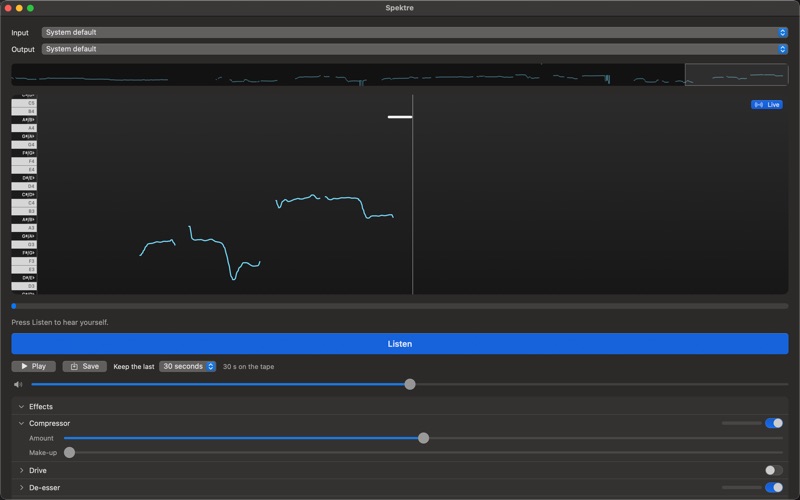
Spektre is a Mac app that sends your microphone straight to your headphones with as little delay as your hardware allows, and draws your pitch on a piano keyboard as you sing. It suits singers and practicers who want to check their pitch and replay takes. It also offers five live effects and a recording tape that keeps the last 30 seconds. Wait, I need to correct that: the store text does not say Mac-only in those words, though it mentions macOS. Here is the corrected summary: Spektre is a macOS app that sends your microphone straight to your headphones with as little delay as your hardware al
Samenvatting door Debuts, gebaseerd op de vermelding in de App Store.Over deze app
Spektre puts your own voice back in your headphones with as little delay as your hardware allows, and draws every note you sing while you sing it.
Press Listen and your microphone goes straight to your headphones. Nothing is added on the way in, so what reaches your ears is what you just sang — not a processed copy of it arriving late.
SEE THE NOTE YOU ARE ON Your pitch is drawn in real time next to a piano keyboard, so you can see whether you landed on the note or slid past it. Click any key to hear that note played back, then match it. Scroll back through the whole take to find the phrase that went wrong.
HEAR THE TAKE BACK The tape keeps what you just sang, even after you stop. Play it, scrub to any moment, and save it to disk as M4A or WAV.
FIVE EFFECTS, LIVE Compressor, Drive, De-esser, Chorus and Reverb. Each one is computed inside the same real-time block as the passthrough, so switching one on shapes your voice without pushing it further away from you. Turn any of them on or off mid-phrase — the change is faded in, never clicked in.
YOUR DEVICES, YOUR CHOICE Pick the input and the output separately: a USB microphone into wired headphones, the built-in microphone into an interface, whatever you own. Leave either one on System default and Spektre follows macOS when the default moves. Plug a device in or pull it out mid-take and the passthrough rebuilds itself around what is there now.
Spektre also tells you when the hardware is the problem: Bluetooth headphones delay your voice by about a tenth of a second, and a Bluetooth headset microphone can only send telephone-quality sound. Wired or USB gear removes both.
PRO The tape keeps the last 30 seconds for everyone. Pro is a one-time purchase that stretches it to 1, 3, 10 or 30 minutes, so a whole practice session stays there to listen back to.
WHAT YOU NEED Wired or USB headphones — anything else adds delay that no software can take back. Microphone access, which macOS will ask you for the first time you press Listen.
Zo beoordelen mensen de app
Log in om deze app te beoordelen. Eerlijk is wat telt.
Nog geen beoordelingen. Heb je de app geprobeerd? Beoordeel hem als eerste.
Meer apps in Muziek en audio
Beste nieuwe apps in Muziek en audio van deze week KlingKlang – Control de AudioKlingKlang reúne todas las salas de tu sistema Sonos en una sola pantalla
 CalabiCalabi is a music toy you can see
 Fingertip Player: Feel MusicClose your eyes
 BANANA-1One banana
 Acord: Guitar Tuner, MetronomeAcord is a precise tuner and metronome for every musician
 MonandaegMōnandæg is two field recorders that cannot leave anything alone