
UseBudget – Marolya
Niet geclaimdTake back control of your money — without ever handing over your bank login
Door Nicolas BERGER · FinanciënWaarom we dit verwachten: A privacy-first budgeting app with clear value, rich features, and a free download that suits people who like trying new apps.




Kort samengevat
UseBudget, Marolya is a finance app that never connects to your bank: you import your own statements (OFX, QFX or CSV), and it sorts them and shows your expected balance at month end. It suits people who want budgeting, envelopes and forecasts without sharing bank logins. It stands out for multi-currency accounts converted at the ECB reference rate.
Samenvatting door Debuts, gebaseerd op de vermelding in de App Store.Over deze app
Take back control of your money — without ever handing over your bank login.
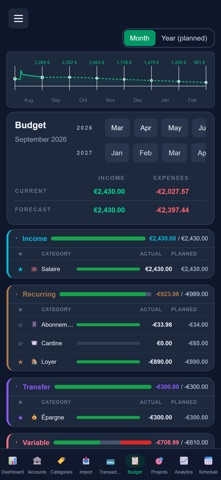
UseBudget never connects to your bank: you import your own statements (OFX, QFX, CSV), the app sorts them and shows what you will have left at the end of the month.
NEW • Multi-currency: an account in the US, another in the UK? Each account in its own currency, your totals converted at the ECB reference rate, and cross-currency transfers at the amount actually received. • Demo without an account: try the app on sample data, without giving your email. • Statement reconciliation, CSV export, yearly budget view, calculations right in amount fields (12+8.50). • Overspend alerts and a weekly email summary, monthly PDF report: each with its own switch, nothing on by default.
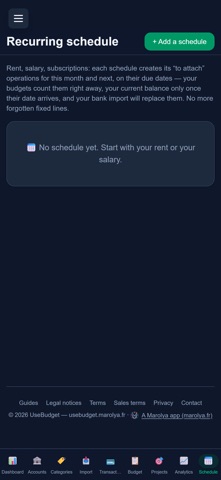
WHAT YOU CAN DO • Import your statements in seconds, duplicates detected automatically. • Categorise automatically with rules (keyword, amount) — and,, from the history of your choices. • Budget with envelopes: income, fixed costs, variable spending, extras. • Look ahead: your forecast balance at month end, and over 3, 6 or 12 months. • Split a receipt across categories, attach a planned expense to the statement line. • Track savings projects and prepare recurring payments (rent, salary, subscriptions).
YOUR ACCOUNT One Marolya account gives you access to UseBudget and to the other apps in the Marolya family. Sign-in happens on marolya.fr, the app's publisher. Your UseBudget data stays in UseBudget.
YOUR DATA In the iPhone app, an optional Face ID lock protects access to your data. Hosted in Europe. No advertising. No data resale. You can erase your UseBudget data at any time from the app. Deleting your ENTIRE Marolya account — the login and the other apps — is done on marolya.fr. Your data is not kept forever: after a year without visiting, you are notified by email, reminded two days before the deadline, then it is erased. Signing in is enough to cancel everything.
TERMS Terms of Use (EULA): https://www.apple.com/legal/internet-services/itunes/dev/stdeula/ Terms of service: https://usebudget.marolya.fr/cgu · Terms of sale: https://usebudget.marolya.fr/cgv
Marolya — RCS 824 330 054 Angers (France)
Zo beoordelen mensen de app
Log in om deze app te beoordelen. Eerlijk is wat telt.
Nog geen beoordelingen. Heb je de app geprobeerd? Beoordeel hem als eerste.
Meer apps in Financiën
Beste nieuwe apps in Financiën van deze week NjukiYour rent should do more than pay for where you live
 Qwiky AIQuiky AI helps you understand and organise your everyday finances in one clear place
 Inflation WatchInflation Watch turns official price data into plain English
 uOwe: Split Bills & BudgetuOwe keeps shared costs fair and your own money clear
 Debtless: Debt-Free by WhenYou are about to know when you will be free
 Pace: Daily Budget & SpendPace turns your monthly budget into one calm number: what you can spend today