
Workspace Manager: Switch Apps
Niet geclaimdOrganize your Mac around the different parts of your life
Door MARIO DIRR · ProductiviteitWaarom we dit verwachten: A clearly written listing with a strong, specific value for Mac users who juggle work and personal apps.



Over deze app
Organize your Mac around the different parts of your life.
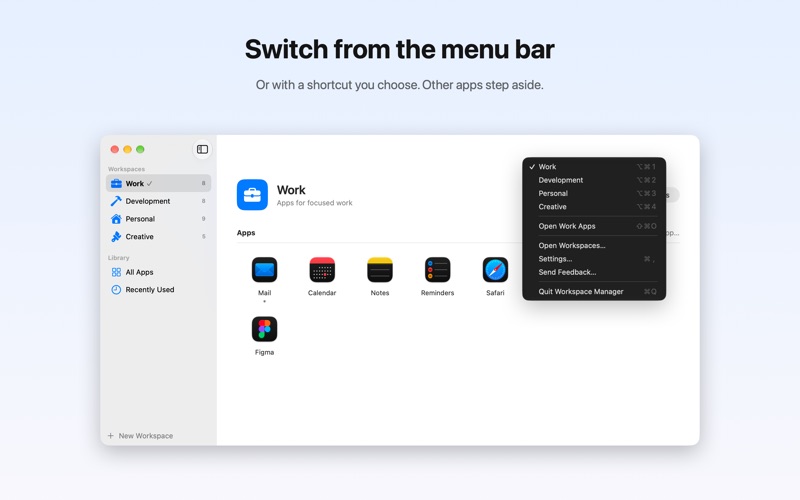
Workspace Manager groups your apps into workspaces such as Work, Personal or Development. Switching takes one click in the menu bar or one keyboard shortcut, and your Mac changes with it.
SWITCH, DON'T SEARCH • Apps from other workspaces are hidden, not quit. Nothing is lost, and they come back when you switch back. • The apps of the new workspace come forward, starting with the one you used last. • Open every app of a workspace in one step when you start your day.
WINDOWS WHERE YOU WANT THEM • Choose a position for each app on any of your displays: draw it freely or pick halves, quarters, thirds or full screen. • Or arrange your windows by hand and save the whole layout at once. • Workspace Manager puts them back in place when it opens the apps or when you switch.
MADE FOR THE MAC • A quick switcher in the menu bar, with the active workspace always visible. • Keyboard shortcuts you can set yourself, working from any app. • Connect a Focus: turn on your Work Focus and Workspace Manager switches along. A Shortcuts action is included too. • Drag apps in from the Finder or the app library, rename workspaces in place, pick an SF Symbol as their icon. • Light and Dark Mode, full keyboard control, VoiceOver labels.
TRY IT FREE Everything is unlocked for 3 days. After that, a one-time purchase unlocks the full version for good. No subscription. Creating and organizing workspaces is always free.
PRIVATE BY DESIGN No account, no tracking, no network access at all. Your workspaces stay on your Mac.
Window positions use a small helper script that you install once from within the app. It only moves the front window of the apps you set up and can be deleted at any time.
Zo beoordelen mensen de app
Log in om deze app te beoordelen. Eerlijk is wat telt.
Nog geen beoordelingen. Heb je de app geprobeerd? Beoordeel hem als eerste.
Meer apps in Productiviteit
Beste nieuwe apps in Productiviteit van deze week ChickMark: Habit TrackerChickMark is a simple habit tracker for routines, goals, and reminders
 Dayflint: One Thing a DayToo many priorities?
 Fristo CAFMFristo is the app for Fristo CAFM, the facility management software
- BeginAnywayMorning alarm for hard tasks: set one task, prove you started, build a streak
 DHUDEDHUDE Analityxs es la herramienta de gestión diaria para grupos de restauración y ocio…
 Fillerless: Teleprompter CoachFillerless is a teleprompter that follows your voice and then tells you how you spoke