
Backup & Restore - Text Export
NieodebranaKeep the things a phone forgets: a conversation you want on paper, and a calendar you…
Twórca: Ngoc Son Tran · Produktywność


W skrócie
Backup & Restore - Text Export rebuilds conversations from screenshots you pick and exports calendars to .ics, JSON or CSV, with text recognition running on the device. It suits people who want a paper or file copy of chats or calendar events. It stands out for needing no account, no servers and no data collection.
Podsumowanie Debuts na podstawie karty aplikacji w App Store.O aplikacji
Keep the things a phone forgets: a conversation you want on paper, and a calendar you would hate to lose.
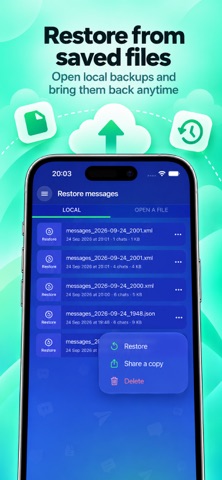
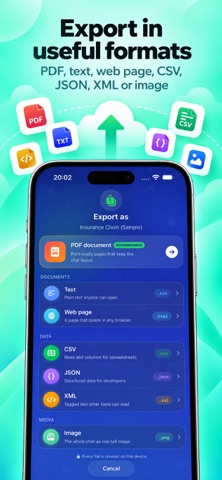
WHAT IT DOES - Rebuild a conversation from screenshots you choose, entirely on this device - Tidy it up — move a line to the other side, hide anything private - Save it as PDF, plain text, CSV, JSON, XML, a web page or one long image - Keep an archive of your conversations and bring it back later - Copy your calendar to a standard .ics file, or to JSON or CSV - Add events back from a file, into the calendar you choose - Duplicates can be skipped automatically, so nothing is added twice
HANDY EXTRAS - Spot duplicate events and unusually long ones - Print a clean agenda of what is coming up - Gentle reminders so a fresh copy is never far away - Files show up in the Files app, ready to share to iCloud Drive or email
PRIVATE BY DESIGN Text recognition runs on this device using Apple's own framework. No account, no sign-in, no servers, no tracking, and no data collected. Calendar access is the only permission requested, and only when you use a calendar feature.
GOOD TO KNOW Conversations are built from screenshots you pick yourself. The app does not read your messaging apps and cannot bring back anything you have deleted. Restoring a conversation returns it to this app's own library.
Subscribe to get unlimited access to all app's features & services: - Your payment will be charged to your iTunes Account as soon as you confirm your purchase. - You can manage your subscriptions and turn off auto-renewal from your Account Settings after the purchase. - Your subscription will renew automatically, unless you turn off auto-renew at least 24 hours before the end of the current period. - The cost of renewal will be charged to your account in the 24 hours prior to the end of the current period. - When canceling a subscription, your subscription will stay active until the end of the period. Auto-renewal will be disabled, but the current subscription will not be refunded. - Any unused portion of a free trial period, if offered, will be forfeited when purchasing a subscription.
Privacy Policy: https://telegra.ph/Privacy-Policy-09-17-146 Term Of Use: https://telegra.ph/Term-Of-Use-09-17
Oceny użytkowników
Zaloguj się, aby ocenić tę aplikację. Liczy się szczerość.
Brak ocen. Znasz tę aplikację? Oceń ją jako pierwszy.
Więcej aplikacji z kategorii Produktywność
Najlepsze nowe aplikacje z kategorii Produktywność w tym tygodniu ChickMark: Habit TrackerChickMark is a simple habit tracker for routines, goals, and reminders
 Dayflint: One Thing a DayToo many priorities?
 Snappy Do ItSix connected modes. One traceable journey.
 Fristo CAFMFristo is the app for Fristo CAFM, the facility management software
 UhWhat? Voice NotesCatch the thought before it disappears
- BeginAnywayMorning alarm for hard tasks: set one task, prove you started, build a streak