
CacheKeep
NieodebranaCacheKeep keeps the receipts, income and tax records for your small or family-run…
Twórca: Big Yeti Games, LLC · FinanseDlaczego tak przewidujemy: CacheKeep offers a clear, well-documented way for small business owners to organize receipts, mileage and tax records.



W skrócie
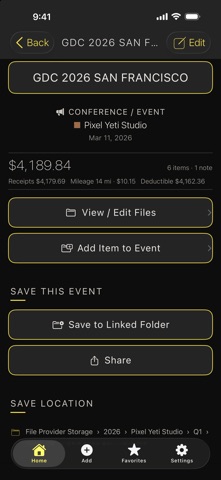
CacheKeep is a finance app that keeps receipts, income and tax records for small or family-run businesses in one place. It lets users capture receipts by scanning, importing or dictating, tracks mileage by GPS, and builds year-end packages for an accountant. Its standout feature is that records stay on the iPhone or in the user's own iCloud, with no account and no tracking.
Podsumowanie Debuts na podstawie karty aplikacji w App Store.O aplikacji
CacheKeep keeps the receipts, income and tax records for your small or family-run businesses in one calm, organized place, so tax time starts with everything already filed.
CAPTURE IT YOUR WAY • Scan a paper receipt with the camera, add a photo from your library, or import a file • CacheKeep reads the text on a scanned receipt to fill in the merchant, date and amount for you to check • Dictate a voice memo or write a note and file it with the expense • Save files to CacheKeep from other apps' share sheet, then file them from the Inbox • Scan a business card, import someone from Contacts, or type them in
FILED WHERE IT BELONGS • Organize by business and event, with each year and quarter kept separate • Mark money in as income so it reports on its own line, and link a refund to the purchase it repays • Split one receipt across two businesses, or move an item to another event • Every category shows the Schedule C line it reports on • Label the card or account you paid with to reconcile against a statement (last four digits only, never a full card number)
MILEAGE, MEASURED • Start a GPS trip when you leave and stop it when you arrive, or enter the miles yourself • Follow a running trip from the Lock Screen and Dynamic Island • Trips are valued at the IRS standard rate for the date they were driven
RECURRING BILLS, REMEMBERED • Set up monthly, quarterly or yearly expenses with an optional reminder • One tap opens a pre-filled expense to check and save. Nothing is ever filed for you automatically
REPORTS AND YEAR END • Quarter and year totals by business and category, with profit and loss and an estimated deduction • Duplicate warnings and a search across events, items, notes and contacts, with filters • Export a spreadsheet, or build a single year-end package with the spreadsheet, a mileage log, a printable summary and every receipt foldered by business and quarter. It opens in any web browser, so your accountant doesn't need the app
YOUR RECORDS STAY YOURS • No account and no sign-in. Records live on your iPhone and, if you turn on sync, in your own private iCloud • Save a copy to a folder you choose in the Files app • Keep a Business Profile for each company, optionally locked with Face ID • Deleted something by mistake? It waits 30 days in Recently Deleted, receipt included • No ads and no tracking. The developer doesn't collect your data
NOT.A.CPA A built-in helper for plain-language questions like "Can I write off meals on a work trip?" It runs entirely on your iPhone with Apple Intelligence, so it's free and your questions never leave your phone. It needs an iPhone that supports Apple Intelligence, with iOS 26 or later and Apple Intelligence turned on. On other iPhones it simply shows that it isn't available, and the rest of CacheKeep works as usual.
CacheKeep is a record-keeping tool. It does not give tax, legal or financial advice. NOT.A.CPA answers and the estimated deduction are general information only, so confirm anything important with a qualified tax professional.
Dark by default, light if you prefer it, or matched to your iPhone.
Oceny użytkowników
Zaloguj się, aby ocenić tę aplikację. Liczy się szczerość.
Brak ocen. Znasz tę aplikację? Oceń ją jako pierwszy.
Więcej aplikacji z kategorii Finanse
Najlepsze nowe aplikacje z kategorii Finanse w tym tygodniu NjukiYour rent should do more than pay for where you live
 Qwiky AIQuiky AI helps you understand and organise your everyday finances in one clear place
 Set Aside for TaxFreelance money arrives without anything taken out of it
 MidRate: Currency ConverterMidRate converts at the mid-market rate, the midpoint between what banks buy and sell a…
 MesuraMesura answers one question: how much can I safely spend before my next pay?
 Inflation WatchInflation Watch turns official price data into plain English