
Dark Box: Math App Lock
NieodebranaPut the apps that steal your time in a box
Twórca: Jesus zamudio parra · ProduktywnośćDlaczego tak przewidujemy: Clear, well-explained concept with a genuinely useful hook for anyone trying to cut back on phone time.



W skrócie
Dark Box: Math App Lock uses Apple's Screen Time to lock the apps and websites you choose, and you solve math problems to unlock them for a set time. The problems get harder as you use your locked apps more relative to your daily limit. It suits people who want to cut down on distracting apps, and it stands out for its streaks, which evolve a neon cube at 3, 7, 14 and 30 days.
Podsumowanie Debuts na podstawie karty aplikacji w App Store.O aplikacji
Put the apps that steal your time in a box. To open one, you have to think first.
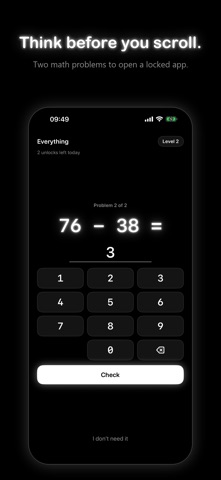
Dark Box uses Apple's Screen Time to lock the apps you choose. Open one and you solve two math problems. The more you've used your locked apps today compared with your own daily limit, the harder the math gets. Then choose how long you need, and it locks again by itself.
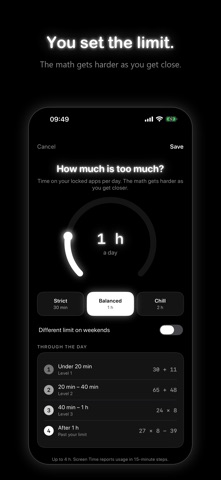
HOW IT WORKS - Pick the apps, categories or websites that pull you in. First, see your 10 most-used apps of the last 7 days. - Set your daily limit, 15 minutes to 4 hours, with a separate weekend limit if you like. - Open a locked app and tap Solve to unlock. - Choose 10 minutes, 20 minutes (recommended) or your own time, up to 4 hours. - When the time is up, it locks again. Tap Lock now to end early.
MATH THAT GETS HARDER - Level 1: two-digit sums, while you're under a third of your limit. - Level 2: a bigger sum and a subtraction, past a third. - Level 3: multiplication and three-digit subtraction, past two thirds. - Level 4: multi-step problems, once you reach your limit. Frequent unlocks raise the level too. A wrong answer swaps in a new problem, and Dark Box avoids repeating a problem on the same day.
FRICTION YOU CONTROL - Unlock cap: 3, 5 or 10 unlocks a day, or no cap. When they run out, apps stay locked until midnight. - Growing wait: none on the first unlock, then 10 seconds more each time, up to 60. - Weekly emergency pass: out of unlocks or in Hard Mode, open everything for an hour, once a week. - Walking away counts: "Not now" and "I don't need it" are tallied as resisted.
STREAKS AND YOUR CUBE Every day under your limit grows your streak. At 3, 7, 14 and 30 days your neon cube evolves: Glow, Charged, Halo, Radiant.
SEE YOUR DAY - Today: a ring of your locked apps' minutes against your limit, your level, unlocks and resisted opens. - Insights: today's Screen Time by hour and by app, with pickups and notifications. - History: your streak, days under your limit and resisted opens. 7 days on Free, 30 days with Pro.
SCHEDULES AND HARD MODE (PRO) Bedtime, work hours or your own window: everything in the box stays shut, even apps that keep notifications, and the math gate still works. Turn on Hard Mode and nothing opens until the schedule ends, except your weekly emergency pass. While it's on, you can't switch it off, edit it or take apps out of the box.
KEEP NOTIFICATIONS iPhone silences an app while it's locked. Add apps whose messages you still want to Keep notifications and set up a one-time Shortcuts automation: they stay out of the box so notifications arrive, and lock as soon as you open one.
WIDGETS AND LIVE ACTIVITY Home Screen and Lock Screen widgets show today's level, minutes and streak. During an unlock, a Live Activity counts down to the re-lock on the Lock Screen and, where available, the Dynamic Island.
PRIVATE BY DESIGN No account, no sign-up, no ads, no analytics. Your Screen Time data stays on your iPhone, and nothing about you leaves it.
FREE AND PRO Included in Free and Pro: - Math gate that gets harder - Streaks and your evolving cube - Unlock limit and growing wait - Weekly emergency pass - Keep notifications - Screen Time insights for today - Widgets and unlock countdown Pro only: - More than 2 apps in the box - Schedules and Hard Mode - 30 days of history Free locks up to 2 apps, categories or websites (keep-notification apps count). No ads on either plan.
Oceny użytkowników
Zaloguj się, aby ocenić tę aplikację. Liczy się szczerość.
Brak ocen. Znasz tę aplikację? Oceń ją jako pierwszy.
Więcej aplikacji z kategorii Produktywność
Najlepsze nowe aplikacje z kategorii Produktywność w tym tygodniu ChickMark: Habit TrackerChickMark is a simple habit tracker for routines, goals, and reminders
 Dayflint: One Thing a DayToo many priorities?
 Fristo CAFMFristo is the app for Fristo CAFM, the facility management software
- BeginAnywayMorning alarm for hard tasks: set one task, prove you started, build a streak
 DHUDEDHUDE Analityxs es la herramienta de gestión diaria para grupos de restauración y ocio…
 ScrollTime: Limit & ChallengesTikTok, Instagram, Facebook… ScrollTime helps you take back control of the time you…