
EARDOG: Save & Search Links
Nieodebrana"Where did I save that?" The recipe you found on Instagram
Twórca: YUEN Inc. · NarzędziaDlaczego tak przewidujemy: Its one-tap saving and automatic filing solve a real problem, and the description explains the value clearly.


W skrócie
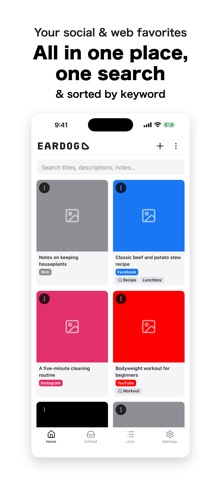
EARDOG: Save & Search Links is a utilities app that collects links and posts from any app through the share button, with no folders or tags needed at save time. Saved search words file matching items into lists automatically, and one search covers everything, including text in descriptions. It suits people who save recipes, workout or study videos, or articles and then lose track of them, and it needs no account.
Podsumowanie Debuts na podstawie karty aplikacji w App Store.O aplikacji
"Where did I save that?"
The recipe you found on Instagram. The workout video on YouTube. The article you meant to read later. They pile up in different apps, and when you actually need one, it's gone.
EARDOG puts all of it in one place. You never pick a folder when you save. It sorts itself out afterward.
Saving is one tap Hit the share button in whatever app you're in and choose EARDOG. The app doesn't open. You see "Saved," and you're straight back to what you were doing. No naming, no tagging, no choosing a list. Nothing interrupts your scroll.
It files things for you Save a search word once — say "recipe" — and every recipe you save from then on drops into that list automatically. Saved search words work backwards, too. Add "workout" today and every workout video you saved months ago collects in one place.
One search across everything Type "pasta" and the Instagram post, the YouTube video and the article come back together. You don't need to remember which app it came from. EARDOG searches inside descriptions, not just titles — so you can search by an ingredient sitting in your fridge, a place you want to go, or the half-remembered phrase that's all you have left.
Lists you build yourself For things you want to hand-pick — "Daily stretches," "Study videos for the weekend" — make a list and add items yourself. You can reorder them, so anything you want to work through in sequence works too.
Nothing gets lost in the pile Anything that hasn't landed in a list shows up under Unfiled. One look tells you what's still loose. Save a search word from there and a whole batch files itself at once.
Not just social apps Blogs, news, recipe sites, documentation. If you can share a URL, you can save it.
No account, no sign-up No email, no password. Download it and start. Everything you save stays on your device and is never sent anywhere. You choose whether it's included in your iCloud backup.
Made for you if - you save recipes but can't find them when you're actually cooking - you collect workout and stretching videos - you save study or exam-prep videos - you save things and then forget they exist - you've tried an organizing app before and stopped using it
EARDOG is named after the dog-ear — the folded corner of a page that helps you find your way back. That's the whole idea.
Oceny użytkowników
Zaloguj się, aby ocenić tę aplikację. Liczy się szczerość.
Brak ocen. Znasz tę aplikację? Oceń ją jako pierwszy.
Więcej aplikacji z kategorii Narzędzia
Najlepsze nowe aplikacje z kategorii Narzędzia w tym tygodniu Drainly: Speaker CleanerMuffled speaker after a splash, rain, or a sweaty workout?
 Photo & PDF Resize: KBFile too large to upload?
 Arvectum Proxy LauncherArvectum Proxy Launcher is a network utility that routes your iPhone through a proxy you…
 Look Twice: Scam & AI CheckLook twice before you click
 Vodoalarm: vodostaji BiHVodoalarm javlja kad tvoja rijeka naglo raste, pa ne moraš stalno gledati vodostaje
 Ham Radio IQHam Radio IQ answers one question: which band is open right now, from where you are, and…