
Hive Foreman: Beekeeping Logs
NieodebranaOpen the Today screen, choose your apiary and work through the hives you came to check
Twórca: RGT Software Ltd · Produktywność



W skrócie
Hive Foreman: Beekeeping Logs is a productivity app for beekeepers that organizes hive checks, findings and follow-up tasks by apiary. Users walk through the hives on a visit, record quick observations or full inspections with queen, brood, strength and varroa details, and set linked tasks with due dates. One notable feature is that repeating work lists missed dates on a single record instead of creating duplicate entries.
Podsumowanie Debuts na podstawie karty aplikacji w App Store.O aplikacji
Open the Today screen, choose your apiary and work through the hives you came to check. Hive Foreman keeps findings and follow-up work together, so scattered notes become a clear record for your next visit.
Start where the work is The Today screen brings overdue jobs, work due soon and this week's checks into view. Record opens an individual entry; Start visit takes you through an apiary in field order. Save the current check, then continue to the next hive with a fresh form. Skip a hive explicitly or finish when you need to. A summary tells you what you saved and skipped.
Record what you found Choose a Quick observation for a brief update or a Full inspection for a thorough check. Add queen details, brood, colony strength, temperament, swarm risk and varroa observations. Unknown and unchecked answers stay distinct from recorded findings. Saved layouts bring back your usual sections, not yesterday's answers.
Add a photo for a visual reference or speak a draft when typing is awkward. Review the words before saving. Keep hive photos with the colony and check photos with the visit they describe.
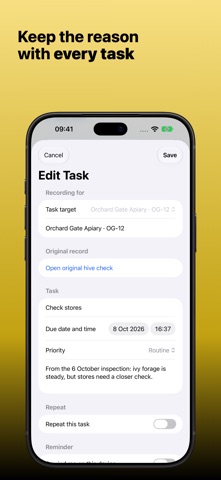
Make the next step useful Add a linked follow-up task from a check or queen change. Set a due date and optional reminder, then return to the original record from the task when you need its context. Complete, skip or reschedule jobs without losing their history. Repeating work lists missed dates on one record instead of creating a queue of duplicates.
Find the right hive Apiaries groups named hives under their yards. Open a hive for feeding, treatments, mite observations, queen history, photos and labels. Dated moves, splits and merges keep earlier records linked to the colony's history. Printable QR labels offer another way to find the right record, with manual lookup if scanning is impractical.
Keep supporting work together Records brings harvests, yard notes, history, reports, cashbook, equipment and batch work together. Separate individual hive yields from pooled apiary harvests. Add your own flower and weather notes for each yard. Review selected hives before applying the same task, feeding entry or basic setup.
Track equipment locations, stock and maintenance needs before a visit. The optional cashbook records sales, expenses and refunds, with separate currency totals and a history of corrections. It is not an accounting or tax system.
Finish with a useful report Choose Summary or Detailed report for the named apiary. Select hives, dates and sections, add optional business details and a logo, then preview before sharing. Give a mentor or client the relevant record without sending everything. Reports are fixed copies, not backups or live shared documents.
Keep your work yours No Hive Foreman account is needed. Your working records stay on the device, and you can work without the internet. Turn on optional Private iCloud to copy saved changes across your Apple devices while the app is open and connected. Different changes to the same record need your review rather than a silent choice.
On iPad, the wider workspace puts the apiary list beside the selected record. Narrowing the window keeps an unfinished form. Clear Save and Cancel choices let you decide what to keep; closing the keyboard does not save.
Begin with the free tier Backup and restore are always free, even above the free hive or task limits. One successful spreadsheet import is free on this device within those limits. Pro removes active-hive and open-task limits and unlocks later imports, spreadsheet exports and shareable reports. Apple shows current subscription options and terms before you buy.
Oceny użytkowników
Zaloguj się, aby ocenić tę aplikację. Liczy się szczerość.
Brak ocen. Znasz tę aplikację? Oceń ją jako pierwszy.
Więcej aplikacji z kategorii Produktywność
Najlepsze nowe aplikacje z kategorii Produktywność w tym tygodniu ChickMark: Habit TrackerChickMark is a simple habit tracker for routines, goals, and reminders
 Dayflint: One Thing a DayToo many priorities?
 Snappy Do ItSix connected modes. One traceable journey.
 Fristo CAFMFristo is the app for Fristo CAFM, the facility management software
 UhWhat? Voice NotesCatch the thought before it disappears
- BeginAnywayMorning alarm for hard tasks: set one task, prove you started, build a streak