
HushCall: Local AI Notetaker
NieodebranaHushCall records your meetings and turns them into transcripts, summaries and answers
Twórca: CoolSolve LLP · Produktywność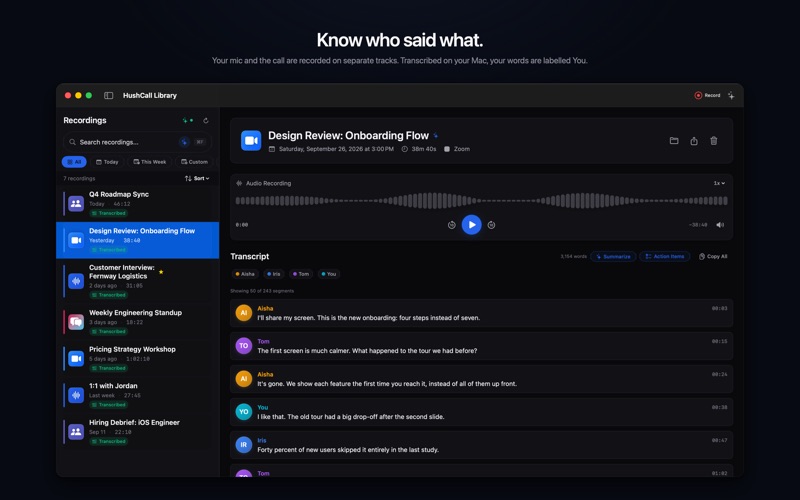


W skrócie
HushCall: Local AI Notetaker records meetings from Zoom, Microsoft Teams, Slack, Discord and browser calls, then makes transcripts, summaries and answers. It runs on a Mac and keeps recordings and transcripts there by default, with cloud options only if you choose them. Its standout feature is that it records your microphone and the meeting audio on separate tracks.
Podsumowanie Debuts na podstawie karty aplikacji w App Store.O aplikacji
HushCall records your meetings and turns them into transcripts, summaries and answers. It runs on your Mac, and by default your recordings and transcripts stay there.
TWO TRACKS HushCall records your microphone and the meeting's audio on separate tracks. When it transcribes on your Mac, your side is labelled You and the other voices are split into speakers. It works with Zoom, Microsoft Teams, Slack, Discord and calls in your browser, such as Google Meet. No bot joins the call.
AUTO-RECORD, IF YOU WANT IT Auto-record is off until you turn it on. When it's on, HushCall starts recording when a meeting app or a browser call starts using your microphone, and shows a notification when it does. You can also start and stop recording from the menu bar.
ON-DEVICE BY DEFAULT Transcription runs on your Mac with Apple Speech on macOS 26, or with WhisperKit. Summaries, action items and chat use Apple's on-device model on Macs with Apple Intelligence, or a local model that HushCall downloads after asking you. Your recordings, transcripts and search index stay on your Mac. The app has no analytics and no tracking.
CLOUD, ONLY IF YOU CHOOSE IT You can move the work off your Mac with HushCall Cloud Pro, or with your own API key: Google Gemini or Deepgram for transcription, and OpenAI or Google Gemini for summaries and chat. Each option is off until you choose it. HushCall Cloud doesn't store your audio or text.
ASK ABOUT YOUR MEETINGS Ask in plain language what was decided, what you agreed to do, or what someone said. Answers come from your transcripts. Click any timestamp in a transcript to jump to that moment in the recording.
PLANS AND PRICES HushCall is a free download. Recording and playback are free, with no time limit and no account. • HushCall Pro unlocks transcripts, speaker labels, summaries, action items and chat. It costs $9.99 a year and starts with a 7-day free trial for new subscribers. • HushCall Pro Lifetime is everything in Pro for a one-time payment of $19.99. • HushCall Cloud Pro is everything in Pro, plus hosted transcription and hosted AI, for $9.99 a month or $79.99 a year. You can buy it without an account. Its cloud features need a HushCall Cloud sign-in with an emailed code.
HushCall Pro and HushCall Cloud Pro are auto-renewing subscriptions. Payment is charged to your Apple Account when you confirm the purchase, or when the free trial ends. A subscription renews automatically unless you cancel it at least 24 hours before the end of the current period. The free trial becomes the paid yearly plan unless you cancel at least 24 hours before it ends. You can manage or cancel a subscription in your App Store account settings. Prices are in US dollars and may differ in your country.
PERMISSIONS HushCall asks for Microphone access to record your voice. It asks for Screen Recording access to record the other people in a call, because macOS puts system audio behind that permission. It records your screen only if you turn on screen video.
REQUIREMENTS A Mac with Apple silicon and macOS 15 or later. Apple Speech transcription and Apple Intelligence features need macOS 26.
Terms of Use (EULA): https://www.apple.com/legal/internet-services/itunes/dev/stdeula/ Privacy Policy: https://hushcall.app/privacy/
Oceny użytkowników
Zaloguj się, aby ocenić tę aplikację. Liczy się szczerość.
Brak ocen. Znasz tę aplikację? Oceń ją jako pierwszy.
Więcej aplikacji z kategorii Produktywność
Najlepsze nowe aplikacje z kategorii Produktywność w tym tygodniu ChickMark: Habit TrackerChickMark is a simple habit tracker for routines, goals, and reminders
 Dayflint: One Thing a DayToo many priorities?
 Fristo CAFMFristo is the app for Fristo CAFM, the facility management software
- BeginAnywayMorning alarm for hard tasks: set one task, prove you started, build a streak
 DHUDEDHUDE Analityxs es la herramienta de gestión diaria para grupos de restauración y ocio…
 Unlocky: Training App BlockerLock the apps that eat your day