
Keyring – Passwords & 2FA
NieodebranaYour keys, in order
Twórca: Aumatex srls · NarzędziaDlaczego tak przewidujemy: Clear value, careful writing and a genuinely useful authenticator make this a strong debut for password fans.



O aplikacji
Your keys, in order.
Keyring is a premium password manager for iPhone, iPad, Mac and Apple Watch: passwords, passkeys, codes and cards in one calm, private place, filled in by the system itself.
It is built the way Apple's own Passwords app is built, and picks up where that app stops: more than one vault, every kind of secret, a real authenticator, a health report on all you keep. No account, no server of ours, no ads.
Features
• AutoFill Everywhere Passwords, passkeys and codes in Safari and in every app, on iPhone, iPad and Mac. Face ID or Touch ID, and the field is filled. Safari hands a new or changed password straight to Keyring, generator included.
• Passkeys, First Class Create passkeys and sign in with them wherever a site offers them. Each one lives inside its login, beside the password it replaces.
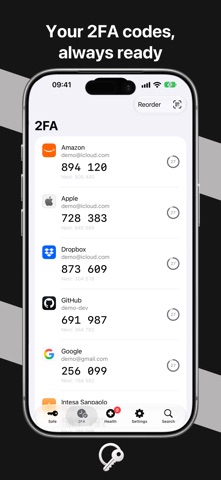
• An Authenticator You Will Actually Use Every code on one screen, in the order you drag them into: large digits, a draining ring, the next code in view, one tap to copy. Scan a QR code, or bring your Google Authenticator library over in one pass.
• Far More Than Passwords Logins, credit and debit cards, bank accounts, crypto wallets, identities, companies, documents, SIMs, Wi-Fi networks, licenses and secret notes. Card numbers check themselves and the network is read from the number.
• Health, Not Just Storage A score out of 100 and the reasons behind it: reused, weak and aging passwords, sites still on http://, Wi-Fi without real encryption, cards expired or expiring, logins that could have a passkey or a code and don't. Breach checking uses Have I Been Pwned; no password leaves your device.
• Your Vaults, Your Rules One vault or many — work, family, a client — each with its own master password, color and symbol. Tags, favorites, archive, a 30-day trash, and search that finds anything by title, site, user name or tag.
• In Sync Through Your Own iCloud Every device stays in step through CloudKit in your iCloud account. Apple stores ciphertext it cannot read; we have no servers and no access. A vault can also stay on one device.
• On Your Wrist, and on Your Mac 2FA codes on Apple Watch, with a Next Code complication for the watch face. On the Mac, a native app with a full menu bar and a search panel that opens over anything with ⌥⌘K.
Oceny użytkowników
Zaloguj się, aby ocenić tę aplikację. Liczy się szczerość.
Brak ocen. Znasz tę aplikację? Oceń ją jako pierwszy.
Więcej aplikacji z kategorii Narzędzia
Najlepsze nowe aplikacje z kategorii Narzędzia w tym tygodniu Drainly: Speaker CleanerMuffled speaker after a splash, rain, or a sweaty workout?
 Photo & PDF Resize: KBFile too large to upload?
 Arvectum Proxy LauncherArvectum Proxy Launcher is a network utility that routes your iPhone through a proxy you…
 BillVoice : Lecteur de billetsPointez votre iPhone vers un billet, touchez l’écran n’importe où et entendez ce que…
 Look Twice: Scam & AI CheckLook twice before you click
 Vodoalarm: vodostaji BiHVodoalarm javlja kad tvoja rijeka naglo raste, pa ne moraš stalno gledati vodostaje