
LifeAssist-AI
NieodebranaYour everyday essentials, all at your fingertips
Twórca: Dhana Angdembey · ProduktywnośćDlaczego tak przewidujemy: Clear, detailed feature descriptions and a no-account, privacy-minded design make this a promising everyday organizer.



W skrócie
LifeAssist-AI is a productivity app for iPhone and iPad that gathers documents, notes, important dates, and reminders in one place. Users can scan pages into PDFs, save items with titles and categories, and search their records, including text recognized from images. A separate Vault uses Face ID, Touch ID, or a passcode to keep private passwords and documents apart from ordinary records.
Podsumowanie Debuts na podstawie karty aplikacji w App Store.O aplikacji
Your everyday essentials, all at your fingertips.
LifeAssist-AI brings documents, notes, important dates, and reminders together on your iPhone or iPad. Capture what matters, save it with a title, and find it again when you need it. No app account is required.
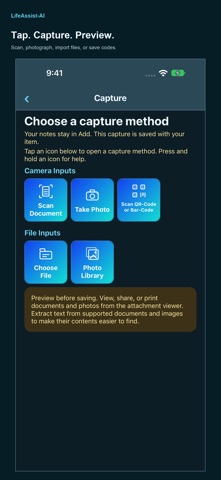
CAPTURE AND KEEP Tap Home’s Vault, Capture, Voice, or Form icon to get started. Scan multiple document pages into a PDF, take a photo, choose a file, or select an image from your photo library. Preview your capture, add a title and category, then save it. Find saved ordinary records in My Stuff and Search. View, share, and print supported attachments.
FIND WHAT YOU SAVED Browse all active ordinary items or choose an alphabetical category filter, with or without search text. Results distinguish item Type and Category. Search item information, attachment names, saved text, and captured QR/barcode values. Matching words are highlighted in results. Short searches of one or two letters or digits match whole words; longer searches can match part of a word. Text recognition works on supported images and scans; PDF text extraction depends on the file.
STAY ORGANIZED Use categories, notes, important dates, and local reminders. Home shows each active-item category in a pie with tappable Legends and exact counts. New users see a single-color placeholder circle until they save an active item. A highlighted alert separates past and upcoming reminders from expired items. Dashboard shows detailed reminders, dates, and categories. Browse Active and Archived records in My Stuff. Optional Voice Input turns supported on-device speech into notes you review before saving.
PROTECT PRIVATE ESSENTIALS Private Secure Vault has separate sections for passwords, documents, notes/codes, and other secure records. Unlock with Face ID, Touch ID where supported, or your device passcode. The Vault locks when you leave it or switch away. Vault records are excluded from ordinary Search and ordinary item backups. Sharing or printing a secure document creates a copy outside the Vault. Its separate Backup & Restore exports an encrypted Vault backup with an owner-held recovery key for manual recovery on the same or another device. Keep the matching key safely; Support cannot recover a lost key.
BACK UP YOUR RECORDS Use Settings > Backup & Restore to export ordinary records and attachment contents to a location you choose through Files. Restore missing items from a saved backup. Backups are manual, unencrypted, limited to 100 MB, and exclude all Private Secure Vault data. Restore keeps existing items with the same internal ID unchanged. Restored reminder alerts must be recreated.
MAKE IT COMFORTABLE Press and hold an icon for help on iPhone, or hover on iPad. Choose System, Light, or Dark appearance and one of five color palettes. Numbered, collapsible Settings sections keep controls easy to browse.
Your records are stored locally. This release has no automatic cloud sync, live AI chat, or cloud AI analysis. Deleting the app removes local records and captured files; reinstalling alone does not restore them. Before deleting, save and verify a backup outside the app, and keep a separate safe copy of important Vault information.
Oceny użytkowników
Zaloguj się, aby ocenić tę aplikację. Liczy się szczerość.
Brak ocen. Znasz tę aplikację? Oceń ją jako pierwszy.
Więcej aplikacji z kategorii Produktywność
Najlepsze nowe aplikacje z kategorii Produktywność w tym tygodniu ChickMark: Habit TrackerChickMark is a simple habit tracker for routines, goals, and reminders
 Dayflint: One Thing a DayToo many priorities?
 Snappy Do ItSix connected modes. One traceable journey.
 Fristo CAFMFristo is the app for Fristo CAFM, the facility management software
 UhWhat? Voice NotesCatch the thought before it disappears
- BeginAnywayMorning alarm for hard tasks: set one task, prove you started, build a streak