
Muze: Personal AI Agent
NieodebranaMuze is a personal agent for errands that take more than one step
Twórca: qthink Company · ProduktywnośćDlaczego tak przewidujemy: Clear multi-step value, thoughtful privacy controls, and a well-explained description make this a strong debut.




W skrócie
Muze: Personal AI Agent is a productivity app for errands that take several steps, running tasks in the background and alerting the user when input is needed. It can compare options with linked sources, set recurring checks and reminders, connect to apps such as Notion and Todoist, and draft emails from its own address. One notable point: it only emails people the user has approved, and asks for review of any other message first.
Podsumowanie Debuts na podstawie karty aplikacji w App Store.O aplikacji
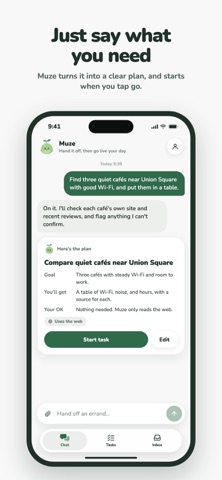
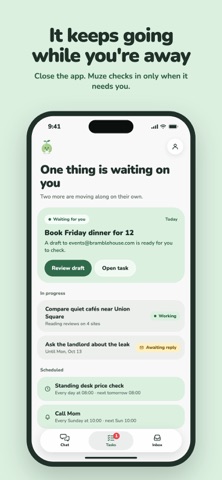
Muze is a personal agent for errands that take more than one step. Tell it what you need in plain words, then put your phone away. Muze keeps working in the background and lets you know when it needs you.
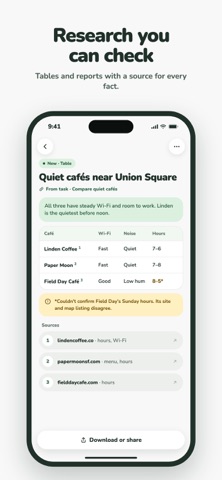
RESEARCH THAT SHOWS ITS WORK Compare venues, products, or options. Muze reads the web, organizes what it finds into reports and tables, and links every source. It tells you what it couldn't verify. Export any report as a PDF.
SET IT ONCE Have Muze check something every morning, on weekdays, or every few hours, and hear from it only when something changes. Ask for a reminder in plain words, like "remind me Friday at 5 to call Mom," and it pings you right on time.
PLACES, ROUTES, AND WEATHER Ask what's open near you, how long the drive takes, what the weekend forecast looks like, or which flights fit your dates. If you allow location, Muze uses your approximate location only for questions about places nearby.
WORKS WITH YOUR APPS Connect Notion, Todoist, Linear, Jira and Confluence, Canva, or Calendly in Me → Connected apps. Muze looks things up there on its own, and asks you before it adds or changes anything.
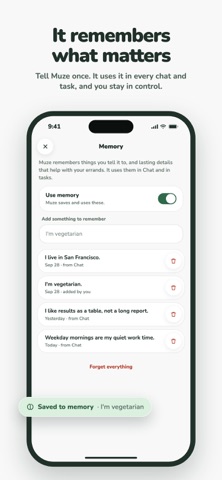
REMEMBERS WHAT MATTERS Tell Muze your city, your diet, or how you like results, and it uses that in every chat and task. See, edit, or turn off memory anytime in Me.
YOUR OWN MUZE ADDRESS Pick a username and get a matching email address. Muze can draft emails from it and wait for replies, for days if needed, then pick the task back up when the answer arrives.
YOU DECIDE WHO HEARS FROM YOU Muze only writes to people you've allowed. Ask it to email someone on your list and it just sends; anyone else, you review, edit, and approve each message first.
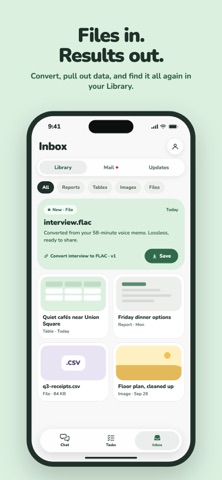
FILES, HANDLED Attach a file and ask Muze to convert it, pull out the data, or turn it into something new. Results land in your Library, ready to open or share.
CALM BY DESIGN See what's waiting for you, what's in progress, what's scheduled, and what's done. Chats, tasks, and Library items stay until you delete them; files clear after 30 days unless you keep them.
Muze uses AI and can make mistakes. Check important details before you rely on them.
Oceny użytkowników
Zaloguj się, aby ocenić tę aplikację. Liczy się szczerość.
Brak ocen. Znasz tę aplikację? Oceń ją jako pierwszy.
Więcej aplikacji z kategorii Produktywność
Najlepsze nowe aplikacje z kategorii Produktywność w tym tygodniu ChickMark: Habit TrackerChickMark is a simple habit tracker for routines, goals, and reminders
 Dayflint: One Thing a DayToo many priorities?
- BeginAnywayMorning alarm for hard tasks: set one task, prove you started, build a streak
 DHUDEDHUDE Analityxs es la herramienta de gestión diaria para grupos de restauración y ocio…
 FTC BIOBUZZ Scorer & TrainerBIOBUZZ Scorer is a free, ad-free scorer for the 2026–2027 FTC season, built on…
 Intent - Scroll by ChoiceTake back control of your screen time