
QueryDog
NieodebranaYour MySQL and MariaDB databases on the Mac, iPhone and iPad
Twórca: Harm Jan Evert van Kammen · Narzędzia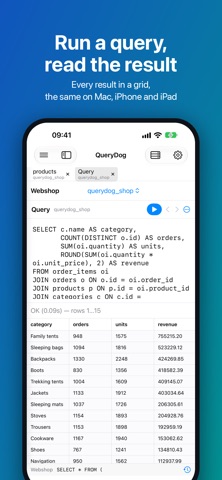




W skrócie
QueryDog is a MySQL and MariaDB client for Mac, iPhone and iPad, with the same connections on all three. It covers browsing and editing tables, running SQL, and exporting or importing data in nine formats. The standout feature is a read-only connection mode and warnings before dangerous queries, aimed at people who work with production databases.
Podsumowanie Debuts na podstawie karty aplikacji w App Store.O aplikacji
Your MySQL and MariaDB databases on the Mac, iPhone and iPad. Look something up in production from your phone, fix a row on the iPad, run a big export on the Mac — with the same connections on all three.
QueryDog is not a companion app: the iPhone and iPad have what the Mac has — the tabs, the grid, the filters, the exports and the imports.
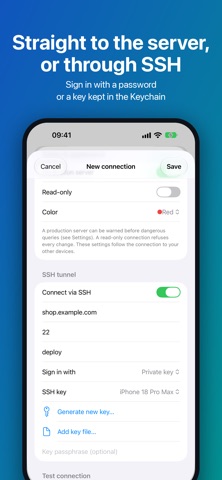
CONNECT • Straight to the server, or through an SSH tunnel that signs in with a password or a key • Make an ed25519 key on the device, or add a key file you have; private keys stay in the Keychain • Works with mysql_native_password and caching_sha2_password, the default of MySQL 8 and later
BROWSE AND EDIT • Databases and tables in a sidebar; each table and each query opens in a tab • On the Mac, open several windows and drag tabs between them • A data grid a page at a time: sort by any column, filter with operators such as contains, ≥ and is null • Change a cell where it is, or buffer your changes, read the SQL they come to, and apply them in one transaction • Run SQL and read the result in a grid; cancel a query that takes too long; the query log keeps your last 500 statements • Add, change and remove columns, with the ALTER statements shown before they run
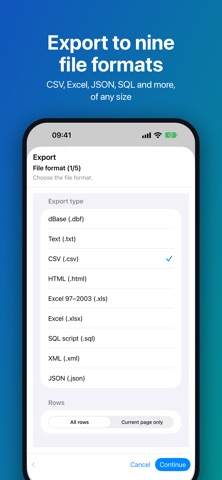
EXPORT AND IMPORT • A table, a query result or a whole database to nine formats: CSV, text, JSON, XML, HTML, SQL, Excel (.xlsx and .xls) and dBase • CSV, Excel and JSON into a table that exists or a new one, with a preview before anything is written • Run SQL scripts and dumps statement by statement • Copy rows as text, CSV, JSON, or INSERT and UPDATE statements • Rows go a batch at a time, so the size of a table or file does not matter
SAFE IN PRODUCTION • Mark a production server with a colour and get a warning before dangerous queries • Make a connection read-only, and it refuses anything that changes data or structure • An UPDATE or DELETE without WHERE, a DROP or a TRUNCATE asks before it runs
ON ALL YOUR DEVICES • Connections, passwords, preferences and the query log sync through your own iCloud, end-to-end encrypted • Private keys never leave the device they were made or added on
PLOI • Link your Ploi account (ploi.io) to see every server and database, add a connection in one step, create databases and put your SSH key on your servers
Light or dark, or follow the device. In English and Dutch.
FREE TO USE QueryDog is free with two connections, with no time limit. One purchase, once, makes that as many as you like — on your Mac, iPhone and iPad together. No subscription, no account, no tracking.
Oceny użytkowników
Zaloguj się, aby ocenić tę aplikację. Liczy się szczerość.
Brak ocen. Znasz tę aplikację? Oceń ją jako pierwszy.
Więcej aplikacji z kategorii Narzędzia
Najlepsze nowe aplikacje z kategorii Narzędzia w tym tygodniu Drainly: Speaker CleanerMuffled speaker after a splash, rain, or a sweaty workout?
 Photo & PDF Resize: KBFile too large to upload?
 Arvectum Proxy LauncherArvectum Proxy Launcher is a network utility that routes your iPhone through a proxy you…
 Vodoalarm: vodostaji BiHVodoalarm javlja kad tvoja rijeka naglo raste, pa ne moraš stalno gledati vodostaje
 Dusty: Photo Cleaner PetYour camera roll's new pet
 FairAuth: AuthenticatorFairAuth creates the codes for two-step verification on iPhone and iPad