
SideKey: Custom Action Button
NieodebranaMake your Action Button do more
Twórca: Ahmet Giray Ucar · NarzędziaDlaczego tak przewidujemy: A clearly explained launcher that makes the iPhone Action Button genuinely more useful, with plenty of free tools and thorough screenshots.


W skrócie
SideKey: Custom Action Button is a utilities app that turns the iPhone Action Button into a personal launcher for tools and Apple shortcuts. It offers free note capture, a focus timer, breathing breaks, a flashlight and profiles for different routines. Its paid SideKey+ tier adds a locked private camera library that is excluded from device backups.
Podsumowanie Debuts na podstawie karty aplikacji w App Store.O aplikacji
Make your Action Button do more.
Sidekey brings your favorite tools and shortcuts into one personal launcher. Press and hold your iPhone Action Button, choose an action, and get on with your day.
YOUR BUTTON, YOUR WAY
Choose your actions, personalize their names and colors, and arrange them in the order you want. Everyday, Work and Unwind profiles are included for free. Switch between them whenever your routine changes.
USEFUL TOOLS, INCLUDED FOR FREE
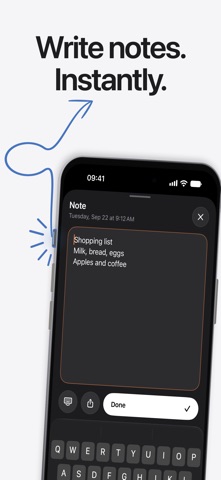
Capture a quick note before the thought disappears. Start a focus timer, take a guided breathing break, use the flashlight, or check copied text.
Take photos and videos with Pocket camera. Record, play and share voice notes. Scan multiple pages into a shareable PDF. Keep a favorite website or Maps destination within easy reach.
Connect your own Apple shortcuts to open apps, play playlists, set a Focus mode, create reminders and more. Simple recipes explain how to build each shortcut and connect it to Sidekey.
GET MORE WITH SIDEKEY+
Private camera Keep personal photos and videos in a locked library inside Sidekey. Unlock with Face ID, Touch ID or your device passcode. Captures stay out of Photos unless you choose to export them. View, share or delete them while your SideKey+ access is active.
Find my car Save your parking spot, add a garage or parking note, and get walking directions back through Apple Maps.
Make a QR Turn a link or text into a QR code. Show it across the table or share it without asking anyone to type.
Oceny użytkowników
Zaloguj się, aby ocenić tę aplikację. Liczy się szczerość.
Brak ocen. Znasz tę aplikację? Oceń ją jako pierwszy.
Więcej aplikacji z kategorii Narzędzia
Najlepsze nowe aplikacje z kategorii Narzędzia w tym tygodniu Drainly: Speaker CleanerMuffled speaker after a splash, rain, or a sweaty workout?
 Photo & PDF Resize: KBFile too large to upload?
 Arvectum Proxy LauncherArvectum Proxy Launcher is a network utility that routes your iPhone through a proxy you…
 BillVoice : Lecteur de billetsPointez votre iPhone vers un billet, touchez l’écran n’importe où et entendez ce que…
 Look Twice: Scam & AI CheckLook twice before you click
 Vodoalarm: vodostaji BiHVodoalarm javlja kad tvoja rijeka naglo raste, pa ne moraš stalno gledati vodostaje