
Snapmodo: Screenshot & Record
NieodebranaCapture, circle, annotate and send
Twórca: Matano Enterprises LLC · ProduktywnośćDlaczego tak przewidujemy: A focused, privacy-friendly Mac tool combining capture, markup and recording with a clear, well-explained value proposition.


W skrócie
Snapmodo: Screenshot & Record is a native Mac app for capturing a region, window or display, then annotating with arrows, shapes, text and redaction. It also records screen and camera with optional audio, offers several framing ratios, and exports finished MP4 files. It stands out for keeping everything local, with no account, subscription or cloud upload required.
Podsumowanie Debuts na podstawie karty aplikacji w App Store.O aplikacji
Capture, circle, annotate and send.
Snapmodo brings screenshots, markup and screen recording into one native Mac app. Choose a region, a window or a display. Copy straight to your clipboard, open the editor or keep a capture in your local library.
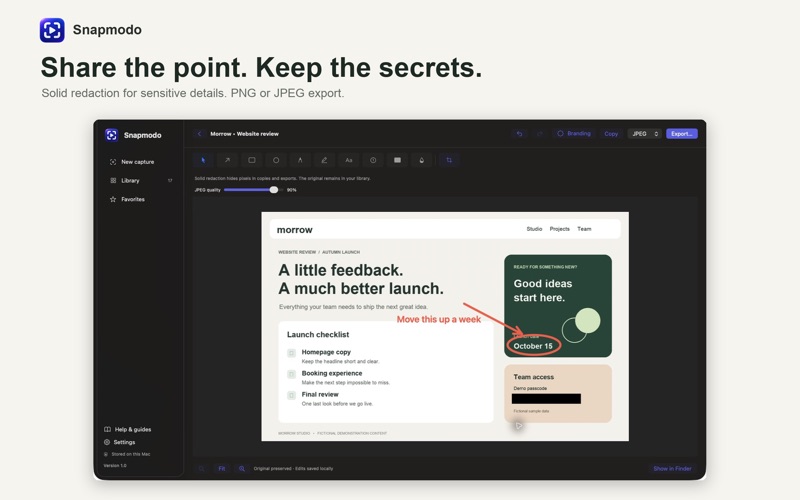
SCREENSHOTS THAT GET TO THE POINT Add arrows, circles, rectangles and text. Select text again to edit, move, resize or rotate it. Crop your capture, add optional branding, use blur for visual emphasis or cover sensitive details with solid redaction. Export PNG or JPEG with adjustable JPEG quality.
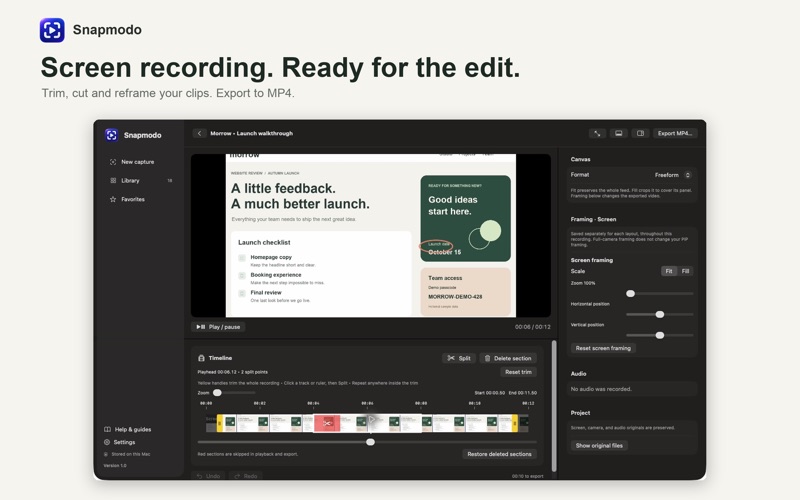
RECORD MORE THAN YOUR SCREEN Record your screen with optional microphone, computer audio and camera. Choose freeform, 16:9, 9:16, 1:1 or 4:5 framing. On-screen boundaries and floating controls help you see the capture area, pause and finish.
TURN A RECORDING INTO SOMETHING USEFUL Keep screen and camera tracks editable. Trim the ends, split sections and remove mistakes. Switch between screen, camera, picture in picture and split layouts. Choose a corner, adjust the overlay size, or use Fit, Fill and zoom to frame your footage. Export a finished MP4.
READY WHEN YOU ARE Start from the menu bar or set your own keyboard shortcuts. The optional Snapmodo Stream Deck plugin provides capture and recording actions with matching icons; Stream Deck software and compatible hardware are sold separately. Setup instructions are in the app's help guides.
YOUR WORK STAYS ON YOUR MAC No Snapmodo account, subscription or cloud upload is required. Keep captures in your local library, find favorites and share exported files using macOS. Original media is preserved while you edit.
Requires macOS 15 or later. Camera, microphone and system audio are optional and require the appropriate macOS permissions. Camera effects depend on macOS and supported hardware. Scrolling screenshots are assembled from overlapping frames you capture as you scroll. Blur is not secure redaction: use solid redaction for secrets and share the flattened export. Hosted sharing links are not included.
A Matano Enterprises app.
Oceny użytkowników
Zaloguj się, aby ocenić tę aplikację. Liczy się szczerość.
Brak ocen. Znasz tę aplikację? Oceń ją jako pierwszy.
Więcej aplikacji z kategorii Produktywność
Najlepsze nowe aplikacje z kategorii Produktywność w tym tygodniu ChickMark: Habit TrackerChickMark is a simple habit tracker for routines, goals, and reminders
 Dayflint: One Thing a DayToo many priorities?
- BeginAnywayMorning alarm for hard tasks: set one task, prove you started, build a streak
 DHUDEDHUDE Analityxs es la herramienta de gestión diaria para grupos de restauración y ocio…
 FTC BIOBUZZ Scorer & TrainerBIOBUZZ Scorer is a free, ad-free scorer for the 2026–2027 FTC season, built on…
 Intent - Scroll by ChoiceTake back control of your screen time