
Tengrid - Time Block Planner
NieodebranaNo ads, no account, no subscription, and repeat blocks are free
Twórca: Yunseong Jung · ProduktywnośćDlaczego tak przewidujemy: Clear value with no ads, no account and free repeat blocks, backed by a thoughtful paper-planner design.




W skrócie
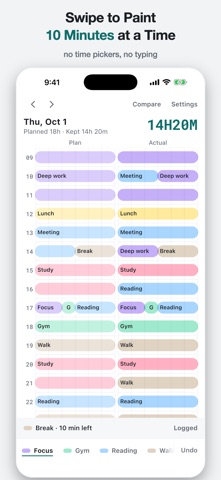
Tengrid - Time Block Planner is a productivity app with a 10-minute grid for planning a day and logging what actually happened, side by side in each row. It is aimed at people who want a paper-style planner on their iPhone, with no account and no ads. One detail that stands out is that the current block appears on the Lock Screen and in the Dynamic Island with the minutes left.
Podsumowanie Debuts na podstawie karty aplikacji w App Store.O aplikacji
No ads, no account, no subscription, and repeat blocks are free. A 10-minute grid for the plan you made and the day you actually had.
Tengrid is a time blocking grid in the spirit of the paper 10-minute study planner. Pick a highlighter pen, swipe across a row and the cells fill in. Swipe again in the Actual column as the day goes. The big number at the top counts the time you spent the way you planned, like 6H10M.
● Swipe to plan — drag across a row to paint, tap twice to fill several hours, tap a painted cell to clear it ● Plan and actual side by side — six cells for the plan, six for what happened, in the same row ● The current block on your Lock Screen — a Live Activity and the Dynamic Island show what you are in and the minutes left ● Log it in one tap — tap an hour number and the Actual cells copy the plan. Tap "As planned" on the block-end alert and the plan is copied the next time you open the app ● Repeat blocks — weekday deep work or a daily lunch are painted in before you open the app ● Widgets — small and medium Home Screen widgets and a Lock Screen widget show the current block
Included without paying - The grid, both columns, painting, erasing and undo - Unlimited block types with six highlighter colors - Repeat blocks, block start alerts, the Live Activity and all three widgets - Every past day, dark mode, five languages - A copy in your own iCloud (the last two years), which you can turn off
Lifetime unlock (one-time purchase) - Compare by week and month: each day becomes one line of 10-minute pixels, and drift mode shows where the day left the plan - Save as many day templates as you like (weekday, weekend, exam week) and apply one in a tap - Three more pen sets and three more app icons
The lifetime unlock is a single payment. There is no subscription and no trial that turns into a charge. Restore Purchase is on the same screen.
No account and no sign-up. Your days stay on your iPhone and in your own iCloud, and nothing goes to our servers. Version 1.0 is iPhone only.
Terms of Use (EULA): https://www.apple.com/legal/internet-services/itunes/dev/stdeula/ Privacy Policy: https://aside.ai.kr/en/apps/timeblock/privacy Support: https://aside.ai.kr/en/apps/timeblock/support
Oceny użytkowników
Zaloguj się, aby ocenić tę aplikację. Liczy się szczerość.
Brak ocen. Znasz tę aplikację? Oceń ją jako pierwszy.
Więcej aplikacji z kategorii Produktywność
Najlepsze nowe aplikacje z kategorii Produktywność w tym tygodniu ChickMark: Habit TrackerChickMark is a simple habit tracker for routines, goals, and reminders
 Dayflint: One Thing a DayToo many priorities?
 Snappy Do ItSix connected modes. One traceable journey.
 Fristo CAFMFristo is the app for Fristo CAFM, the facility management software
 UhWhat? Voice NotesCatch the thought before it disappears
- BeginAnywayMorning alarm for hard tasks: set one task, prove you started, build a streak