
WiseBar
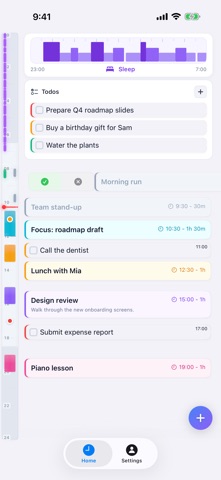
NieodebranaWiseBar puts your day on one timeline: your events, your todos, and your sleep and…
Twórca: YOUFUN, LLC. · ProduktywnośćDlaczego tak przewidujemy: WiseBar's clear timeline combining events, todos, and Apple Health data makes its value easy to grasp.




W skrócie
WiseBar is a productivity app that shows events, todos, sleep and workouts from Apple Health on one daily timeline, with versions for iPhone, iPad and Apple Watch. It suits people who want their planning and health data in a single view. One notable feature is that it only reads Apple Health data and never writes to it.
Podsumowanie Debuts na podstawie karty aplikacji w App Store.O aplikacji
WiseBar puts your day on one timeline: your events, your todos, and your sleep and workouts from Apple Health. It works on iPhone, iPad and Apple Watch.
PLAN YOUR DAY • See each day as one timeline, from midnight to midnight, with the current time marked. • Create events with a title, start and end time, location, description, category and color. Edit or delete them at any time. • Keep a list of todos with a priority and an optional due time. Drag an unscheduled todo onto the timeline to schedule it. • After an event has passed, swipe to note whether you took part. • Jump to any date to review past days or plan ahead.
SEE YOUR SLEEP AND WORKOUTS • Connect Apple Health to bring your sleep and workouts into WiseBar (WiseBar Pro). WiseBar only reads this data and never writes to Apple Health. • The sleep track shows your sleep stages (core, deep and REM) against the rest window you planned. • Set your planned rest time in Settings to compare your plan with how you actually slept. • Workouts appear on your activity timeline with their time and duration.
ON YOUR WRIST • The Apple Watch app (WiseBar Pro) shows today's events, scheduled todos, sleep and workouts at a glance. • Scroll through the day with the Digital Crown, and tap Now to jump back to the current time. • Mark past events as completed or not completed, and check off todos. • Open the Todo Box to complete an unscheduled todo or schedule it into today. • Changes made on the watch are sent to your iPhone. The watch shows when changes are still waiting for confirmation. • The Apple Watch app needs a paired iPhone with WiseBar installed and signed in.
SYNC AND CONNECTIONS • Events and todos are saved to your WiseBar account and stay in sync across your iPhone and iPad, and with WiseBar Pro on Apple Watch. With WiseBar Pro, your sleep and workouts from Apple Health sync too. • Connect Google Calendar and Google Tasks to sync your events and tasks with WiseBar (WiseBar Pro). • Sign in with Apple, Google, Microsoft, or your email address. You can look around without an account; sign in to save events, todos and health data.
MADE FOR IPHONE AND IPAD • Portrait and landscape layouts on iPhone and iPad, with iPad multitasking. • Light, dark or system appearance. • Choose English or Simplified Chinese in the app.
YOUR DATA, YOUR CHOICE • Health access is optional and read-only. You choose what to share in Apple Health. • Export your account data as a JSON file from Settings. • Delete your account from Settings at any time. • Send feedback to the WiseBar team from Settings and read our replies there.
WISEBAR PRO WiseBar is free to download. The optional WiseBar Pro subscription, monthly or yearly with a 7-day free trial for eligible new subscribers, unlocks the Apple Watch app, Apple Health sync and Google Calendar/Google Tasks sync. Everything else in WiseBar is free.
Payment is charged to your Apple Account at confirmation of purchase. The subscription renews automatically unless it is turned off at least 24 hours before the end of the current period. You can manage or cancel your subscription in your Apple Account settings. Any unused portion of a free trial is forfeited when you purchase a subscription.
Terms of Use (EULA): https://www.tutuo.ai/en/wisebar/terms/ Privacy Policy: https://www.tutuo.ai/en/wisebar/privacy/
Oceny użytkowników
Zaloguj się, aby ocenić tę aplikację. Liczy się szczerość.
Brak ocen. Znasz tę aplikację? Oceń ją jako pierwszy.
Więcej aplikacji z kategorii Produktywność
Najlepsze nowe aplikacje z kategorii Produktywność w tym tygodniu ChickMark: Habit TrackerChickMark is a simple habit tracker for routines, goals, and reminders
 Dayflint: One Thing a DayToo many priorities?
 Snappy Do ItSix connected modes. One traceable journey.
 Fristo CAFMFristo is the app for Fristo CAFM, the facility management software
 UhWhat? Voice NotesCatch the thought before it disappears
- BeginAnywayMorning alarm for hard tasks: set one task, prove you started, build a streak