
XeoPlayer
NieodebranaXeoPlayer plays the audio files you keep on your iPhone: audiobooks, music, lectures…
Twórca: Yurii Tarnavskyi · Muzyka i audioDlaczego tak przewidujemy: Clear value for offline audio lovers, with thoughtful folder handling and a refreshingly private, no-account design.


W skrócie
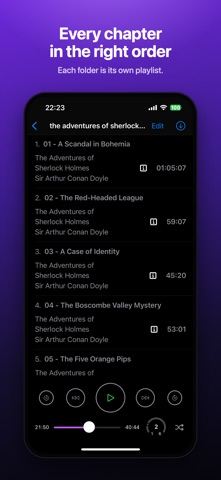
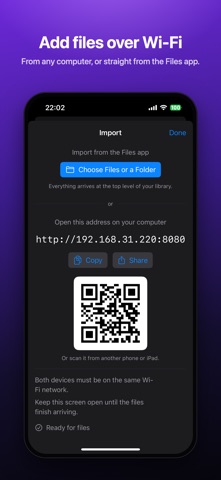
XeoPlayer plays audio files already stored on an iPhone, such as audiobooks, music and lectures, without streaming, accounts or ads. It is aimed at people who keep their own audio collections and want each folder played as its own ordered queue that resumes at the exact second it stopped. One notable point is that files can be added over Wi-Fi from a computer browser or from the Files app, including iCloud Drive.
Podsumowanie Debuts na podstawie karty aplikacji w App Store.O aplikacji
XeoPlayer plays the audio files you keep on your iPhone: audiobooks, music, lectures, recordings. It plays them straight from your folders, in the right order, and remembers the exact second you stopped. No streaming, no account, no ads, and no internet needed.
YOUR FOLDERS, IN THE RIGHT ORDER • Every folder is its own queue, so two books never end up mixed in one playlist. • Numbers in file names are read the way you read them: Chapter 2 comes before Chapter 10. • Subfolders first, then tracks. Browse the whole library while something plays. • Search any folder by file name, title, artist or album.
PICKS UP WHERE YOU LEFT OFF • Close the app and come back days later: the same track, the same second. • Keeps playing with the screen locked, with controls on the Lock Screen and in Control Center. • Skip 15 seconds back or forward, jump between tracks, or shuffle a folder and hear every track once.
GETTING AUDIO IN • Over Wi-Fi: open the address XeoPlayer shows in a browser on any computer on the same network, or scan its QR code from another phone, then drop in files or whole folders. • From the Files app: pick single files or whole folders, including ones in iCloud Drive.
Plays MP3, M4A, M4B, AAC, FLAC, WAV, AIFF and CAF.
PRIVATE BY DESIGN XeoPlayer collects nothing. There is no account, no analytics, no advertising and no tracking, and it never sends your files anywhere.
FREE FOR FIVE DAYS, THEN YOUR CHOICE Everything is included for the first five days. After that, importing needs a subscription (3 months or 1 year) or a one-time lifetime purchase. Everything already in your library keeps playing, free, for good.
Subscriptions renew automatically unless cancelled at least 24 hours before the end of the current period. You can manage or cancel them at any time in your Apple ID settings.
Terms of Use (EULA): https://xeoplayer.web.app/terms.html Privacy Policy: https://xeoplayer.web.app/privacy.html
Oceny użytkowników
Zaloguj się, aby ocenić tę aplikację. Liczy się szczerość.
Brak ocen. Znasz tę aplikację? Oceń ją jako pierwszy.
Więcej aplikacji z kategorii Muzyka i audio
Najlepsze nowe aplikacje z kategorii Muzyka i audio w tym tygodniu KlingKlang – Control de AudioKlingKlang reúne todas las salas de tu sistema Sonos en una sola pantalla
 BANANA-1One banana
 Acord: Guitar Tuner, MetronomeAcord is a precise tuner and metronome for every musician
 MonandaegMōnandæg is two field recorders that cannot leave anything alone
 Yul — Gugak Tuner & JangdanA tuner and rhythm trainer built for Korean traditional instruments
 MusiquitosMusiquitos es una app de música para niños con treinta canciones para cantar, bailar y…