
Bidas
Não reivindicadaBidas is the phone companion to the Bidas desktop app for Mac and Windows
Por demelos LLC · ProdutividadePorque esperamos isto: A thoughtful companion app for service businesses, with real-document previews and locked sent proposals that make quoting on the go genuinely practical.




Sobre
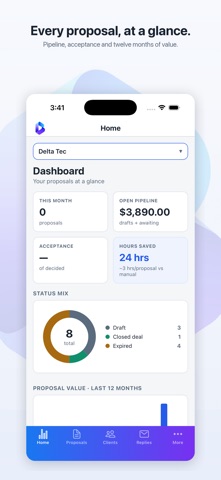
Bidas is the phone companion to the Bidas desktop app for Mac and Windows. It uses the same account and the same sync server, so the clients, services, terms and proposals you already have are there when you sign in.
It is built for small service businesses that have to quote work: commercial cleaning, landscaping, maintenance, professional services.
BUILD A PROPOSAL IN SIX STEPS
Pick the client, add services from your catalogue, choose a layout, choose its colours, check the preview, then send. The preview is the real document rather than a mock-up: the phone renders proposals with the same engine as the desktop, so what you see on the phone is what your client reads.
SEND IT, AND THE CLIENT GETS A LINK
Sending publishes the proposal to a private web link and emails that link to the client's address. The client opens it in a browser and can accept and sign it there. Once a proposal has been sent its design is locked, so the document your client is reading cannot change underneath them.
WHAT YOU CAN DO FROM THE PHONE
Proposals, split into all, drafts and sent, with the status of each one and a way to change it. Clients: company, contact name, email, phone and address, in a searchable list. Services: your catalogue, with unit price, unit type, taxable and hidden flags, also searchable. Replies: answers your clients sent back about proposals you sent them. Terms and clauses, the wording that goes out attached to a proposal. Company profile: name, website, licence numbers, logo, signature image, the letter that opens a proposal, and who signs it. Industry catalogue: pick the closest trade and Bidas fills your services and terms with typical entries, which you can then edit. Nothing you already have is touched. Team workspaces: create one, or join one with an invite code, and see who shares it. Account and licence, a billing summary, referrals, and support tickets with their replies.
FIFTY LAYOUTS AND TEN COLOUR SETS
The design step is two screens. The first shows every layout as a real render of your own proposal. The second shows the layout you picked in every colour set. You can also make your own theme from a primary and an accent colour.
IT WORKS WITH THE DESKTOP, NOT INSTEAD OF IT
Changes go both ways. Edit a client on the laptop and it is on the phone after the next sync; write a proposal on the phone and it is on the laptop. Both sides use the same merge rule, so an edit that wins on one device wins on the other.
A avaliação das pessoas
Inicia sessão para avaliares esta aplicação. O que conta é seres sincero.
Ainda sem avaliações. Já a experimentaste? Sê o primeiro a avaliar.
Mais apps de Produtividade
As melhores apps novas de Produtividade desta semana ChickMark: Habit TrackerChickMark is a simple habit tracker for routines, goals, and reminders
 Dayflint: One Thing a DayToo many priorities?
 Snappy Do ItTurn photos, text and voice into tasks, plans and more.
 Fristo CAFMFristo is the app for Fristo CAFM, the facility management software
 UhWhat? Voice NotesCatch the thought before it disappears
- BeginAnywayMorning alarm for hard tasks: set one task, prove you started, build a streak