
Caps: Screenshot Manager
Não reivindicadaCaps keeps your recent screenshots close at hand and ready to share
Por Colorful Bunch LLC · ProdutividadePorque esperamos isto: Clear value, a careful description, and a local-only privacy stance make this a well-positioned Mac screenshot tool.



Em resumo
Caps: Screenshot Manager is a Mac productivity app that keeps recent screenshots in a sidebar that slides in from the screen edge. Users can preview, copy, drag, annotate, and organize captures, and add backgrounds or padding before sharing. Caps works locally with no account, analytics, or cloud sync, and the app stands out for leaving original files untouched when sharing.
Resumo do Debuts, com base na ficha da App Store.Sobre
Caps keeps your recent screenshots close at hand and ready to share. A full-height sidebar slides in from the edge of your screen, so you can preview, copy, drag, annotate, and organize your captures without breaking your flow.
YOUR SCREENSHOTS, WITHIN REACH Choose your screenshot folder once, then take screenshots as usual. New Caps appear automatically. Click the menu bar icon or press Control-Option-C (or a shortcut of your own) to open Caps. Click a screenshot to copy it or drag it into another app, and Caps tucks itself away. Use the arrow keys to move through your collection, Return to copy, and Space for a closer look.
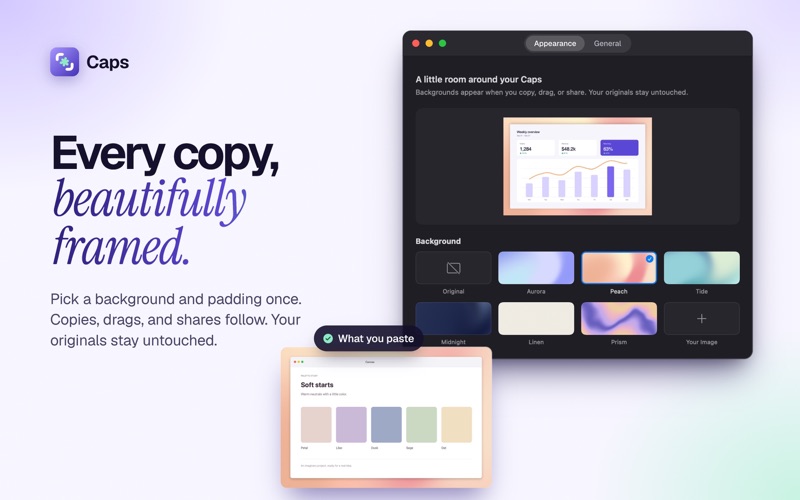
READY TO SHARE Choose one of six included backgrounds or use your own image. Smart padding adds breathing room around each screenshot, or you can adjust it yourself. Copying, dragging, and sharing create a separate image with your chosen appearance. Your original files stay untouched. Choose Original to turn backgrounds off, or Copy Original for a single unframed copy.
MAKE YOUR POINT Add arrows, rectangles, freehand drawing, and text. Copy the result or save a new full-resolution PNG. Undo and redo make it easy to get the details right.
KEEP THE USEFUL ONES Pin Caps you want to keep handy, rename them, or search by filename. Clear Caps and the retention setting tidy the list without deleting your files. When you choose Delete Cap, the file goes to the macOS Trash.
LOCAL BY DESIGN Caps works on your Mac, with no account, analytics, or cloud sync. Screenshots are shared only with the apps and destinations you choose.
Requires an Apple silicon Mac with macOS 14 Sonoma or later. Caps uses screenshots saved by macOS or another screenshot tool to the folder you select.
A avaliação das pessoas
Inicia sessão para avaliares esta aplicação. O que conta é seres sincero.
Ainda sem avaliações. Já a experimentaste? Sê o primeiro a avaliar.
Mais apps de Produtividade
As melhores apps novas de Produtividade desta semana ChickMark: Habit TrackerChickMark is a simple habit tracker for routines, goals, and reminders
 Dayflint: One Thing a DayToo many priorities?
 Snappy Do ItSix connected modes. One traceable journey.
 Fristo CAFMFristo is the app for Fristo CAFM, the facility management software
- BeginAnywayMorning alarm for hard tasks: set one task, prove you started, build a streak
 DHUDEDHUDE Analityxs es la herramienta de gestión diaria para grupos de restauración y ocio…