
Comment Reflow
Não reivindicadaComment Reflow reflows long // and /// comments in Xcode to a column width you choose —…
Por Nils Anspach · UtilitáriosPorque esperamos isto: A focused, clearly useful Xcode utility with a well-explained description, privacy stance, and free access for Swift developers.



Em resumo
Comment Reflow is a macOS utility that rewraps long // and /// comments in Xcode to a column width the user sets. It keeps indentation, comment markers, and DocC structure such as parameter lists and code blocks intact, and it can process a single comment, a selection, or a whole file in one command. Its standout feature is that it runs entirely on the Mac, with source code held in memory only while a command runs.
Resumo do Debuts, com base na ficha da App Store.Sobre
Comment Reflow reflows long // and /// comments in Xcode to a column width you choose — keeping indentation, comment markers, and DocC structure correct on every line, even across multiple comment blocks at once.
If you have ever pasted a long comment into Swift code and ended up with an ugly, overlong line — or manually re-wrapped a DocC comment after editing one word — Comment Reflow fixes that with one command.
HOW IT WORKS
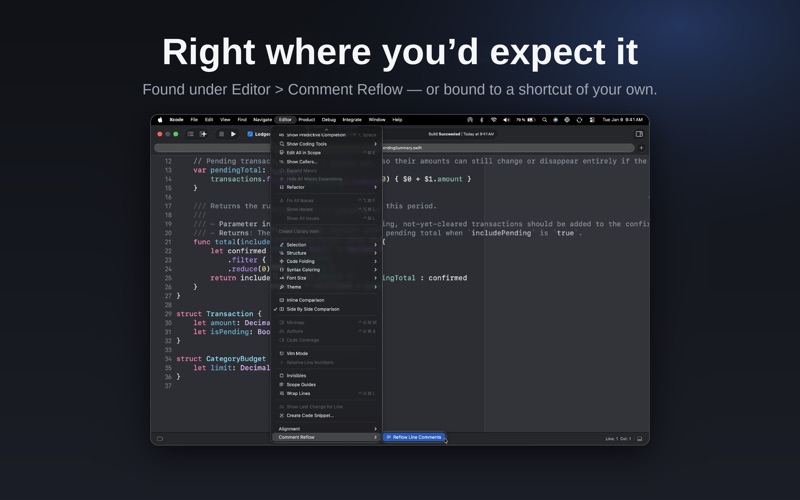
Place your cursor in a // or /// comment, or select part of one, then run "Reflow Line Comments" from the Editor menu in Xcode (or your own keyboard shortcut). Select a larger range — even an entire file — to reflow every comment block inside it in one pass, while leaving your actual code untouched.
FEATURES
• Wraps // line comments and /// DocC comments to a configurable column width • Preserves indentation and comment markers on every line • Correctly re-wraps DocC structure: parameter lists, bullet points, code blocks, and callouts • Reflows a single comment, a selection, or an entire file in one command • Works as a lightweight Source Editor Extension for Xcode — no changes to your project files or build settings
PRIVACY
Comment Reflow works entirely on your Mac. Your source code is processed in memory only while you run a command, and is never stored or sent anywhere.
SETUP
After installing, open the app once and follow the Setup tab to enable the extension in System Settings and (optionally) assign a keyboard shortcut in Xcode.
Comment Reflow is free, with no ads, no tracking, and no account required.
A avaliação das pessoas
Inicia sessão para avaliares esta aplicação. O que conta é seres sincero.
Ainda sem avaliações. Já a experimentaste? Sê o primeiro a avaliar.
Mais apps de Utilitários
As melhores apps novas de Utilitários desta semana Drainly: Speaker CleanerMuffled speaker after a splash, rain, or a sweaty workout?
 Photo & PDF Resize: KBFile too large to upload?
 Arvectum Proxy LauncherArvectum Proxy Launcher is a network utility that routes your iPhone through a proxy you…
 Look Twice: Scam & AI CheckLook twice before you click
 Vodoalarm: vodostaji BiHVodoalarm javlja kad tvoja rijeka naglo raste, pa ne moraš stalno gledati vodostaje
 Sift: Photo CleanupYour camera roll is full of blurry shots, old screenshots and videos you'll never watch…