
Dimly: Sleep Wind-Down
Não reivindicadaIn the evening you tap "I want to sleep"
Por Michal Damborsky · Saúde e fitness


Em resumo
Dimly: Sleep Wind-Down is a health and fitness app that guides an evening routine. It offers a journal for thoughts, 14 sounds, dimming red and night-sky light screens, and a morning check-in that asks how the night went. Its distinct feature is that it has no alarm and no time display at night, and it keeps all data on the phone.
Resumo do Debuts, com base na ficha da App Store.Sobre
In the evening you tap "I want to sleep". First you can write down whatever is still on your mind. The list stays in the app and you'll find it there in the morning. Then you pick a sound and a light, and the screen turns dim red. Over about 20 minutes it fades to black. The sound stops on its own after 15, 30 or 60 minutes, or plays all night if you want.
You can switch off any step you don't use, and your choices stay for the next night. On nights when you just want to lie down, play something on the Sounds tab and tap "Dim and sleep".
There are 14 sounds: rain, rain on the roof, a distant storm, ocean waves, a stream, night crickets, wind, rustling trees, a forest, a fan, a fireplace, and white, pink and brown noise. You can mix any two.
For the light you get Embers, Aurora, Night sky, Breath (a circle you can breathe along with) or Dark, which is just a black screen. Tap the screen for the controls. To end the night, hold the button.
At night None of the night screens show the time. That's on purpose.
If you wake up and open the app, one tap starts your sound and the light again. You can change the sound, the volume or the light in the middle of the night, and the controls stay dim and red. If you can't fall asleep, there's a short page that suggests getting up for a bit and coming back when you feel sleepy.
In the morning Dimly has no alarm. If you open it 7.5 hours or more after lights out, it asks "Time to get up?" You can sleep a little longer with your sound on, or get up and let the sound fade out.
Then it asks how the night was. Pick good, okay or rough. One tap is enough. If you like, add what helped, and last night's list is there too.
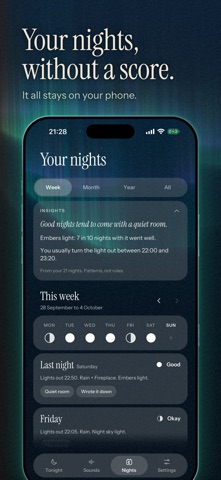
Looking back Tonight shows your last seven nights as small moons. The Nights tab goes back by week, month, year or all at once. After about ten nights you'll start to see what your good nights often had in common, a sound or going to bed on time, for example. It only works from your own nights in the app, so take it as a hint. There are no scores, streaks or badges.
You can set a reminder 15 to 60 minutes before bedtime. It stays off until you turn it on.
The daytime screens have an aurora in the background, in one of five shades from Emerald to Ice. At night everything turns red anyway.
You don't need an account or a sign-up. There are no ads and nothing to buy. The app doesn't track you and doesn't send anything anywhere, so what you write stays on your phone. You can delete all of it in Settings.
A avaliação das pessoas
Inicia sessão para avaliares esta aplicação. O que conta é seres sincero.
Ainda sem avaliações. Já a experimentaste? Sê o primeiro a avaliar.
Mais apps de Saúde e fitness
As melhores apps novas de Saúde e fitness desta semana Orbit: Self-Care Habit TrackerYour healthy choices deserve more than a checkmark
 Wellbeing: Digital WellbeingBillions of people spend more time scrolling than they want to
 Vigia: meds & family healthVigia keeps your health and your family's in order: a child, a parent, a partner
 Pinfall: Bowling StatsPinfall is the bowling score tracker for league bowlers who want to get better, not just…
 Nuchronic: Energy & SymptomsTrack your energy and symptoms in seconds
 Drrreong - Sleep RecorderWhat did your night sound like?