
DM TV Remote
Não reivindicadaDM TV Remote puts your Apple TV's remote on your Mac
Por JOSHUA CHARLES JORDAN · Utilitários


Em resumo
DM TV Remote turns your Mac into a remote for an Apple TV on the same network, with a clickpad, trackpad mode, keyboard controls and a Now Playing view. It suits people who want to control their Apple TV from the desk without hunting for the physical remote. A standout detail is that when a search or sign-in field opens on the TV, you can type on your Mac's keyboard instead.
Resumo do Debuts, com base na ficha da App Store.Sobre
DM TV Remote puts your Apple TV's remote on your Mac. Pair once with the code your TV shows, then use the clickpad, your keyboard or your trackpad to get around — no more hunting for the remote in the couch cushions.
CONTROL • A clickpad like the real remote: click the edges to move, the centre to select, and hold any of them to hold on the TV • Trackpad mode: drag on the pad to move the highlight, click to select • Back, TV/Home, Play/Pause and volume buttons, each held for as long as you hold them • Arrow keys move, Return selects, Esc goes back, Space plays and pauses • Swipe with two fingers on the clickpad to scroll through long lists • Sleep and wake your Apple TV
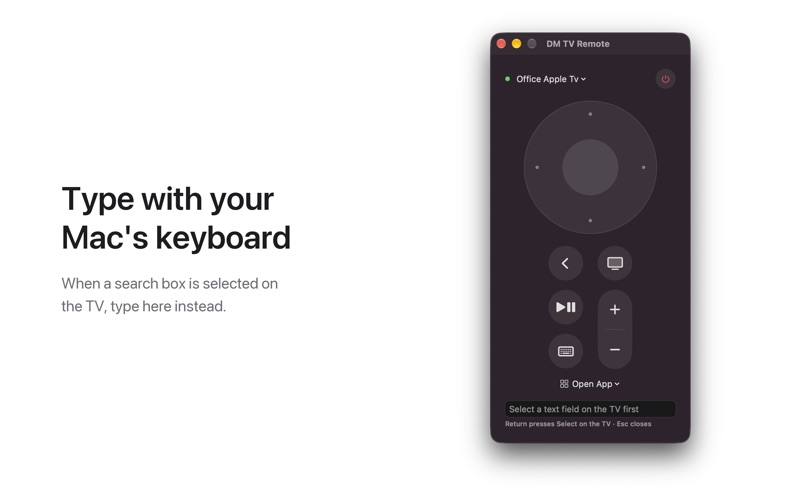
TYPE WITH YOUR MAC'S KEYBOARD When a search box or sign-in field is selected on your TV, a text field opens on your Mac. Type there and the text appears on the TV.
NOW PLAYING See what's playing on the TV (artwork, title and progress) and skip, pause or jump anywhere with the progress bar. Prefer a plain remote? Hide it with one click.
OPEN APPS Pick any app installed on your Apple TV from the Open App menu.
ALWAYS AT HAND Keep the remote in its own window or open it from the menu bar. Switch between the Apple TVs in your home from the menu at the top.
PRIVATE No account, no ads, no analytics. The app talks only to the Apple TVs on your own network, and its pairing keys stay in your Mac's keychain.
Requires macOS 14 or later and an Apple TV (tvOS 15 or later is recommended) on the same network. Volume buttons work when your Apple TV controls your TV's volume. Apple TV is a trademark of Apple Inc.; this app is not made or endorsed by Apple.
A avaliação das pessoas
Inicia sessão para avaliares esta aplicação. O que conta é seres sincero.
Ainda sem avaliações. Já a experimentaste? Sê o primeiro a avaliar.
Mais apps de Utilitários
As melhores apps novas de Utilitários desta semana Drainly: Speaker CleanerMuffled speaker after a splash, rain, or a sweaty workout?
 Photo & PDF Resize: KBFile too large to upload?
 Arvectum Proxy LauncherArvectum Proxy Launcher is a network utility that routes your iPhone through a proxy you…
 Vodoalarm: vodostaji BiHVodoalarm javlja kad tvoja rijeka naglo raste, pa ne moraš stalno gledati vodostaje
 Dusty: Photo Cleaner PetYour camera roll's new pet
 FairAuth: AuthenticatorFairAuth creates the codes for two-step verification on iPhone and iPad