
EvaLumina Capture
Não reivindicadaEvaLumina Capture grades multiple-choice exams on paper with the iPhone's camera
Por Diego Halabi · EducaçãoPorque esperamos isto: Clear value for teachers, with thoughtful live reading, flagged doubts and a carefully described workflow.




Sobre
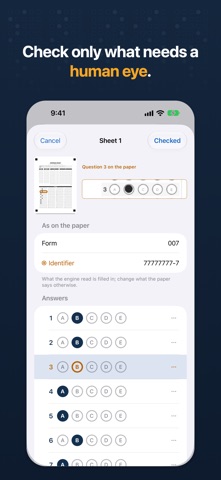
EvaLumina Capture grades multiple-choice exams on paper with the iPhone's camera. Point it at the answer sheet: the engine reads every bubble live, marks on the sheet what it read and where it doubts, and takes the sheet on its own once the reading is complete. The grade is right there.
IN THE ROOM • Live reading: over each bubble, you see what the engine read and where it doubted, before the sheet is taken. • A sheet is taken when the reading holds over several frames in a row, and whatever changes from one frame to the next is flagged for review. Hold the phone parallel to the sheet to avoid the torch's glare. • Built-in torch: grade in poor light, and even in the dark. • A doubtful sheet says why (form or ID not read, a student not on the class list, a question read two ways), and you check it with the paper in hand, or later with the sheet's image. • A student's blanks and double marks are shown as what they are, not as reading errors.
GRADES • At once, by name, in class-list order or by score. • Copy the grades column to paste into your institution's platform, or share it as a spreadsheet. • What is not final says so: a sheet still to check, or a grade waiting for open-ended points, is marked in the app, in the spreadsheet and when you copy. • Each evaluation has its own scale: 0 to 10, 1 to 7 or your institution's, with its decimals and its penalty.
THE EXAM • Prepare it in EvaLumina for Mac or Windows and bring its answer key and class list to the phone via AirDrop or iCloud Drive. • Or make it here: write or paste simple questions and generate a different form for every student, with their answer sheets, in one PDF to print. • Courses with their class lists, typed, pasted or imported from Excel, once for the whole term. • With EvaLumina Pro on the Mac, an evaluation comes to the phone with its answer key, class list and grading rules, and its record goes back into it on the Mac. EvaLumina Capture connects with EvaLumina Pro; it does not need it to work.
TRY IT "Explore a demo" opens a ready batch, with its grades and a sheet to check, without printing anything. "Try it with a printed sample" builds a sample exam to print, fill in with a pencil and scan.
PRIVACY No data collected, no accounts, no internet connection. Nothing goes to Photos: the sheets, the class lists and the grades stay on the phone and are deleted after evaluation.
FREE No purchases, no subscription and no limit on students.
A avaliação das pessoas
Inicia sessão para avaliares esta aplicação. O que conta é seres sincero.
Ainda sem avaliações. Já a experimentaste? Sê o primeiro a avaliar.
Mais apps de Educação
As melhores apps novas de Educação desta semana FluencyToolShadow a native Japanese sentence, hear your own voice back, and get scored.
 YoMoo: Read & Shadow JapaneseYoMoo turns real Japanese writing into graded reading practice: news articles, Wikipedia…
 KeyswingLearn music notes, rhythm and piano through playful practice in a magical forest.
 Uncle Math Homeschool - 6 to 8No Math Fear, Uncle Math Is Here
 Malachi SpeaksMalachi Speaks gives a voice to people who don't use speech
 SelvarisWatch evolution unfold in real time – on an entire planet