
Gander: Quick Look Preview
Não reivindicadaPress Space on a developer file and actually see what's inside
Por 65FN LLC · UtilitáriosPorque esperamos isto: A focused, well-described Quick Look extension that solves a real developer pain with clear value, careful privacy touches, and ten screenshots.




Em resumo
Gander: Quick Look Preview is a macOS Quick Look extension that turns Finder's Space bar preview into a viewer for developer files, including Markdown with Mermaid diagrams, JSON, SQLite databases, .env files, YAML, Terraform and archives. It is aimed at developers who want to inspect these files without opening an editor. One notable detail is that .env values stay hidden by default and likely secrets are flagged, and SQLite files open read-only.
Resumo do Debuts, com base na ficha da App Store.Sobre
Press Space on a developer file and actually see what's inside.
Gander is a Quick Look extension for macOS. It turns the Space bar preview in Finder into a real viewer for the files developers open every day: Markdown with diagrams, JSON, JSONC and JSON Lines, SQLite databases, .env files, YAML, TOML, Terraform, source code, archives and more. You don't open an editor or switch apps. Select a file, press Space, and take a gander.
MARKDOWN, FULLY RENDERED • GitHub-flavoured Markdown: tables, task lists, strikethrough and autolinks • Math ($…$ and $$…$$), footnotes, GitHub alerts (Note, Tip, Important, Warning, Caution) and :emoji: shortcodes • ```mermaid blocks drawn as diagrams inside your README • Switch between Render and Raw at any time
MERMAID DIAGRAMS • .mmd and .mermaid files open as diagrams • Flowcharts, sequence, class, state, ER and XY charts, pie, mindmap, timeline, Gantt, user journey, git graph, quadrant, C4 and requirement diagrams • Diagram and Source views
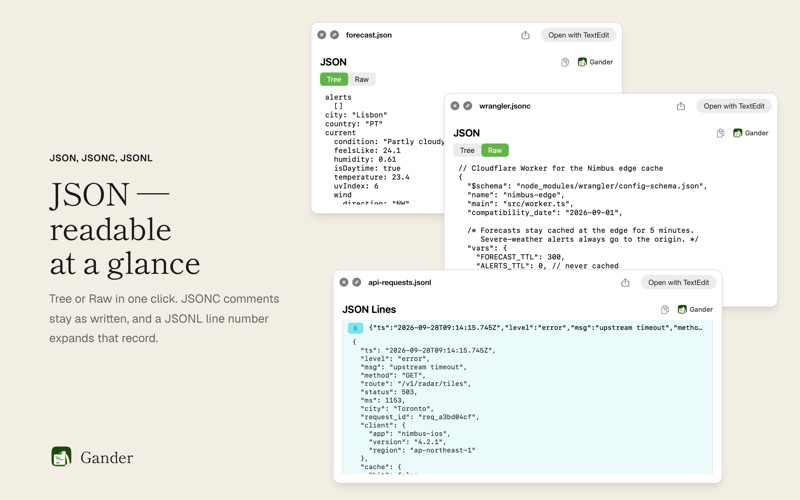
JSON, JSONC AND JSON LINES • JSON opens with Tree and Raw views • JSONC (JSON with comments) works too, and so do .json files with comments such as tsconfig.json: Raw keeps every comment, and Tree still shows the data • JSONL and NDJSON show one line per record. Click a line number to expand that record as formatted JSON.
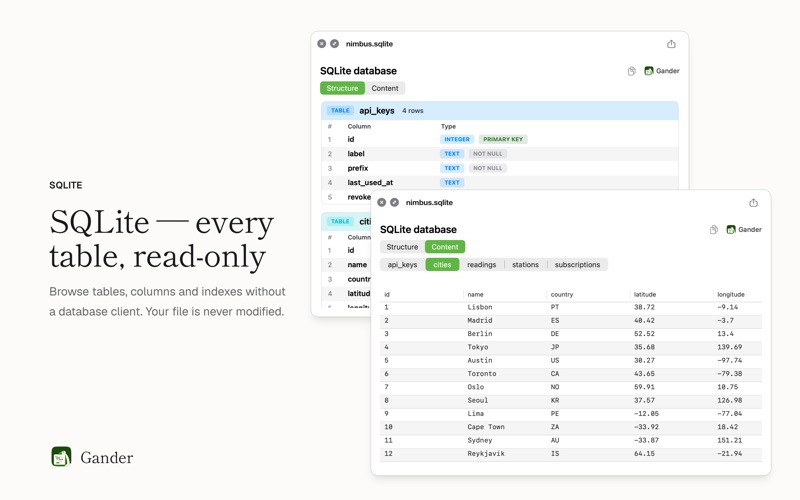
SQLITE DATABASES • .sqlite, .sqlite3 and .db files open read-only. Your database is never modified. • Structure: the columns, types, keys and indexes of every table • Content: rows table by table, up to the first 200 rows of each
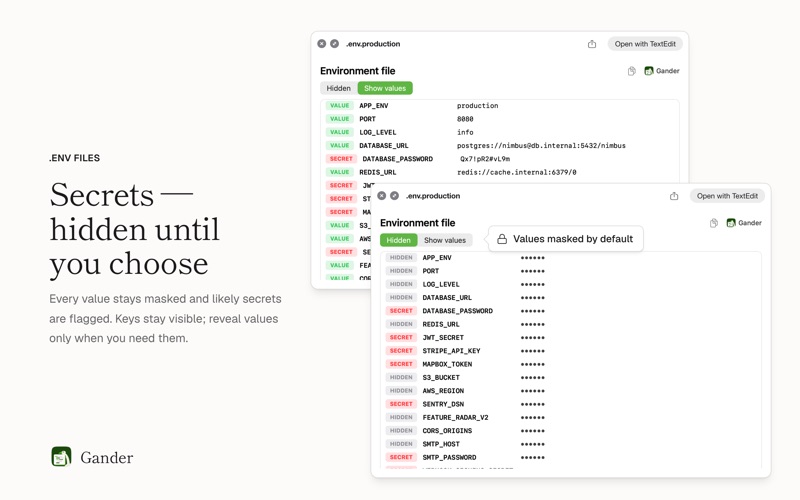
.ENV FILES, SAFELY • Every value is hidden by default, and likely secrets such as passwords, tokens and API keys are flagged • Keys stay visible. Values appear only when you choose Show values.
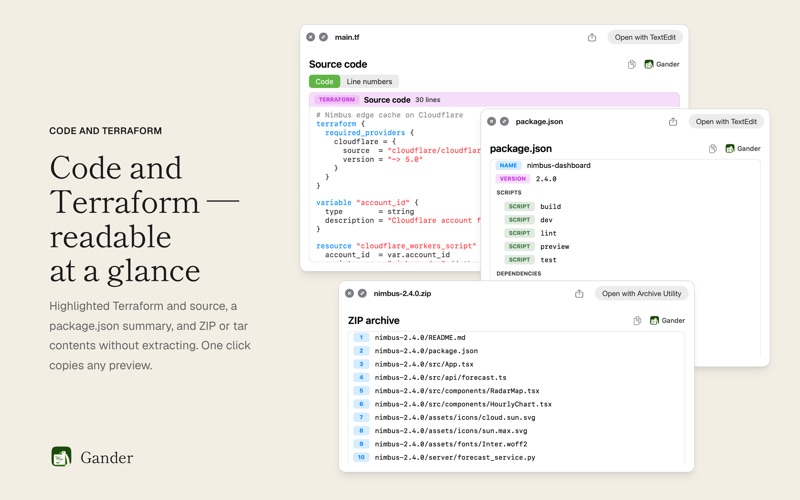
CONFIG AND CODE • YAML, TOML, .cfg and .config files as typed, colour-coded structures • A package.json overview: name, version, scripts and dependencies • Syntax-highlighted Swift, Python, JavaScript and shell scripts • Terraform: .tf, .tfvars and .hcl files highlighted, and .tfstate as JSON • Dotfiles, files with no extension, .ini and plain text
ON EVERY PREVIEW • A copy button copies exactly what you see: code, the current JSON view, formatted Markdown, a Mermaid diagram, or a table ready for your spreadsheet. Hidden .env values stay hidden. • Code opens clean. Switch to Line numbers when you need them; copies never include them.
ARCHIVES AND MORE • The contents of ZIP (including ZIP64), XIP, tar and .tar.gz archives, listed without extracting • Text inside GZIP files • Folder contents • MIDI files, with play, pause and scrubbing
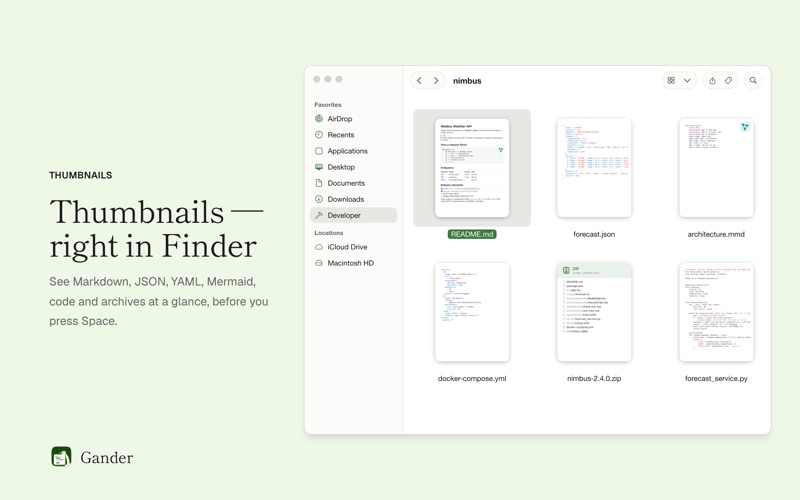
FINDER THUMBNAILS • Real thumbnails in Finder's icon, gallery and column views: rendered Markdown, colored JSON, YAML and code, Mermaid sources and archive contents • .env thumbnails show keys only, never values
PRIVATE BY DESIGN Everything happens on your Mac. There is no account, no subscription and no tracking, and nothing is uploaded. In the Gander window you can turn each preview type and each Markdown extra on or off.
A avaliação das pessoas
Inicia sessão para avaliares esta aplicação. O que conta é seres sincero.
Ainda sem avaliações. Já a experimentaste? Sê o primeiro a avaliar.
Mais apps de Utilitários
As melhores apps novas de Utilitários desta semana Vodoalarm: vodostaji BiHVodoalarm javlja kad tvoja rijeka naglo raste, pa ne moraš stalno gledati vodostaje
 NadhirNadhir is an independent app
 Rokey: Romanian KeyboardType Romanian without worrying about diacritics
 Vibe Island: AI Agent MonitorVibe Island is a command center for the AI coding agents running on your Mac
 Private AuthenticatorPrivate Authenticator keeps your two-factor authentication codes on your own Apple…
 Photo Clean: Photo CleanupA crowded camera roll?