
Momentide: Menu Bar Calendar
Não reivindicadaLess switching
Por YANMIN WANG · ProdutividadePorque esperamos isto: A clear menu bar calendar with useful free essentials and a focused Pro upgrade for busy Mac users.



Em resumo
Momentide: Menu Bar Calendar is a Mac menu bar app that shows the month, selected-day events, unfinished reminders, and world clocks in one view. It is aimed at people who want quick date checks without opening another calendar app. One notable point is that it works with existing macOS calendars and reminder lists and does not send calendar data to a developer-operated server.
Resumo do Debuts, com base na ficha da App Store.Sobre
Less switching. More focus.
A quick date check should not interrupt your day. Momentide brings your calendar, events, reminders and world clocks to the Mac menu bar. Click, catch up, get back to what matters.
YOUR DAY, TOGETHER See the month and your selected day's events and unfinished reminders in one view. Add a task, change a meeting or check what is next without opening another calendar app. Work with your existing macOS calendars and reminder lists, with separate permissions for each.
DAILY ESSENTIALS, FREE • Browse the month, pick a date and jump back to today. • Show optional Chinese lunar dates. • View, create, edit and delete events and reminders in writable accounts. • Open supported meeting links, including Zoom, Google Meet and Microsoft Teams, from your agenda. • Keep two city clocks close at hand. • Start automatically when you log in.
Keep using these features without buying Pro. No trial countdown.
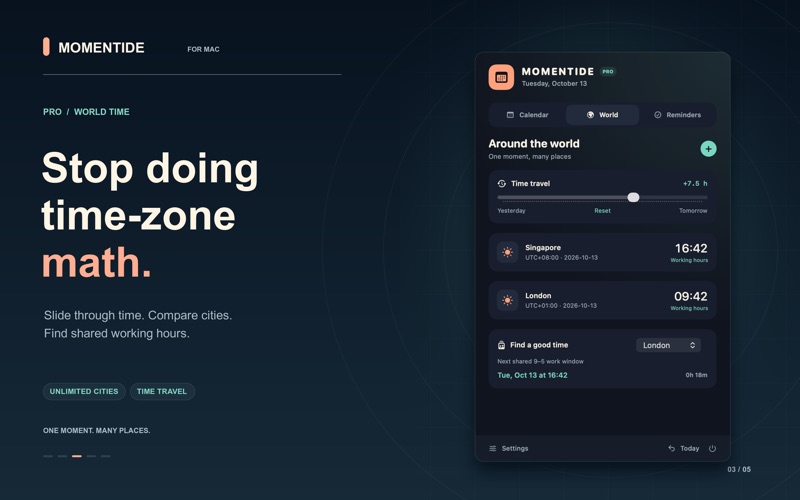
SKIP THE TIME-ZONE MATH WITH PRO Add as many cities as you need. Move the time slider to compare local times yesterday, today or tomorrow. Find the next shared weekday 9-to-5 window between two cities, so planning a call takes less mental arithmetic. Shared hours are based on local working hours, not calendar availability.
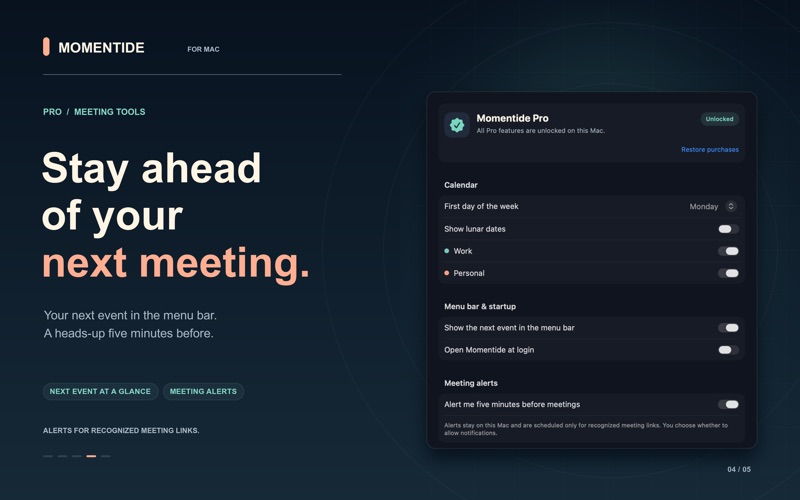
STAY A STEP AHEAD WITH PRO Show your next event right in the menu bar. Turn on local notifications for a heads-up five minutes before events with recognized meeting links. Calendar access and notification permission are required. Meeting links open when you choose; Momentide never joins a meeting automatically.
PAY ONCE. KEEP PRO. One optional purchase unlocks all Pro features. No subscription or recurring charge. In the U.S. App Store, claim Pro for free through December 31, 2026 and keep it permanently. The U.S. price returns to $1.99 on January 1, 2027. Other storefronts retain their localized price. See your local App Store price before you buy, and restore a valid purchase with the same Apple Account.
Already had Momentide 1.0? Pro is included at no extra charge for users who first acquired that version, including during the transition to free. Restore purchases to check your original purchase.
YOUR SCHEDULE STAYS YOURS No app account. No ads. No developer analytics. Momentide works with Apple's EventKit and does not send your calendar or reminders to a developer-operated server. Your configured account providers may sync items according to their settings. Apple handles purchases.
Free download with an optional one-time Pro purchase. Requires macOS 15 or later.
A avaliação das pessoas
Inicia sessão para avaliares esta aplicação. O que conta é seres sincero.
Ainda sem avaliações. Já a experimentaste? Sê o primeiro a avaliar.
Mais apps de Produtividade
As melhores apps novas de Produtividade desta semana ChickMark: Habit TrackerChickMark is a simple habit tracker for routines, goals, and reminders
 Dayflint: One Thing a DayToo many priorities?
 Fristo CAFMFristo is the app for Fristo CAFM, the facility management software
- BeginAnywayMorning alarm for hard tasks: set one task, prove you started, build a streak
 DHUDEDHUDE Analityxs es la herramienta de gestión diaria para grupos de restauración y ocio…
 Fillerless: Teleprompter CoachFillerless is a teleprompter that follows your voice and then tells you how you spoke