
NetLens: Wifi Heatmap Survey
Não reivindicadaNetLens turns your iPhone or iPad into an augmented reality Wifi survey instrument
Por WADE L ARNOLD · UtilitáriosPorque esperamos isto: The description clearly explains its value with well-organized features, making this a promising Wifi survey tool for home and office users.


Sobre
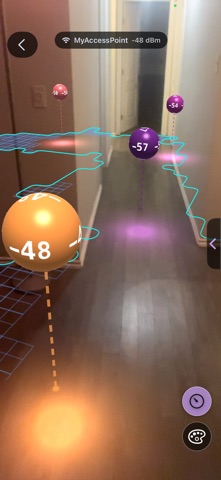
NetLens turns your iPhone or iPad into an augmented reality Wifi survey instrument. Walk a home or an office with the camera up, and the signal of the network you are on is painted onto the floor in front of you, built into heatmaps and 3D point clouds, and turned into reports you can keep and export.
FIVE WAYS TO MAP - Heatmaps: hold the phone in front of you and walk. The rear camera supplies visual-inertial tracking, so every reading is placed in 3D by the phone itself. No floor plan to upload, no markers on the walls, and a live 2D heatmap fills in as you go. - Floor Plans: no camera needed. Import a picture of your floor plan, set its scale with one known length, and tap where you stand to drop a reading - or hold your finger down and it keeps measuring. Mark your access points and show only the readings taken on one of them. - Quick Scan: a live AR look with nothing to save. See signal painted on the floor as lava, or planted as orbs and bouncing balls. A dead zone shows up in seconds. - 3D Scan: keep walking up stairs and outdoors. A point cloud builds around you, every point colored by the Wifi measured there. Orbit it, tap any point for its exact dBm, and read the dimension lines. LiDAR sharpens the capture on iPhone 12 Pro and later Pro models and on iPad Pro from 2020; every other iPhone and iPad, iPhone Duo included, builds the cloud from the camera alone. - Terrain: walk stairs, slopes, and rooms that are not one flat floor, and save a 3D map of the ground you covered, colored by signal.
WHAT YOU GET - Map layers: heatmap, trail path, photos, and your floor plan underneath, lined up and measured - Color palettes including a colorblind-friendly option, a custom hue and Invert, plus a two-handle color bar - Export a PDF report, a PNG, raw CSV, or an interactive web page that opens in any browser with no app and no internet - Live tools: your current connection, a Signal graph of the last minute, and a Speed Test with history - On iPad: layouts made for the bigger screen, in every orientation, Split View and Stage Manager - On the unfolded iPhone Duo: a bigger hub, Connection in two panes, and a Heatmaps scan split on the fold - Backup and restore of every scan and floor plan, with an optional password - Examples to explore on a fresh install: a heatmap, a 3D Scan, a Terrain map, and a floor plan
HOW IT READS THE SIGNAL iOS does not let apps read Wifi signal strength, so NetLens uses a Shortcut called NetLens Link, which you add to the Shortcuts app once. While it runs, it reads the strength of the network you are connected to about once a second and hands it to NetLens. It reads only the network you are already on, and nothing leaves your device.
PRIVACY Everything you capture stays on your device until you choose to share it. No account, no cloud, and NetLens itself does no profiling or tracking; free-tier ads are not personalized. The only data that leaves the device is the ad requests on the free tier and the speed test itself. NetLens asks for location only because iOS requires it to tell an app the name of the Wifi network; NetLens never records a position.
FREE AND PRO The free tier covers 1 project, 3 heatmaps, 2 floor plans, 2 3D Scans, 2 Terrain maps, and unlimited Quick Scans, with watermarked PNG export (clear it on one export after a short ad), a sample CSV, a full in-app PDF preview, and every live tool unlimited. Free shows small banners on browse and tool screens (never over the map or camera) and a full-screen ad before every fourth Quick Scan. One-time NetLens Pro - no subscription - lifts every creation cap, unlocks the full PDF and CSV, lets you edit a floor plan's web page in the browser, and removes ads and the watermark. Anything you created stays viewable on either tier.
REQUIREMENTS The AR tools need an iPhone or iPad with ARKit and a working rear camera; LiDAR is optional. Floor Plans and the live tools need no camera. NetLens Link needs the Shortcuts app, which ships with iOS.
A avaliação das pessoas
Inicia sessão para avaliares esta aplicação. O que conta é seres sincero.
Ainda sem avaliações. Já a experimentaste? Sê o primeiro a avaliar.
Mais apps de Utilitários
As melhores apps novas de Utilitários desta semana Drainly: Speaker CleanerMuffled speaker after a splash, rain, or a sweaty workout?
 Photo & PDF Resize: KBFile too large to upload?
 Arvectum Proxy LauncherArvectum Proxy Launcher is a network utility that routes your iPhone through a proxy you…
 Look Twice: Scam & AI CheckLook twice before you click
 Vodoalarm: vodostaji BiHVodoalarm javlja kad tvoja rijeka naglo raste, pa ne moraš stalno gledati vodostaje
 Ham Radio IQHam Radio IQ answers one question: which band is open right now, from where you are, and…